
Build and Sell Your Own Hosting Services with On-Premise High-Performance Hardware & KVM
In today’s hosting landscape, hyperscale public cloud services dominate—but what if you could own the infrastructure, maximize performance, and offer competitive VPS or web hosting solutions from your own on-premise datacenter?
In this post, we’ll walk through how to build a self-hosted, high-performance hosting platform using open-source tools and KVM virtualization, ideal for businesses aiming to sell:
- VPS Hosting
- Web/App Hosting
- Game Servers
- Developer Sandboxes
- Internal SaaS Solutions
Why Owning and Operating a Hosting Business from On-Premise ?
Deploy a cost-efficient and secure on-premise infrastructure to:
- Sell VPS hosting to customers
- Manage resources centrally
- Maintain full control of pricing, security, and performance
Hardware Setup
Minimum Recommended Hardware (per node):
- Dual Intel Xeon or AMD EPYC CPUs (32+ cores)
- 128–512 GB DDR4 ECC RAM
- NVMe SSDs + HDDs (RAID 10) for performance + storage
- 10 Gbps NICs with VLAN support
- IPMI or iDRAC for out-of-band management
- Redundant power and cooling
Network Infrastructure:
- Layer 3 managed switch
- Hardware firewall or pfSense
- Public IPv4/IPv6 pool (from ISP or IP broker)
Software Stack (100% Open Source)
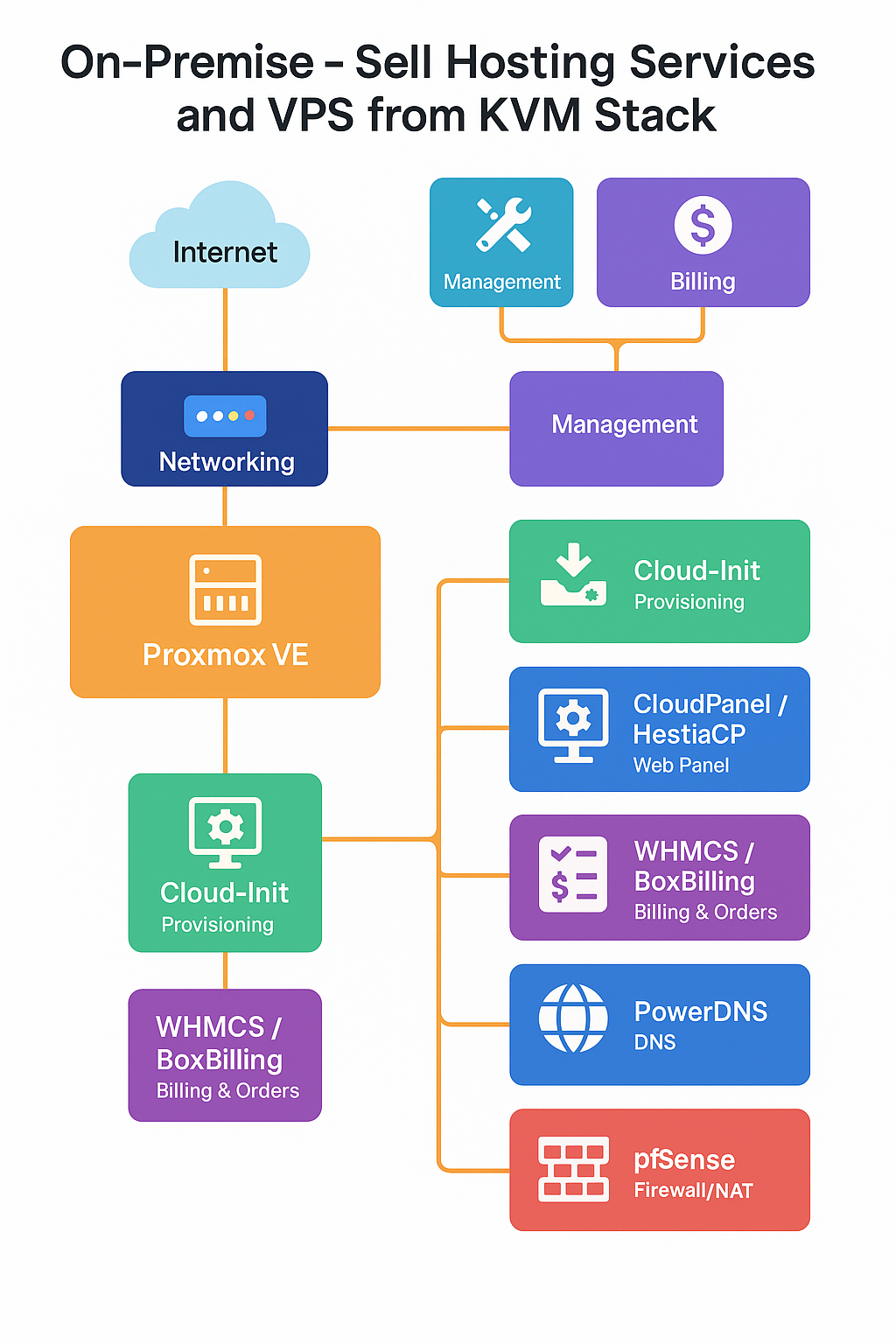
| Component | Tool(s) | Purpose |
|---|---|---|
| Hypervisor | KVM/QEMU | Lightweight virtualization layer |
| Management | Proxmox VE or Virt-Manager + Cockpit | GUI & CLI for VM lifecycle |
| Provisioning | Cloud-Init + Templates | Fast VPS deployment |
| Web Panel | CloudPanel / HestiaCP / ISPConfig | For user website/app management |
| Billing & Orders | WHMCS (paid) or BoxBilling/FOSSBilling | Customer billing & VM provisioning |
| Firewall/NAT | pfSense or OPNsense | Security & network segmentation |
| Monitoring | Netdata + Prometheus + Grafana | Real-time resource usage tracking |
| DNS Management | PowerDNS / Bind9 | Host domain DNS in-house |
Implementation Steps
1. Install Proxmox VE or Base KVM Stack
Proxmox VE offers a polished GUI, HA support, ZFS, and Ceph integration.
For KVM:
apt install qemu-kvm libvirt-daemon-system virtinst bridge-utils
Use virt-manager or Cockpit Web UI for basic VM lifecycle operations.
2. Network Configuration
- Set up Linux bridges for public/private IP segregation.
- Assign public IP pools to routed bridge interfaces (e.g.
vmbr0) - Setup NAT via
iptablesor use pfSense for advanced firewall/DHCP.
3. Create VPS Templates
- Preconfigure cloud-init enabled Ubuntu, CentOS, Debian images.
- Configure SSH keys, hostname, networking.
- Automate deployment using
virt-install, Proxmox templates, or Ansible.
4. Offer User Panels
Install a web hosting control panel for users to manage:
- Web domains
- Databases
- File managers
Popular lightweight panels:
- CloudPanel (for developers)
- HestiaCP (based on VestaCP)
- CyberPanel (OpenLiteSpeed based)
5. Billing & Automation
Integrate WHMCS or FOSSBilling:
- Auto-provision VMs using APIs
- Handle subscriptions, domains, SSL
- Customer support integration
WHMCS + Proxmox or SolusVM modules allow direct control of VM lifecycle from client dashboard.
6. Security & Isolation
- Use
AppArmororSELinuxwith libvirt - Configure VLANs or private VXLAN for tenant isolation
- Regularly patch host OS and hypervisor
7. Monitoring and Backups
- Netdata for node-level analytics
- Prometheus for metrics
- Grafana for dashboards
- Use
BorgBackup,Restic, or ZFS snapshots for backup routines
Business Model Tips
- Start small: Offer affordable plans (2 vCPU / 4GB RAM / 50GB SSD)
- Target local businesses: Emphasize low latency and data residency
- Bundle services: VPS + web hosting + domain + SSL
- Offer managed support as an add-on
Final Thoughts
With open-source tooling and enterprise-grade hardware, you can build your own cloud-like VPS hosting platform—without recurring public cloud bills and while keeping full control of your infrastructure.
This model is perfect for:
- Hosting startups
- IT consulting firms
- Managed service providers (MSPs)
- DevOps agencies needing test/dev environments
Advantages of Hosting 100+ Servers On-Premise
1. Full Ownership and Control
- No reliance on third-party cloud providers.
- Tailor networking, storage, and compute exactly to your business model.
- Ideal for strict compliance (e.g., HIPAA, GDPR, PCI-DSS).
2. Cost Optimization at Scale
- One-time CapEx investment, amortized over time.
- Avoid variable public cloud bills (egress, compute hours, snapshots).
- Predictable OpEx with in-house power, cooling, and staffing.
Real-World Example:
A regional web hosting company deployed 120 KVM-based VMs across 5 physical nodes with 768 GB RAM and NVMe RAID storage saving 55% vs. AWS EC2 equivalent in 1 year.
3. High-Performance Hardware
- Use custom-tuned CPU/RAM/SSD combos.
- Direct access to 10–40 Gbps networking, no shared tenancy.
- Run GPU workloads (e.g., AI inference, video encoding) without cloud limits.
Example:
A video streaming startup runs its own H.265 transcoding farm on EPYC servers with Quadro GPUs—delivering low-latency encoding at 30% of the public cloud GPU instance price.
4. Customized Network & Storage Architecture
- Build your own VLANs, VXLANs, firewall policies.
- Use Ceph, ZFS, or GlusterFS for fast, redundant, self-healing storage.
- Direct peering with local ISPs or IXPs for latency-sensitive apps.
Use Case:
A fintech company with 100+ trading VMs uses local NVMe-backed Ceph pools with 1.2ms read latency—crucial for real-time analytics.
5. High Density Virtualization
- Run 20–40 VMs per physical node with KVM or Proxmox.
- Snapshot, clone, and migrate VMs across nodes seamlessly.
- Consolidate workloads: DBs, game servers, SaaS apps, CI pipelines.
6. Advanced Automation
- Use Ansible, Terraform, GitLab CI for full lifecycle automation.
- Auto-provision VPS per user request (ideal for hosting providers).
- Integrate monitoring (Prometheus), backups (Borg/Restic), and billing (WHMCS).
7. Business Differentiation
- Offer “local-first” hosting, custom SLAs, and direct customer support.
- Deliver specialized packages: developer sandboxes, low-latency game servers, cPanel/Plesk solutions, or regional data hosting.
Example:
A Germany-based hosting firm markets “local GDPR-compliant VPS”—running OpenStack+Ceph in-house and attracted 500+ SMEs needing EU-only data hosting.
Real-World Solutions & Use Cases
1. Managed VPS Hosting Platform
- Run 100–200 VMs per rack.
- Self-service panel (e.g., Proxmox + WHMCS).
- Packages: WordPress VPS, Dev environments, Game servers.
2. SaaS Platform Hosting
- Each customer gets their own VM/container.
- CI/CD integrated with infrastructure automation.
- SSO, audit logging, and full isolation.
3. High-Performance Game Server Hosting
- KVM + isolated CPU pinning for game engines.
- SSD/NVMe with iSCSI or Ceph for low-latency file reads.
- Monetize with player slots, mods, and server management.
4. Enterprise Private Cloud for Internal IT
- HR, CRM, ERP apps running in isolated VMs.
- Backup, monitoring, and role-based access baked in.
- Extendable to hybrid setups with VPN or SD-WAN.
Technologies That Make It Work
| Purpose | Tool/Stack |
|---|---|
| Virtualization | KVM/QEMU, Proxmox VE |
| Storage | Ceph, ZFS, GlusterFS |
| Orchestration | Terraform, Ansible, Cloud-init |
| Monitoring | Prometheus, Grafana, Netdata |
| Networking | pfSense, Open vSwitch, BGP |
| Billing/API | WHMCS, FOSSBilling, REST APIs |
| VM Templates | Ubuntu/Debian cloud-init builds |
Want to Start Small and Scale?
- Start with 3–5 servers (32–64 cores, 256–512 GB RAM, 4–10 TB NVMe SSD).
- Test provisioning, monitoring, and automation.
- Add more nodes gradually; design for HA with shared Ceph/ZFS storage.
Absolutely! Here’s an SEO-optimized section you can add to the end of your blog post, which naturally integrates the high-performing keywords while highlighting the core benefits of building and selling VPS hosting from on-premise servers using open-source tools.
Why Build Your Own Private Cloud Hosting Business with Open Source?
Building your own on-premise server infrastructure gives you unmatched control, performance, and profitability. Instead of relying on expensive hyperscalers, you can launch a self-hosted cloud solution that rivals public cloud performance—with far greater customization.
Here are the biggest advantages of starting your VPS hosting business on-premise using tools like KVM, Proxmox VE, and Ceph:
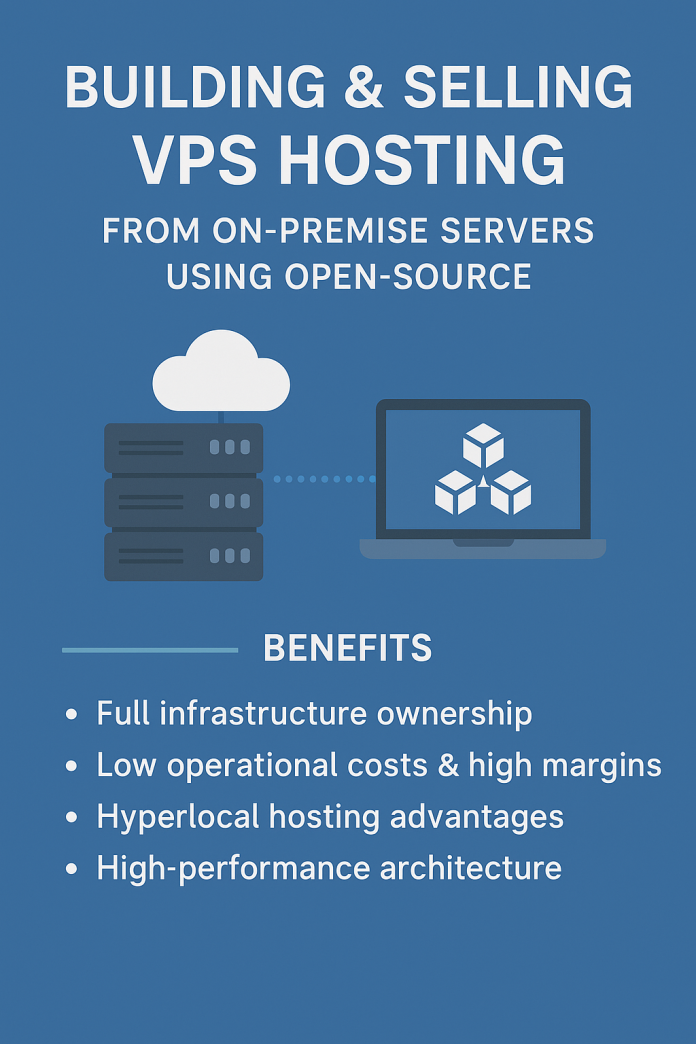
Benefits of On-Premise VPS Hosting with Open Source Stack
- Full Infrastructure Ownership
Run your entire private cloud hosting business from your own datacenter or office using open source hosting stacks no third-party lock-in, full control over pricing, uptime, and policies. - Low Operational Costs & High Margins
With KVM VPS hosting on your own hardware, you eliminate recurring cloud costs. Tools like Terraform, Ansible, and cloud-init VPS templates make provisioning efficient and repeatable. - Hyperlocal Hosting Advantages
Offer VPS hosting in India, Singapore, UK, China, or the USA with low-latency, regionally compliant infrastructure ideal for customers seeking GDPR hosting solutions or local data residency. - High-Performance Architecture
Run SSD VPS hosting, NVMe-based compute nodes, and Ceph storage setup for ultra-fast, reliable virtual machines. Compete head-to-head with AWS Lightsail, DigitalOcean, or Linode at a fraction of their cost. - Ready for Commercial Scaling
Use open-source billing platforms like WHMCS, FOSSBilling, or integrate self-hosted WHMCS alternatives to automate customer onboarding, support, and payments. - Custom Product Offerings
From game server VPS to developer sandbox environments, you can tailor your cloud hosting business plan to niche markets using your KVM virtualization stack.
Who is This Solution For?
- Hosting startups looking to launch VPS services from home
- DevOps teams needing a self-hosted cloud solution
- Managed IT providers building a hybrid cloud with on-prem servers
- Tech entrepreneurs wanting to monetize self-hosted servers
Future-Proof Your Infrastructure in 2025 and Beyond
In a world moving toward decentralized cloud infrastructure and edge computing, the ability to build your own cloud is more valuable than ever. With this setup, you’re not just hosting VMs you’re creating a powerful, profitable, and scalable platform using 100% open-source technologies.
Start today with:
- Proxmox VPS setup
- Ceph + ZFS storage
- KVM virtualization on high-performance hardware
- Full-stack automation with Ansible and Terraform
Whether you’re in India, USA, UK, China, or Singapore, your private cloud can serve global customers at local speed with global ambition.
Open-source tools and platforms
These resources will help you install, configure, and integrate the full private cloud and VPS hosting stack
🖥️ Virtualization & Infrastructure Management
- KVM (Kernel-based Virtual Machine)
🔗 https://www.linux-kvm.org/page/Main_Page
A native Linux hypervisor for running virtual machines. - Proxmox VE
🔗 https://www.proxmox.com/en/proxmox-ve
A complete virtualization management platform based on KVM and LXC. - QEMU
🔗 https://www.qemu.org/
The core emulator used by KVM for hardware virtualization.
💾 Storage Solutions
- Ceph
🔗 https://docs.ceph.com/en/latest/
A distributed object, block, and file storage system. - ZFS (OpenZFS)
🔗 https://openzfs.org/
Advanced file system with snapshots, compression, and RAID-like features.
⚙️ Automation & Provisioning
- Ansible
🔗 https://www.ansible.com/
Simple IT automation and configuration management tool. - Terraform (by HashiCorp)
🔗 https://www.terraform.io/
Infrastructure as Code (IaC) for provisioning servers and resources. - Cloud-Init
🔗 https://cloud-init.io/
Used for initializing cloud VMs and VPS at first boot.
🌐 Web & VPS Panels
- CloudPanel
🔗 https://www.cloudpanel.io/
Developer-friendly web hosting panel. - HestiaCP
🔗 https://www.hestiacp.com/
Lightweight open-source web hosting control panel. - CyberPanel
🔗 https://cyberpanel.net/
Hosting panel powered by OpenLiteSpeed. - ISPConfig
🔗 https://www.ispconfig.org/
Popular multi-server control panel for Linux.
💰 Billing & Client Management
- WHMCS (Paid)
🔗 https://www.whmcs.com/
Industry-standard hosting automation platform. - FOSSBilling (Open Source)
🔗 https://fossbilling.org/
Free alternative for managing clients, invoices, and product provisioning. - BoxBilling
🔗 https://www.boxbilling.org/
Another open-source client management and billing solution.
🔐 Networking & Security
- pfSense (Firewall & Router)
🔗 https://www.pfsense.org/
Enterprise-grade open-source firewall solution. - OPNsense
🔗 https://opnsense.org/
A fork of pfSense focused on usability and modern UI.
📊 Monitoring & Analytics
- Prometheus
🔗 https://prometheus.io/
Time-series monitoring system and alerting toolkit. - Grafana
🔗 https://grafana.com/
Beautiful dashboards and data visualization. - Netdata
🔗 https://www.netdata.cloud/
Real-time performance monitoring tool with instant alerts.