
AWS Cost Optimization Strategies for 2026
Cloud costs continue to rise in 2026 as organizations scale AI workloads, containerized applications, and data platforms on AWS. With more teams shifting to on-demand cloud adoption, companies in the US, Europe, and Asia are aggressively searching for ways to reduce spend using an AWS cost optimization workflow aligned with FinOps. This guide compiles the most practical strategies, updated tools, and expert practices that help engineering teams lower monthly AWS bills without sacrificing performance.
Whether you run a startup exploring the best AWS cost optimization practices for small teams or you manage a large enterprise migrating analytics workloads, this guide will help you build a repeatable and sustainable approach to controlling AWS spend.

Why AWS Cost Optimization Matters in 2026
Cloud costs have become the second-largest OpEx component for many digital organizations. With growing usage of EC2, EKS, Lambda, S3, and AI compute, businesses often face:
-
Unpredictable monthly billing
-
Unused or idle resources
-
Oversized compute instances
-
Data transfer costs across regions
-
Lack of centralized visibility
This has made frameworks like FinOps essential. FinOps encourages cost ownership, engineering accountability, and ongoing optimization instead of a one-time cleanup exercise. In 2026, AWS has also released updated features such as:
-
AWS Cost Optimization Hub
-
Compute Optimizer advanced recommendations
-
Graviton4 & ARM-based savings opportunities
-
New S3 Intelligent-Tiering classes
Organizations that combine these tools with structured FinOps processes see up to 40–60% savings in 3–6 months.
Optimize Compute Costs – EC2, EKS, ECS, Lambda
Compute is typically the largest portion of AWS billing. A structured approach using Right Sizing + Graviton Migration + Reservations gives the highest ROI.
Right-Size EC2 Instances Using Compute Optimizer
AWS Compute Optimizer analyzes CPU, RAM, disk I/O, and network patterns to suggest:
-
Smaller instance families
-
Cheaper ARM-based alternatives
-
Spot VM recommendations
-
Underutilized EBS volumes
This is essential for teams running large workloads and wanting a predictable AWS cost optimization workflow for continuous improvement.
Move to Graviton (ARM) for 20–40% Savings
In 2026, AWS Graviton4 offers measurable savings over x86 instances. Many modern workloads—Node.js, Python, Java, Go, Kubernetes pods—run smoothly on ARM without code changes.
Best workloads to migrate:
-
API microservices
-
Containers on EKS/ECS
-
Serverless backends
-
Caching layers
-
Analytics servers
This is one of the simplest ways to build an affordable AWS architecture for small businesses.
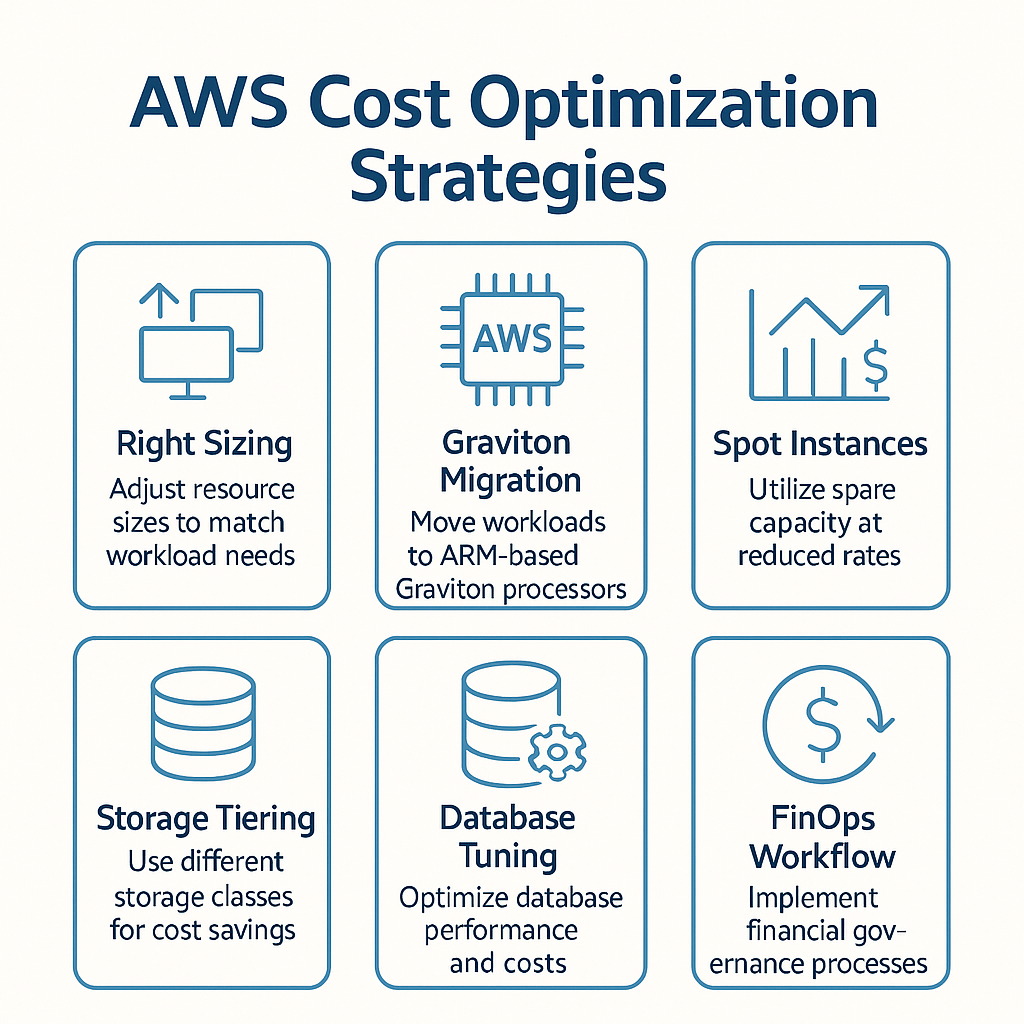
AWS Cost Optimization Strategies for 2026
Use Spot Instances for Non-Critical Workloads
Spot Instances reduce compute costs by up to 90% and are ideal for:
-
CI/CD pipelines
-
Batch jobs
-
EKS worker nodes
-
AI model training
-
Data processing
You can combine On-Demand + Spot + Reserved Instances to maintain both reliability and cost efficiency.
Optimize AWS Lambda Costs
AWS Lambda remains a powerful model for workloads requiring automatic scaling. For 2026:
-
Use the new Pricing Calculator to model cost
-
Reduce memory size if execution time allows
-
Use Provisioned Concurrency sparingly
-
Avoid large code bundle sizes
For startups searching for an AWS serverless cost optimization workflow, Lambda tuning provides immediate results.
Storage Cost Optimization – S3, EBS, EFS, Glacier
Storage is often overlooked, yet it can silently grow into thousands of dollars per month.
Smart Use of S3 Storage Classes
2026 S3 pricing updates make it crucial to use the right class:
| Storage Class | Best Use Case | Savings |
|---|---|---|
| S3 Standard | Hot data | — |
| S3 Intelligent-Tiering | Unknown access patterns | 30–40% |
| S3 Glacier Instant | Short-term archive | 60% |
| S3 Deep Archive | Long-term cold storage | 90% |
Using Lifecycle Policies prevents cost explosions by automatically moving data to cheaper classes.
Reduce Cross-Region Data Transfer Costs
AWS charges heavily for:
-
Inter-region transfers
-
Public egress
-
VPC endpoint data movement
To avoid these:
-
Use S3 VPC endpoints
-
Keep compute + storage in the same region
-
Implement CloudFront for caching
This is one of the common cloud pricing mistakes that kill ROI on AWS.
Clean Up EBS Volumes and Snapshots
Use automation to delete:
-
Unattached EBS volumes
-
Old snapshots
-
Over-provisioned SSD disks
EBS gp3 also gives cheaper performance than gp2.
Database and Analytics Cost Optimization
Databases consume 15–50% of cloud budgets.
Optimize RDS, Aurora & DynamoDB
-
Enable Auto Scaling
-
Turn on serverless Aurora v2
-
Use DynamoDB On-Demand for variable traffic
-
Apply storage autoscaling
Redshift vs Athena – Spend Smarter
-
Use Athena for unpredictable query workloads
-
Use Redshift Serverless for team-based analytics
-
Compress and partition data
These techniques support a cloud cost optimization strategy for analytics teams.
Implement FinOps for Continuous Optimization
FinOps is no longer optional. A mature process includes:
-
Visibility (AWS Cost Explorer, CUR, QuickSight dashboards)
-
Optimization (Compute Optimizer, S3 Analyzer, Graviton insights)
-
Automation (budgets, anomaly detection, tagging enforcement)
-
Accountability (engineering ownership)
Teams in Europe especially follow FinOps to meet budget rules and ESG requirements.
Build an AWS Cost Optimization Framework
A repeatable checklist:
-
Inventory cloud resources
-
Identify idle or underutilized workloads
-
Apply right-sizing using Compute Optimizer
-
Implement reservations or Savings Plans
-
Migrate to Graviton and Spot
-
Optimize storage lifecycle policies
-
Monitor anomalies weekly
-
Review architecture monthly
This AWS cost optimization workflow helps engineering teams avoid cloud waste forever.
When to Consider GCP Instead of AWS for Cost Savings
While AWS dominates the US market, GCP often wins in areas like:
-
BigQuery pricing
-
AI/ML workloads
-
Spot VMs with more predictable eviction rates
-
Per-second billing
-
Lower data analytics pricing
Final Thoughts
AWS cost optimization in 2026 is a mix of automation, FinOps discipline, and smart architecture choices. Using ARM instances, tuning storage and database costs, and enforcing cross-team governance can reduce spend significantly. With cloud becoming more expensive every year, cost optimization is no longer a “nice-to-have”—it is a core engineering responsibility.
FAQ Section (5–7 questions)
Q1. What is the fastest way to reduce AWS costs in 2026?
Right-size EC2 instances, move to Graviton, and clean up unused EBS volumes. These deliver immediate savings.
Q2. How does FinOps help with AWS cost optimization?
FinOps introduces accountability, reporting, and continuous optimization so teams make cost-aware technical decisions.
Q3. Are Spot Instances reliable for production workloads?
Yes, when combined with On-Demand and Auto Scaling groups. Many companies run 50–70% of compute on Spot.
Q4. Which AWS services contribute the most to unexpected billing spikes?
Data transfer, Lambda concurrency, unused EBS volumes, and over-provisioned EC2 instances.
Q5. Is Graviton migration worth the effort?
Absolutely. Most companies save 20–40% with minimal performance regression and almost zero refactoring.
Q6. What tools should I use for AWS cost monitoring?
Cost Explorer, Cost Optimization Hub, Compute Optimizer, CUR + QuickSight dashboards.
Q7. How often should teams review cloud spend?
Weekly anomaly checks and monthly architecture reviews.
Important Links
AWS Official Pricing
-
AWS Well-Architected Framework
https://aws.amazon.com/architecture/well-architected/ -
AWS Compute Optimizer Documentation
https://docs.aws.amazon.com/compute-optimizer/ -
AWS Cost Explorer Guide
https://docs.aws.amazon.com/awsaccountbilling/latest/aboutv2/cost-explorer.html -
AWS Graviton (Official Page)
https://aws.amazon.com/ec2/graviton/ -
AWS S3 Storage Classes Documentation
https://docs.aws.amazon.com/AmazonS3/latest/userguide/storage-class-intro.html -
AWS Lambda Documentation
https://docs.aws.amazon.com/lambda/