
🚀CI/CD in AWS Using CodePipeline, CodeBuild, and CodeDeploy
Building and deploying software efficiently is a cornerstone of modern development practices. AWS CodePipeline, AWS CodeBuild, and AWS CodeDeploy are three powerful tools in AWS that streamline the software release process through Continuous Integration (CI) and Continuous Deployment (CD).
In this blog, we’ll dive deep into each of these services, their features, and how they work together to enable a robust CI/CD pipeline for your applications.
🌟 Overview of AWS CI/CD Tools
1. AWS CodePipeline
CodePipeline is a fully managed CI/CD service that automates the build, test, and deploy phases of your release process.
- Use Case: Orchestrating CI/CD workflows.
- Key Features: Integrates with AWS services (e.g., CodeBuild, CodeDeploy) and third-party tools (e.g., GitHub, Jenkins).
Learn more about AWS CodePipeline.
2. AWS CodeBuild
CodeBuild is a fully managed build service that compiles source code, runs tests, and produces deployable artifacts.
- Use Case: Performing builds and running tests in isolated environments.
- Key Features: Scalable and customizable build environments.
Learn more about AWS CodeBuild.
3. AWS CodeDeploy
CodeDeploy automates application deployments to services like Amazon EC2, AWS Lambda, or on-premises servers.
- Use Case: Managing automated deployments with rollback capabilities.
- Key Features: Supports blue/green and in-place deployments.
Learn more about AWS CodeDeploy.
📈 Benefits of Using AWS CI/CD Tools Together
- End-to-End Automation: Automate the entire software release lifecycle.
- Faster Time to Market: Deliver features and updates quickly.
- Reliability: Built-in testing, rollback, and monitoring improve deployment stability.
- Scalability: Dynamically scales with your project’s needs.
🚀 Step-by-Step Guide: Setting Up CI/CD with CodePipeline, CodeBuild, and CodeDeploy
Step 1: Set Up Your Source Code Repository
- Choose a Source Control System:
- Use AWS CodeCommit, GitHub, or Bitbucket.
- Create a Repository:
- Navigate to the AWS CodeCommit Console.
- Click Create Repository and provide a name (e.g.,
MyAppRepo).
- Push Your Code:
- Clone the repository locally and push your application code.
Step 2: Create a CodePipeline
- Access CodePipeline Console:
- Go to the CodePipeline Console and click Create Pipeline.
- Configure Pipeline Settings:
- Provide a pipeline name (e.g.,
MyAppPipeline). - Select an existing service role or let CodePipeline create one.
- Provide a pipeline name (e.g.,
- Add Source Stage:
- Choose your repository (e.g., CodeCommit or GitHub).
- Specify the branch to monitor (e.g.,
main).
- Add Build Stage:
- Select AWS CodeBuild as the build provider.
- Create a build project (detailed in Step 3).
- Add Deploy Stage:
- Choose AWS CodeDeploy as the deploy provider.
- Select the deployment group (detailed in Step 4).
- Review and Create Pipeline:
- Confirm the pipeline stages and click Create Pipeline.
Learn about CodePipeline stages.
Step 3: Configure a Build Project in CodeBuild
- Access CodeBuild Console:
- Go to the CodeBuild Console and click Create Build Project.
- Project Configuration:
- Provide a project name (e.g.,
MyAppBuild). - Select the source repository and branch.
- Provide a project name (e.g.,
- Environment Setup:
- Choose the runtime environment (e.g., Amazon Linux, Ubuntu).
- Select a build image (e.g.,
aws/codebuild/standard:5.0). - Specify compute resources (e.g.,
Build General1 Small).
- Add Buildspec File:
- Use a
buildspec.ymlfile in your source repository or define commands inline.
Example
buildspec.yml:version: 0.2 phases: install: commands: - echo "Installing dependencies..." - npm install build: commands: - echo "Building the application..." - npm run build post_build: commands: - echo "Build complete. Packaging artifacts..." - zip -r MyApp.zip . -x node_modules artifacts: files: - MyApp.zip - Use a
- Save and Start the Build Project:
- Test the build process by running a build manually.
Learn more about CodeBuild projects.
Step 4: Configure a Deployment with CodeDeploy
- Access CodeDeploy Console:
- Go to the CodeDeploy Console and click Create Deployment Group.
- Choose Deployment Type:
- Select the target type (e.g., EC2, Lambda, or ECS).
- For EC2, specify the Auto Scaling Group or tagged instances.
- Configure Deployment Settings:
- Deployment Type: Choose In-place or Blue/Green.
- Rollback: Enable automatic rollback on failure.
- Create an AppSpec File:
- Define deployment actions in an
appspec.ymlfile. - Example for EC2:
version: 0.0
os: linux
files:
  - source: /MyApp.zip
    destination: /var/www/myapp
hooks:
  BeforeInstall:
    - location: scripts/install_dependencies.sh
    - location: scripts/setup_environment.sh
  AfterInstall:
    - location: scripts/start_application.sh
- Define deployment actions in an
- Start a Deployment:
- Test the deployment manually by creating a new deployment in CodeDeploy.
Learn about CodeDeploy AppSpec files.
Step 5: Test and Monitor the CI/CD Pipeline
- Trigger the Pipeline:
- Push changes to the source repository.
- CodePipeline will automatically detect the changes and start the pipeline.
- Monitor Progress:
- Use the CodePipeline Console to view real-time progress for each stage.
- Check CodeBuild Logs for build-specific details.
- Verify deployment status in the CodeDeploy Console.
- Handle Failures:
- Use CloudWatch Logs to debug failed stages.
- Set up notifications using SNS to alert on pipeline failures.
🌐 Best Practices for AWS CI/CD
- Use IAM Roles Securely:
- Follow the principle of least privilege when assigning permissions to CI/CD tools.
- Automate Tests:
- Integrate unit tests and integration tests into the CodeBuild process.
- Monitor Pipeline Performance:
- Use CloudWatch Metrics to track pipeline execution times and error rates.
- Enable Rollbacks:
- Always configure rollbacks in CodeDeploy for failed deployments.
- Optimize Costs:
- Use on-demand build instances or spot instances for CodeBuild to reduce costs.
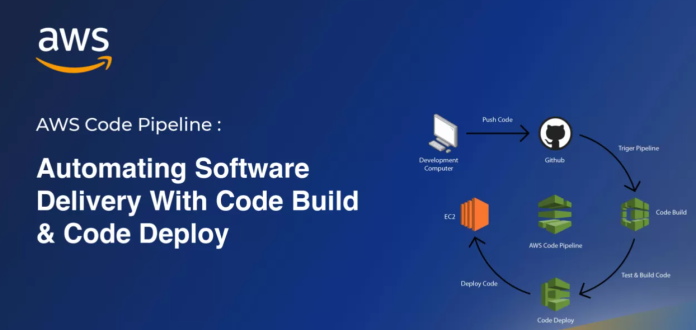
📊 Example CI/CD Workflow
Workflow Overview:
- Source Stage: Monitor a GitHub repository for changes.
- Build Stage: Compile the code and package artifacts using CodeBuild.
- Deploy Stage: Deploy artifacts to an EC2 instance using CodeDeploy.
⚙️ Step-by-Step Guide: Configuring CodePipeline, CodeBuild, and CodeDeploy in AWS Console
AWS provides powerful tools to automate the Continuous Integration (CI) and Continuous Deployment (CD) process. In this guide, we’ll walk you through the step-by-step configuration of CodePipeline, CodeBuild, and CodeDeploy using the AWS Console.
Each step will be accompanied by examples and links to official AWS documentation to ensure clarity and accuracy.
🚀 Step 1: Set Up Your Source Repository
1.1 Use AWS CodeCommit or External Repositories
AWS CodePipeline integrates with several source control systems, including:
- AWS CodeCommit
- GitHub
- Bitbucket
1.2 Create a CodeCommit Repository
- Go to the AWS CodeCommit Console.
- Click Create Repository.
- Enter a Repository Name (e.g.,
MyAppRepo). - (Optional) Add a description.
- Click Create.
1.3 Clone and Push Code
- Clone the repository locally using:
git clone https://git-codecommit.<region>.amazonaws.com/v1/repos/MyAppRepo - Add your application code and push it to the repository.
⚙️ Step 2: Create a CodePipeline
2.1 Navigate to CodePipeline
- Open the AWS CodePipeline Console.
- Click Create Pipeline.
2.2 Configure Pipeline Settings
- Enter a Pipeline Name (e.g.,
MyAppPipeline). - Select or create a new Service Role for CodePipeline.
2.3 Add a Source Stage
- Choose Source Provider:
- AWS CodeCommit: Select the repository and branch.
- GitHub: Authenticate and select the desired repository.
- Click Next.
🛠️ Step 3: Configure a Build Stage with CodeBuild
3.1 Navigate to AWS CodeBuild
- Open the AWS CodeBuild Console.
- Click Create Build Project.
3.2 Configure Build Project
- Project Name: Provide a name (e.g.,
MyAppBuild). - Source Provider: Select the same repository as the source stage.
3.3 Set Environment Details
- Environment Image: Use a managed image (e.g.,
aws/codebuild/standard:5.0). - Compute Type: Select a resource size (e.g.,
Build General1 Small). - Privileged Mode: Enable if building Docker containers.
3.4 Specify the Buildspec
- Use a
buildspec.ymlfile stored in your repository:version: 0.2 phases: install: commands: - echo Installing dependencies... - npm install build: commands: - echo Building the application... - npm run build post_build: commands: - echo Packaging artifacts... - zip -r MyApp.zip . artifacts: files: - MyApp.zip - Save and complete the configuration.
Read the CodeBuild Buildspec Guide.
3.5 Add Build Stage to CodePipeline
- In CodePipeline, select CodeBuild as the build provider.
- Choose the project you created earlier (
MyAppBuild). - Click Next.
📦 Step 4: Configure Deployment with CodeDeploy
4.1 Set Up CodeDeploy
- Navigate to the AWS CodeDeploy Console.
- Click Create Deployment Group.
4.2 Define Deployment Settings
- Application Name: Enter a name (e.g.,
MyAppDeployment). - Compute Platform: Choose the platform:
- EC2/On-Premises
- AWS Lambda
- Amazon ECS
- Configure the deployment:
- Deployment Type: Choose In-Place or Blue/Green.
- Target Instances: Use an Auto Scaling Group, EC2 tags, or individual instances.
Learn More About Deployment Types.
4.3 Create AppSpec File
Define how files are deployed and scripts are executed.
Example appspec.yml for EC2:
version: 0.0
os: linux
files:
  - source: /MyApp.zip
    destination: /var/www/myapp
hooks:
  BeforeInstall:
    - location: scripts/install_dependencies.sh
  AfterInstall:
    - location: scripts/start_application.sh
4.4 Add Deployment Stage to CodePipeline
- Return to CodePipeline and add a new stage.
- Choose CodeDeploy as the provider.
- Select the deployment group created earlier.
- Save and click Next.
🔍 Step 5: Test and Monitor the CI/CD Pipeline
5.1 Trigger the Pipeline
- Push changes to the source branch.
- CodePipeline will automatically start executing.
5.2 Monitor Pipeline Progress
- Open the CodePipeline Console and select your pipeline.
- Review logs for each stage:
- Source Logs: Verify that the correct branch was fetched.
- Build Logs: Use CodeBuild logs to debug build issues.
- Deployment Logs: Check CodeDeploy logs for deployment details.
📊 Step 6: Enable Notifications and Rollbacks
6.1 Configure CloudWatch Alarms
- Navigate to the CloudWatch Console.
- Set alarms for:
- Pipeline failures
- Build errors
- Deployment rollbacks
6.2 Enable Rollbacks in CodeDeploy
- Open the deployment group in CodeDeploy.
- Enable Rollback on Failure.
Learn More About Rollback Configurations.
🌐 Best Practices for CI/CD Pipelines
- Secure IAM Roles: Ensure CodePipeline, CodeBuild, and CodeDeploy have least privilege permissions.
- Automate Tests: Integrate unit, integration, and load tests into the build stage.
- Optimize Costs: Use spot instances for build resources.
- Monitor Metrics: Use CloudWatch for pipeline and resource monitoring.
- Backup Artifacts: Store build artifacts in Amazon S3 for disaster recovery.
📋 Example Architecture
- CodePipeline: Automates the CI/CD process.
- CodeBuild: Builds and tests the application.
- CodeDeploy: Deploys the build to an EC2 environment.

Image Source: AWS Documentation
CTA: Start Building Your CI/CD Pipeline Today
AWS CodePipeline, CodeBuild, and CodeDeploy simplify the CI/CD process, allowing teams to release features faster and with greater reliability. By following this guide, you can implement a fully automated pipeline tailored to your application’s needs.
Get Started:
This guide offers detailed steps, official backlinks, and practical tips for configuring a CI/CD pipeline using AWS tools. Let me know if additional use cases or scenarios are needed!
CTA: Start Automating Your CI/CD Today
AWS CodePipeline, CodeBuild, and CodeDeploy offer a comprehensive CI/CD solution to automate the software release process. By integrating these tools, you can enhance development efficiency, reduce manual effort, and deliver high-quality applications at scale.
Get Started:
FAQs
1. What is AWS CodePipeline?
CodePipeline is a CI/CD service that automates the build, test, and deployment stages of your application.
2. How does CodeBuild work?
CodeBuild compiles source code, runs tests, and produces deployable artifacts in isolated environments.
3. What deployment types are supported by CodeDeploy?
CodeDeploy supports In-place and Blue/Green deployments for EC2, Lambda, and ECS.
4. Can I integrate third-party tools with CodePipeline?
Yes, CodePipeline supports integrations with tools like Jenkins, GitHub, and Bitbucket.
This technical blog provides an in-depth guide to using AWS CodePipeline, CodeBuild, and CodeDeploy for CI/CD. Let me know if additional configurations or examples are required!