

Create an Azure DevOps Project
What is DevOps?
The term DevOps combines “Development” and “Operations.” It represents a set of practices, philosophies, and tools that integrate and automate processes between software development and IT teams.
Definitions by Industry Leaders:
- Amazon Web Services (AWS): DevOps is the combination of cultural philosophies, practices, and tools that increase an organization’s ability to deliver applications and services at high velocity.
- Microsoft: DevOps is the union of people, processes, and products to enable continuous delivery of value to our customers.
Key Benefits of DevOps
- Improved Collaboration: Better alignment between development and operations teams.
- Faster Deployment: Reduced lead time from code commit to deployment.
- Scalable Development: Enables organizations to scale with less risk.
- Higher Efficiency: Automated workflows reduce manual interventions.
What is Azure DevOps?
Azure DevOps is a Software-as-a-Service (SaaS) platform provided by Microsoft that facilitates DevOps practices. It enables teams to automate, plan, and manage their projects efficiently by providing tools like CI/CD pipelines, version control, testing, release management, and more. It was previously known as Microsoft Visual Studio Team Services (VSTS) before being rebranded as Azure DevOps in October 2018.
Services Used in Azure DevOps Project
Azure DevOps offers a variety of services to streamline software development and deployment:
1. Azure Boards
A tool for project management that helps teams plan, track, and discuss work. It supports methodologies like Scrum, Agile, and Kanban, allowing flexibility for various team workflows.
- Features:
- Work items to track tasks, bugs, and epics.
- Kanban boards for visualization.
- Sprint planning for Agile teams.
- Integrated dashboards for progress tracking.
2. Azure Pipelines
A cloud-based CI/CD (Continuous Integration/Continuous Deployment) service that automates building, testing, and deploying code. It supports multiple platforms, including Windows, Linux, and macOS, and integrates seamlessly with Docker and Kubernetes.
- Features:
- Multi-platform CI/CD pipelines.
- Support for containers and Kubernetes.
- Compatibility with multiple languages like .NET, Java, Python, and Node.js.
3. Azure Repos
A Git-based version control service for managing source code. It allows teams to collaborate efficiently and securely with cloud-hosted repositories.
- Features:
- Unlimited private and public Git repositories.
- Pull requests for code reviews.
- Branching strategies for better collaboration.
4. Azure Artifacts
A package management solution for hosting and sharing packages such as Maven, npm, Python, and NuGet. It helps teams manage dependencies and ensures consistent builds.
- Features:
- Support for public and private package feeds.
- Integrated with CI/CD pipelines.
5. Azure Test Plans
A service for manual and exploratory testing, integrated with Azure Boards and Pipelines. It provides a comprehensive solution for quality assurance.
- Features:
- Manual and automated testing tools.
- Integration with CI/CD pipelines for seamless testing.
How to Create an Azure DevOps Project
Follow these steps to create an Azure DevOps project and start using its services:
Step 1: Set Up an Azure DevOps Account
- Visit the official Azure DevOps Portal.
- Sign in with your Microsoft account and create a new organization.
Step 2: Create a New Organization
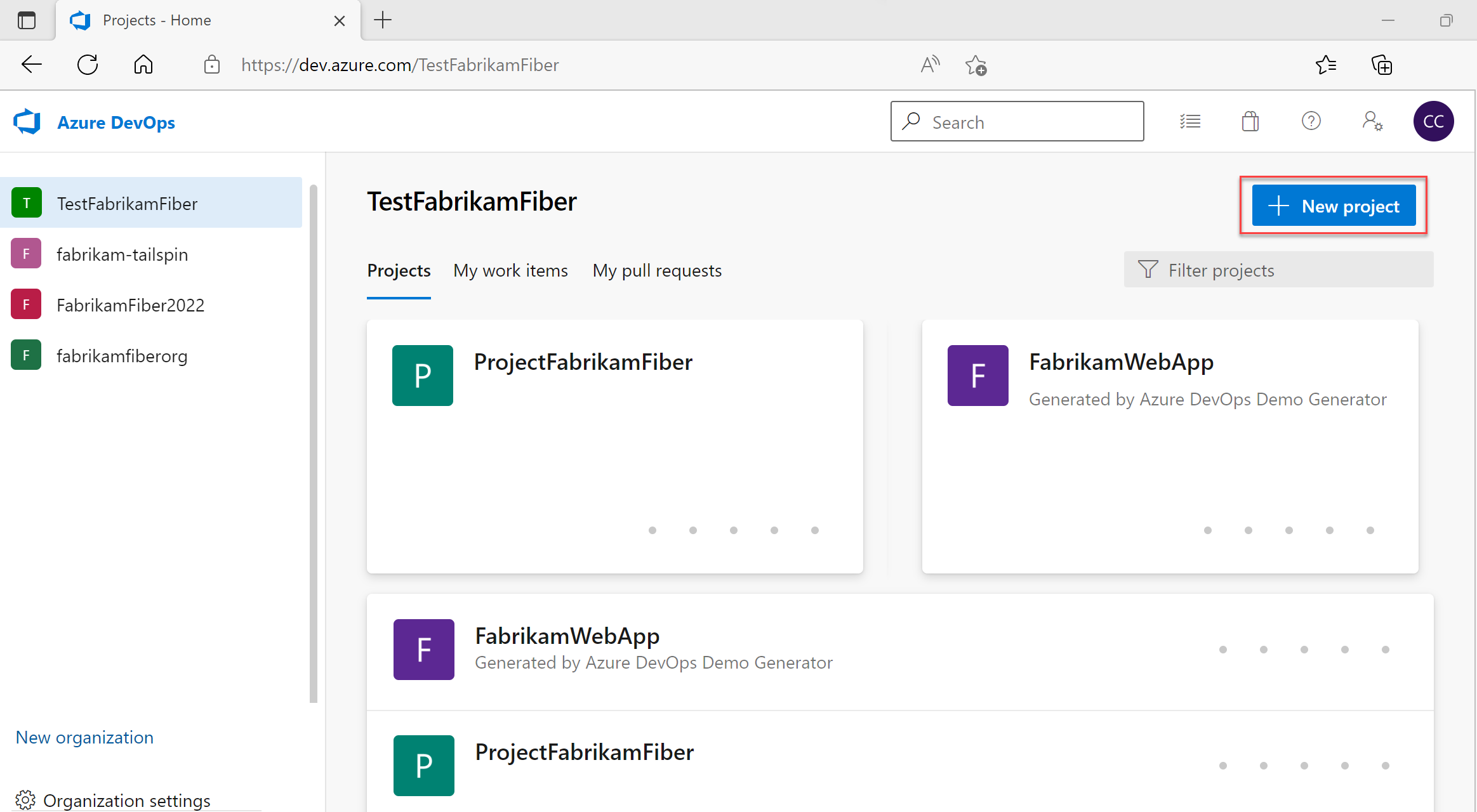
- Click on Create Organization and name it according to your project or team.
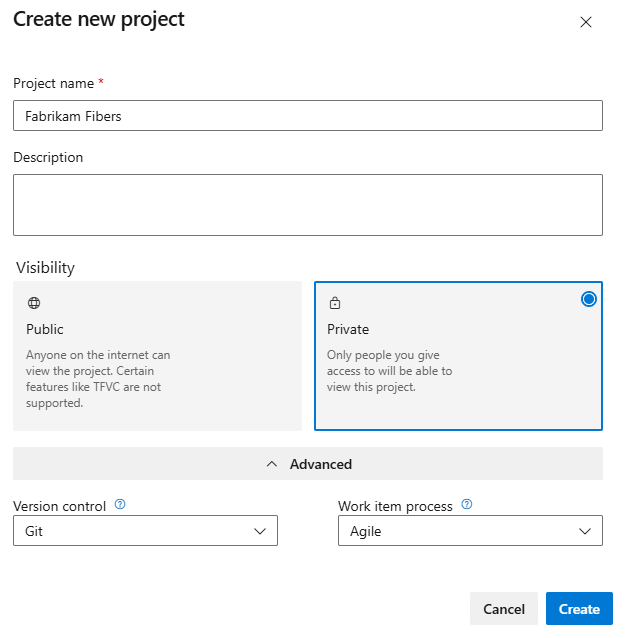
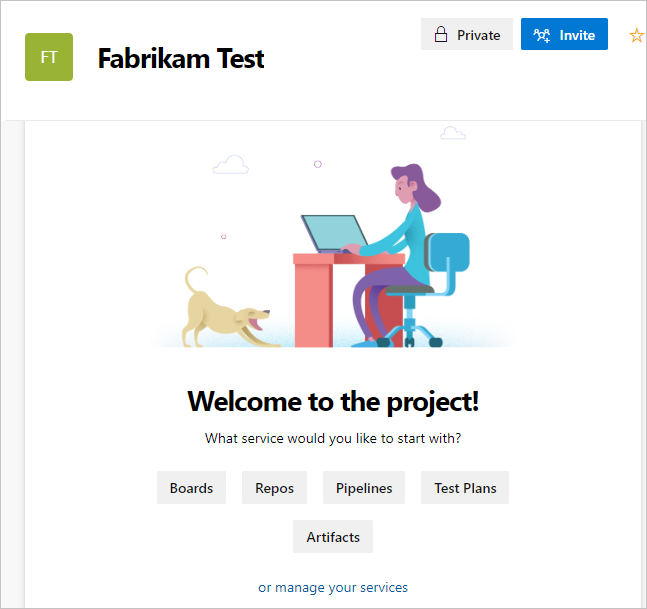
- Select New project.
 https://linuxcloudservers.com/wp-content/uploads/2025/01/d1-1.png
Step 3: Set Up Azure Repos
- Use Azure Repos for version control. Push and pull your code using Git commands or the Azure DevOps interface.
Step 4: Configure CI/CD Pipelines
- Click on Pipelines > Create Pipeline to automate the build and deployment process.
Step 5: Add Test Plans
- Integrate Azure Test Plans to perform manual or automated testing for your application.
Who Uses Azure DevOps?
Azure DevOps is used by a wide range of industries and teams, from small startups to large enterprises. Some notable companies using Azure DevOps include:
- Netflix: Continuous updates to their platform are powered by Azure DevOps.
- Microsoft: Microsoft itself relies on Azure DevOps to streamline product updates and ensure quality.
- Uber, Google, and Samsung: Major tech companies leverage Azure DevOps for its scalability and reliability.
azure devops add user to project
Adding users to an Azure DevOps project allows them to collaborate on code, pipelines, and work items. Follow these steps to add a user:
Step 1: Open Azure DevOps
- Sign in to your Azure DevOps account:
👉 Azure DevOps Portal - Navigate to your Organization.
- Select the Project where you want to add a user.
Step 2: Add a User to the Project
- Go to Project Settings (bottom left corner).
- Under General, select Users.
- Click the “Add users” button.
- Enter the email address of the user.
- Assign a permission level (Basic, Stakeholder, Visual Studio Subscription, etc.).
- Click “Add” to confirm.
Step 3: Assign Permissions (Optional)
If the user needs specific permissions:
- Go to Project Settings → Permissions.
- Select the appropriate Security Group (e.g., Project Administrators, Contributors, Readers).
- Click Add Member and select the user.
- Set role-based access control (RBAC) as required.
Step 4: Verify User Access
- The user will receive an invitation email with a link to access the project.
- They need to sign in with their Microsoft account to get access.
Benefits of Azure DevOps
- Reliability:
- A stable and highly available SaaS platform.
- Regular updates and robust support from Microsoft.
- Scalability:
- Easy to scale projects without additional overhead.
- Suitable for teams of all sizes.
- Better Collaboration:
- Tools like Azure Boards improve communication and coordination between team members.
- Access to Latest Features:
- Azure DevOps updates every 3 weeks, ensuring access to the latest tools and features.
- Hassle-Free Upgrades:
- No need to worry about manual patching or upgrades.
Drawbacks of Azure DevOps
- Cost:
- While Azure DevOps offers a free tier, advanced features and large-scale usage come with significant costs.
- Open-source alternatives like Jenkins or GitHub Actions can be more budget-friendly.
- Complexity:
- Steep learning curve compared to traditional tools.
- Requires thorough documentation review to master.
- Integration Challenges:
- While flexible, integrating third-party tools can be tricky and may require careful configuration.
- Overkill for Small Projects:
- Best suited for medium to large-scale projects. Smaller projects may find it unnecessarily complex.
Difference Between Azure DevOps and DevOps
| Aspect | Azure DevOps | DevOps |
|---|---|---|
| Platform | SaaS platform by Microsoft. | General methodology and practice. |
| Integration | Built-in tools like Azure Boards and Pipelines. | Requires manual setup for various tools. |
| Agent Machines | Built-in agents for pipelines. | Requires custom agent setup. |
| Cost | Paid with limited free tier. | Open-source tools like Jenkins are free. |
Microsoft Azure Certifications
Azure DevOps is part of the broader Microsoft Azure ecosystem. Earning an Azure certification can enhance your career prospects. Popular certifications include:
- Azure DevOps Engineer Expert
- Azure Administrator Associate
- Azure Solutions Architect Expert
For more details, visit the official Azure Certification Guide.
Conclusion
Azure DevOps is a powerful platform for automating and managing the software development lifecycle. With services like Azure Boards, Pipelines, Repos, Artifacts, and Test Plans, it simplifies workflows and enhances team collaboration. While it comes with a learning curve and cost considerations, its scalability and feature set make it an excellent choice for organizations aiming to adopt modern DevOps practices.
If you’re looking to get started with Azure DevOps, visit the official Azure DevOps website and explore its features.
Learn about azure devops agile process