
Cloud Based Services
Cloud computing has transformed the way organizations store, manage, and process data by leveraging remote servers hosted on the internet instead of relying on local servers or personal computers. Cloud providers such as Amazon Web Services (AWS), Microsoft Azure, and Google Cloud charge users based on consumption, making it a cost-effective solution for businesses of all sizes.
This post provides an in-depth look at cloud-based services, their types, benefits, challenges, and how they cater to diverse needs, with additional backlinks for further learning.
Types of Cloud Based Services
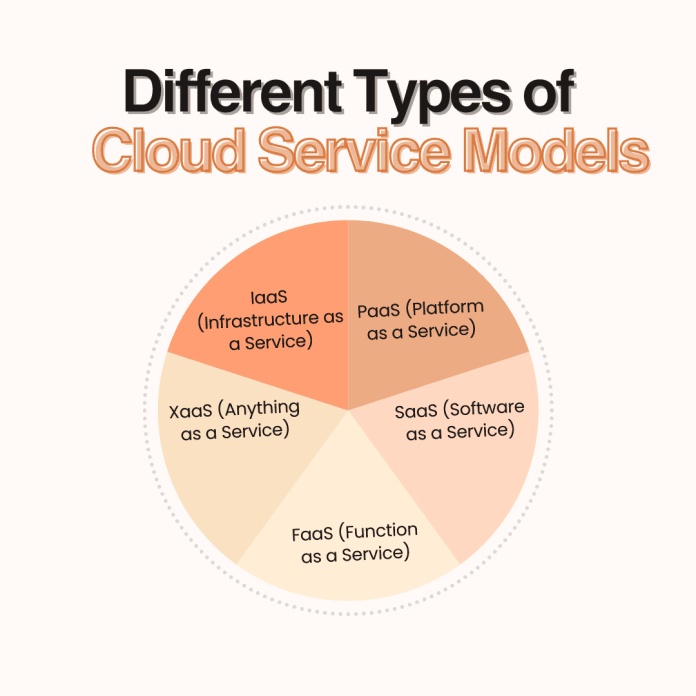
Cloud computing services can be categorized into five major types:
- Software as a Service (SaaS)
- Platform as a Service (PaaS)
- Infrastructure as a Service (IaaS)
- Anything as a Service (XaaS)
- Function as a Service (FaaS)
These categories are collectively referred to as the cloud computing stack, with higher-level services building on top of foundational ones.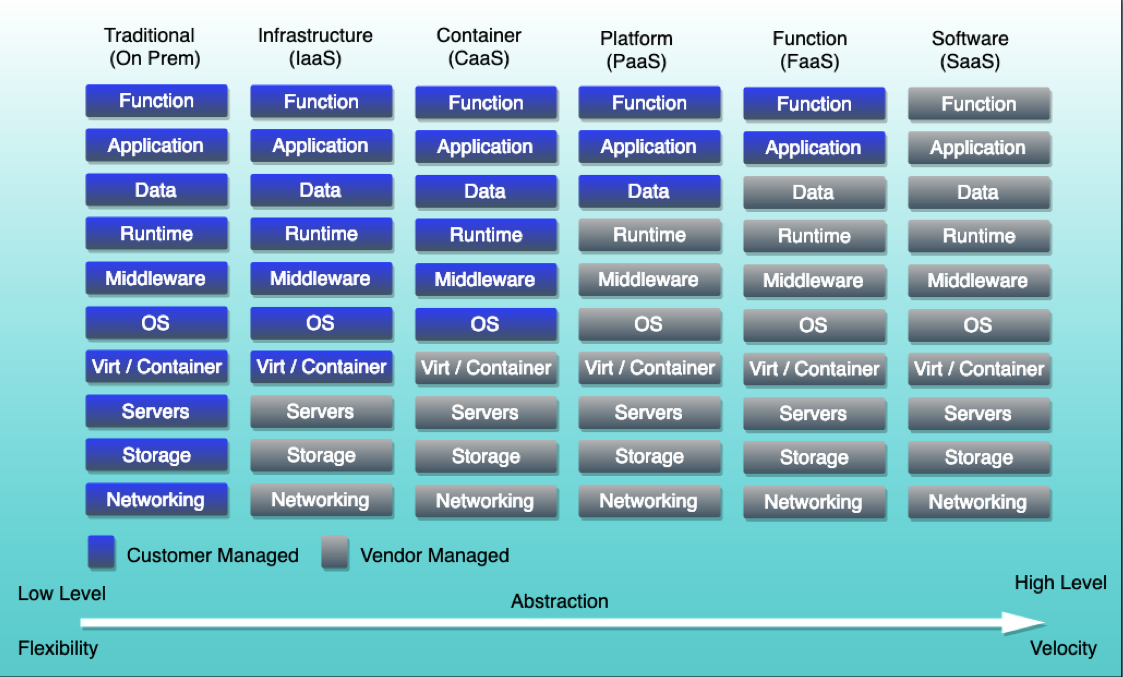
1. Software as a Service (SaaS)
SaaS delivers software applications over the internet, eliminating the need for installations or updates. Users can access these services directly through a web browser.
Advantages:
- Cost-Effective: Pay-as-you-go pricing eliminates upfront costs.
- Accessibility: Access software anytime, anywhere with an internet connection.
- Automatic Updates: Updates and maintenance are handled by the provider.
- Scalability: Services can scale easily to meet user demands.
Disadvantages:
- Limited Customization: Customization options may be restricted to the provider’s platform.
- Internet Dependency: Requires a stable internet connection.
- Security Concerns: Providers may have access to sensitive data.
Examples:
2. Platform as a Service (PaaS)
PaaS provides a platform and environment for developers to build, test, and deploy applications without managing the underlying infrastructure.
Advantages:
- Streamlined Development: Offers tools for the entire application lifecycle.
- Cost Savings: Eliminates the need for on-premises hardware.
- Scalability: Adjusts resources based on workload.
- Simplified Collaboration: Teams can collaborate easily within the platform.
Disadvantages:
- Limited Control: Providers manage the infrastructure, reducing user control.
- Provider Dependency: Reliant on the provider’s availability and reliability.
- Restricted Flexibility: May not support all workloads or customizations.
Examples:
3. Infrastructure as a Service (IaaS)
IaaS offers fundamental infrastructure services like virtual machines, storage, and networking, allowing businesses to outsource their IT infrastructure needs.
Advantages:
- Cost-Efficiency: Pay for only the resources you use.
- Customizable: Highly flexible and customizable.
- Scalability: Scale up or down based on demand.
- Security: Robust protection provided by leading cloud providers.
Disadvantages:
- Management Complexity: Requires expertise to configure and manage.
- Security Challenges: Users must secure their applications and data.
- Limited Accessibility: Restrictions in some regions due to local regulations.
Examples:
4. Anything as a Service (XaaS)
XaaS encompasses a wide range of services delivered over the internet, including storage, databases, and networking, tailored to meet organizational needs.
Advantages:
- Scalability: Easily scale resources as needed.
- Flexibility: Wide range of services to choose from.
- Cost-Effective: Pay for only the services consumed.
Disadvantages:
- Provider Dependency: Risk of outages or downtime.
- Integration Challenges: May not integrate seamlessly with existing systems.
- Limited Customization: Services may not cater to all specific needs.
Examples:
5. Function as a Service (FaaS)
FaaS is a serverless computing model where developers deploy and execute code as individual functions without managing infrastructure.
Advantages:
- Cost-Efficient: Pay only for execution time.
- Highly Scalable: Automatically scales based on demand.
- Simplified Maintenance: No need to manage servers.
Disadvantages:
- Cold Start Latency: Initial function execution may experience delays.
- Limited Control: Providers manage the underlying infrastructure.
- Security Concerns: Users must secure their own data and functions.
Examples:
Key Differences Between Cloud-Based Services
1. Software as a Service (SaaS)
- Definition: SaaS delivers software over the internet, eliminating the need for installation or maintenance. Users access the software via a web browser.
- Purpose: Provides ready-to-use applications for end-users, such as email, CRM, or collaboration tools.
- User: Typically end-users like employees or customers.
- Scalability: Highly scalable, allowing users to add or reduce features on-demand.
- Control Level: Low control; users manage application settings but not the underlying infrastructure.
2. Platform as a Service (PaaS)
- Definition: PaaS offers a platform for developers to build, test, and deploy applications without worrying about hardware or infrastructure.
- Purpose: Simplifies app development by providing tools, libraries, and an environment for efficient development and deployment.
- User: Designed for developers and software engineers.
- Scalability: High scalability, enabling developers to adjust resources for apps during development.
- Control Level: Medium control; developers manage applications but not the infrastructure.
3. Infrastructure as a Service (IaaS)
- Definition: IaaS provides fundamental computing infrastructure such as virtual machines, storage, and networking.
- Purpose: Offers complete control over the IT environment, enabling businesses to build their own platforms.
- User: IT administrators and infrastructure managers.
- Scalability: Highly scalable, allowing businesses to scale hardware and network resources.
- Control Level: High control; users have full access to configure and manage infrastructure.
4. Anything as a Service (XaaS)
- Definition: XaaS refers to a broad category of services that include SaaS, PaaS, IaaS, and additional services like Database as a Service (DBaaS).
- Purpose: Combines various services to provide a flexible IT environment tailored to organizational needs.
- User: Businesses and organizations requiring versatile IT solutions.
- Scalability: Highly scalable, supporting dynamic scaling across services.
- Control Level: Medium control, as customization depends on the services selected.
5. Function as a Service (FaaS)
- Definition: FaaS is a serverless computing model that allows users to deploy and execute code as individual functions in response to events.
- Purpose: Focuses on executing specific tasks without managing infrastructure.
- User: Developers creating modular, event-driven applications.
- Scalability: Automatically scalable based on demand.
- Control Level: Low control; developers focus on code, while the provider manages infrastructure.
In Short
- SaaS is best for end-users who need ready-to-use applications.
- PaaS is ideal for developers who require tools to build and deploy applications.
- IaaS caters to IT teams needing complete control over infrastructure.
- XaaS offers flexible solutions by combining various cloud services.
- FaaS suits developers looking to create event-driven applications without worrying about server management.
Each service type has unique strengths and is suited to specific use cases. Selecting the right one depends on your organization’s needs and technical expertise.
Conclusion
Cloud-based services have revolutionized IT infrastructure, enabling businesses to scale efficiently while reducing costs. Each service—SaaS, PaaS, IaaS, XaaS, and FaaS—offers unique advantages and disadvantages, making them suitable for different business needs.
For further information and detailed insights, check out these resources:
By choosing the right cloud-based service, organizations can stay competitive and innovate without the burden of managing physical infrastructure.
Learn about Google Cloud Customer Support