

What Are Kubernetes Containers?
Kubernetes is revolutionizing the way developers build, deploy, and manage applications. With its powerful capabilities, it has become a cornerstone of cloud-native environments. This guide will provide an in-depth overview of Kubernetes, containerization, and related technologies while highlighting their benefits, features, and real-world applications.
What is Kubernetes?
Kubernetes is an open-source platform developed to automate the deployment, scaling, and management of containerized applications. Initially developed by Google, it is now maintained by the Cloud Native Computing Foundation (CNCF). Kubernetes orchestrates containers across clusters of machines, ensuring high availability and efficient resource utilization.
With Kubernetes, organizations can simplify the management of complex microservices architectures, making it indispensable for modern cloud-native environments.
Key Features of Kubernetes
- Service Discovery and Load Balancing: Automatically distributes traffic and ensures availability.
- Self-Healing: Detects and replaces failed containers automatically.
- Automated Rollouts and Rollbacks: Seamlessly update applications while maintaining uptime.
- Horizontal Scaling: Dynamically scale applications based on traffic.
- Persistent Storage: Easily manage storage across different platforms.
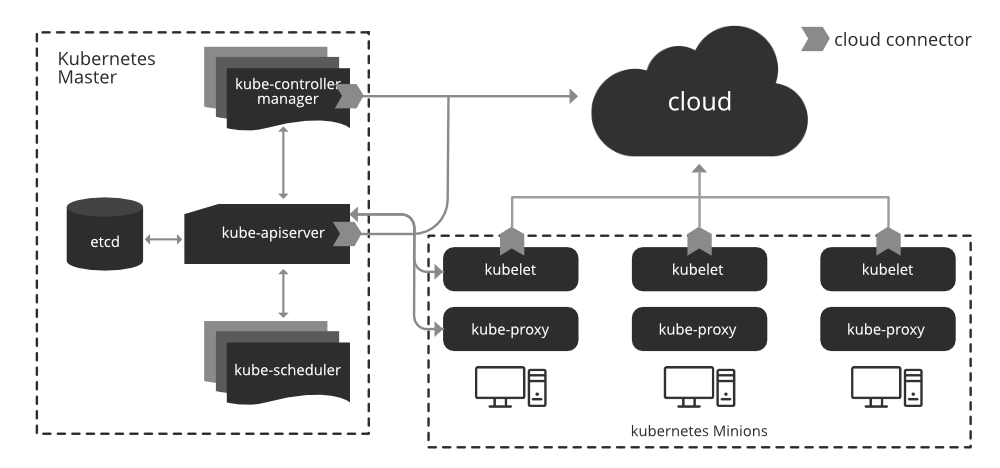
What Are Kubernetes Containers?
Containers are lightweight, portable, and self-sufficient environments that include all the dependencies required to run an application. Kubernetes is a container orchestration platform that automates application deployment, scaling, and management, making it ideal for running containerized applications in production environments.
Advantages of Containers in Kubernetes
- Portability: Move applications between environments seamlessly.
- Consistency: Maintain the same behavior across development, staging, and production.
- Efficiency: Share the host OS kernel, leading to lower overhead than virtual machines.
Core Kubernetes Container Features
- Multi-host Scheduling: Kubernetes dynamically schedules containers across a cluster of machines.
- Scalability: Adjust resources based on demand.
- Fault Tolerance: Automatically recover from failures.
How Containers and Kubernetes Work Together
Containers provide the foundation for packaging and deploying applications, while Kubernetes acts as the orchestration layer that ensures those containers are running optimally. Together, they enable seamless development, deployment, and scaling in cloud-native environments.
Steps to Containerize an Application Using Kubernetes
- Build a Docker Image: Use Docker to package the application and its dependencies.
- Push to a Container Registry: Store the image in repositories like Docker Hub or Google Container Registry.
- Create a Kubernetes Manifest File: Define your application’s deployment details in YAML.
- Deploy to Kubernetes: Use
kubectl applyto create resources like pods, deployments, and services.
Sample Deployment Manifest File
apiVersion: apps/v1
kind: Deployment
metadata:
  name: my-deployment
spec:
  replicas: 3
  selector:
    matchLabels:
      app: my-app
  template:
    metadata:
      labels:
        app: my-app
    spec:
      containers:
      - name: my-app
        image: my-app:latest
What are containers in kubernetes : Technology
Containerization is a form of operating system-level virtualization that creates isolated environments for applications. Unlike traditional virtual machines, containers share the host OS kernel, leading to better resource utilization and faster boot times.
Containerization vs. Virtualization
| Aspect | Containers | Virtual Machines |
|---|---|---|
| Isolation | Process-level | Full OS-level |
| Resource Overhead | Minimal | Significant |
| Portability | Highly portable | Limited |
| Boot Time | Seconds | Minutes |
| Efficiency | Shares host OS kernel | Requires dedicated resources |
Key Benefits of Kubernetes and Containers
- Scalability: Scale applications up or down based on traffic demands.
- High Availability: Built-in redundancy ensures applications remain operational.
- Portability: Easily deploy applications across different environments.
- Automation: Simplifies repetitive tasks like scaling and updating.
- Resource Efficiency: Optimizes the use of underlying hardware.
Installing Kubernetes: A Step-by-Step Guide
Follow these steps to set up Kubernetes on a Linux platform:
Step 1: Update the Package Repository
sudo apt-get update
Step 2: Install Docker
sudo apt install docker.io
sudo systemctl start docker
sudo systemctl enable docker
Step 3: Install Kubernetes Components
sudo apt-get install -y apt-transport-https curl
sudo curl -s https://packages.cloud.google.com/apt/doc/apt-key.gpg | sudo apt-key add
sudo apt-add-repository "deb https://apt.kubernetes.io/ kubernetes-xenial main"
sudo apt-get update
sudo apt-get install -y kubectl kubeadm kubelet
Step 4: Initialize the Master Node
sudo kubeadm init
Step 5: Configure kubectl
mkdir -p $HOME/.kube
sudo cp -i /etc/kubernetes/admin.conf $HOME/.kube/config
sudo chown $(id -u):$(id -g) $HOME/.kube/config
 Step 6: Deploy a Pod Network
kubectl apply -f https://raw.githubusercontent.com/coreos/flannel/master/Documentation/kube-flannel.yml
Step 7: Verify the Installation
kubectl get nodes
Kubernetes Pods
A pod is the smallest deployable unit in Kubernetes. Each pod can run one or more containers and includes shared storage, networking, and specifications. Pods are ephemeral and can be recreated automatically if they fail, ensuring application availability.
Key Features of Pods
- Ephemeral Nature: Automatically replaced upon failure.
- Shared Storage: Persistent volumes shared across containers.
- Networking: Unique IP address within the cluster.
Docker: The Backbone of Containerization
Docker is a container management tool that allows developers to build, ship, and run applications in isolated environments. It simplifies the creation and deployment of applications with all their dependencies.
Key Concepts in Docker
- Docker Images: Immutable templates for creating containers.
- Docker Containers: Running instances of images.
- Docker Registry: Stores and distributes images (e.g., Docker Hub).
Conclusion
Kubernetes and containerization have transformed how applications are developed, deployed, and scaled. By leveraging tools like Docker for creating containers and Kubernetes for orchestration, developers can build robust, scalable, and portable applications.
From managing microservices to deploying complex architectures, Kubernetes simplifies the process while ensuring high availability and efficient resource utilization. Whether you’re a developer, system administrator, or IT professional, understanding Kubernetes is essential for succeeding in modern cloud-native environments.
For more resources, explore the following:
- Kubernetes Documentation
- Docker Official Website
- Kubernetes GitHub Repository
- Cloud Native Computing Foundation
Embrace the power of Kubernetes and take your applications to the next level!
Learn more about: How to Configure Kubernetes on Ubuntu