
Create a Project in Azure DevOps-Agile Process
Introduction
The Agile Process in Azure DevOps is designed for teams that follow Agile planning methodologies, such as Scrum, and aim to track development and testing activities separately. It provides a structured framework to manage work items like Epics, Features, User Stories, Tasks, and Bugs, enabling efficient tracking and delivery of projects.
In this article, we’ll explore the Agile Process, discuss the hierarchy of work items, and provide step-by-step instructions to create a project in Azure DevOps using the Agile Process. We’ll also delve into its key features, advantages, disadvantages, best practices, and troubleshooting steps.
What is the Agile Process in Azure DevOps?
The Agile Process is one of the work item process templates available in Azure DevOps. It is specifically tailored for teams using Agile principles and values to track and manage work. With its focus on flexibility and iteration, the Agile Process allows teams to track various stages of work, from business initiatives (Epics) to actionable tasks.
Key Work Items in the Agile Process:
- Epic: Represents a high-level business initiative or goal.
- Feature: Represents a significant deliverable or part of an Epic.
- User Story: Represents a new functionality or change from the user’s perspective.
- Task: The smallest unit of work that is part of a User Story or Bug.
- Bug: Used to track defects or issues in the project.
- Test Case: Used by QA teams to write test steps for a specific feature.
Create a Project in Azure DevOps-Agile Process
Step 1: Sign In or Sign Up for Azure DevOps
- Visit the Azure DevOps Portal.
- Log in with your Microsoft account. If you don’t have one, click Create Account and follow the sign-up instructions.
- Select or create an organization:
- Existing Organization: Choose from the dropdown menu.
- New Organization: Follow prompts to create one.


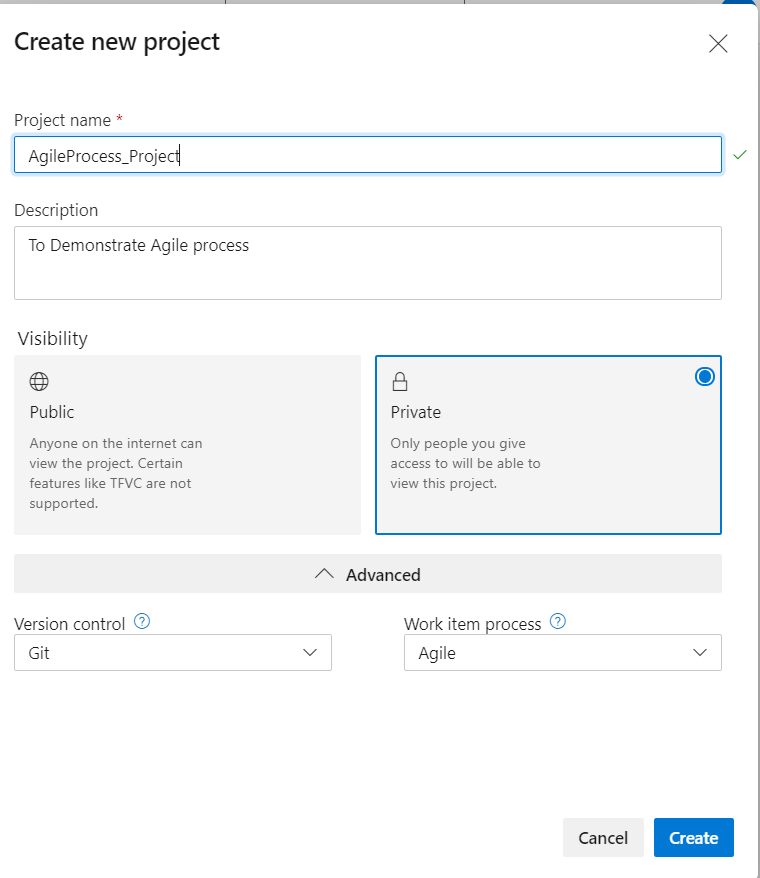
Step 2: Create a New Project
- Click the New Project button in the top-right corner.

- Fill in the required details:
- Project Name: Enter a unique name (no special characters like
/ : \ ~ & % ; @). - Description: Optionally, provide a brief project overview.
- Visibility:
- Public: Allows anyone on the internet to view your project.
- Private: Restricts access to authorized users only.
- Version Control: Choose between:
- Git: A distributed version control system.
- TFVC: A centralized version control system.
- Work Item Process: Select Agile from the dropdown.
- Project Name: Enter a unique name (no special characters like
- Click the Create button. You will be redirected to the project’s Welcome Page.
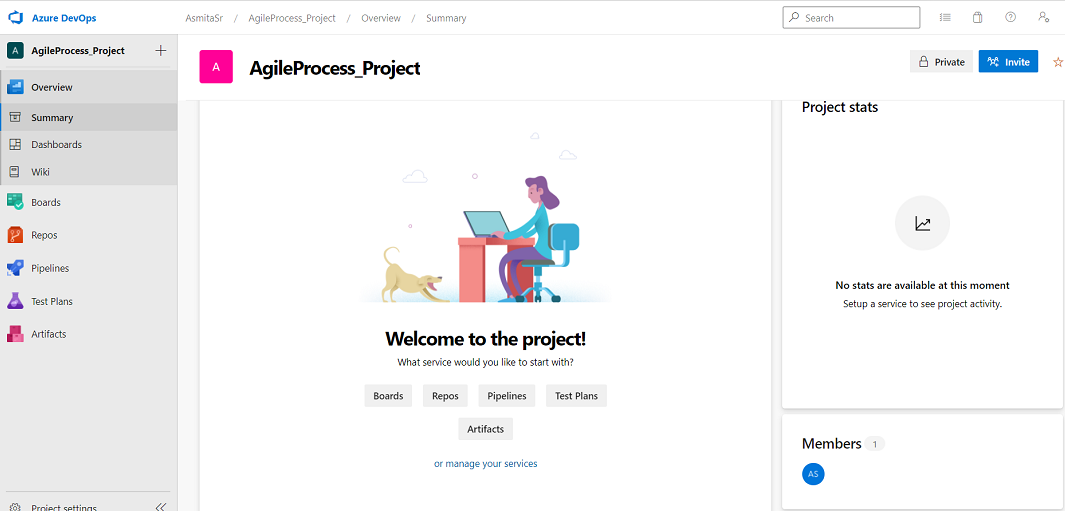
Step 3: Navigate the Welcome Page
The welcome page provides several options to set up and manage your project:
- Invite Team Members:
Add users to your project for collaboration. - Boards:
Create and manage work items like Epics, Features, User Stories, and Tasks. - Repos:
Set up a repository to manage your source code. - Pipelines:
Configure CI/CD pipelines for automated builds and deployments. - Test Plans:
Create test cases and plans to ensure quality. - Artifacts:
Manage package dependencies like NuGet, npm, and Maven.
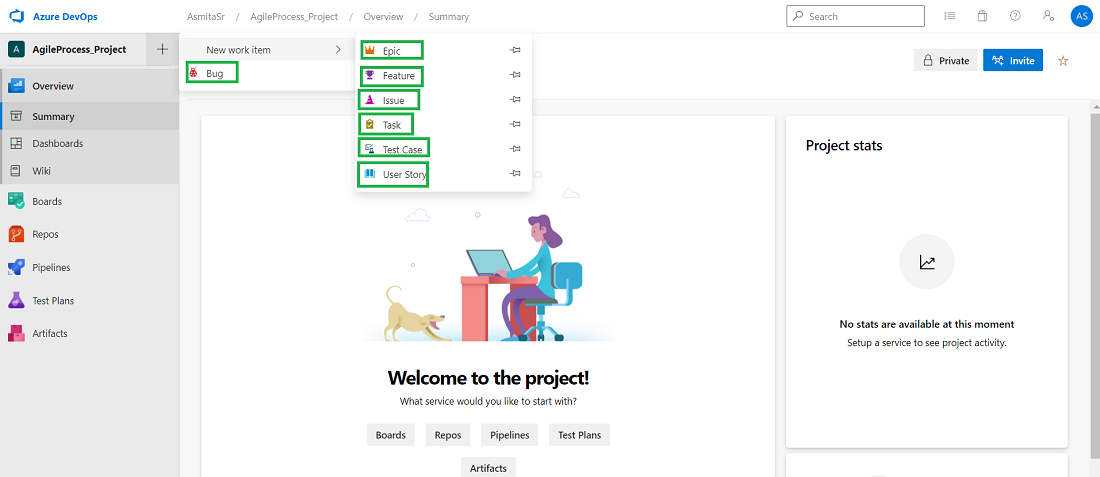
Step 4: Understand Work Items in the Agile Process
The Agile Process organizes work items in a hierarchical structure:
- Epic → Feature → User Story → Task:
- Epic: High-level goal or business initiative.
- Feature: Shippable components of the project.
- User Story: Describes work from a user’s perspective.
- Task: Smallest unit of work for implementation.
- Bug → Task:
- Bugs are tracked separately and can have multiple associated tasks.
- Test Case:
- QA teams use test cases to validate specific features or user stories.
- QA teams use test cases to validate specific features or user stories.
Key Features of the Agile Process
- Flexible Work Item Types:
Tracks different types of work items such as Epics, Features, User Stories, Tasks, Bugs, and Test Cases. - Clear Work Hierarchy:
Provides a structured hierarchy for tracking progress and dependencies. - Sprint Planning:
Easily plan and manage work for specific iterations. - Custom Boards and Backlogs:
Visualize work with customized Kanban boards and Agile backlogs. - Seamless Integration with Azure DevOps Services:
Combines with Repos, Pipelines, Test Plans, and Artifacts for end-to-end project management.
Advantages of the Agile Process
- Optimized for Agile Teams:
Perfectly aligns with Agile methodologies, including Scrum. - Improved Collaboration:
Work items, boards, and dashboards enable seamless communication and tracking among team members. - Scalability:
Supports projects of all sizes, from small teams to enterprise-level initiatives. - Iteration-Based Development:
Focuses on delivering value incrementally through sprints. - Integrated Testing:
Includes built-in tools for manual and automated testing.
Disadvantages of the Agile Process
- Complexity for New Teams:
Teams unfamiliar with Agile principles may face a steep learning curve. - Rigid Hierarchy:
The hierarchical structure may not suit all project types. - Overhead for Small Projects:
Tracking multiple work items may be excessive for simple projects. - Dependency on Azure DevOps Services:
Requires integration with other Azure tools for full functionality.
Best Practices for Using the Agile Process
- Define Work Items Clearly:
Ensure Epics, Features, and User Stories are well-defined and linked properly. - Plan Sprints Effectively:
Use sprint planning tools to allocate work and set clear goals for each iteration. - Leverage Dashboards:
Create custom dashboards to monitor progress and identify bottlenecks. - Integrate with Pipelines:
Automate testing and deployment for faster delivery. - Collaborate with Teams:
Use Boards and Comments to keep all stakeholders informed.
Troubleshooting Steps
1. Unable to Create a Project:
- Verify your permissions within the organization.
- Check that the project name adheres to character and length restrictions.
2. Work Items Not Visible on Boards:
- Ensure work items are assigned to the correct Iteration or Area.
- Refresh the board and check for applied filters.
3. Sprints Not Displaying Properly:
- Ensure sprints are configured correctly under Project Settings → Iterations.
4. Integration Issues with Pipelines or Repos:
- Verify repository permissions and pipeline configurations.
5. Bugs or User Stories Missing Tasks:
- Check the work item relationships to ensure tasks are properly linked.
Conclusion
The Agile Process in Azure DevOps provides a robust framework for teams using Agile methodologies. Its structured hierarchy, integrated tools, and flexibility make it ideal for managing complex projects. While it may have a learning curve for new teams, its benefits in collaboration, scalability, and iteration-based development outweigh the challenges.
By following the steps outlined in this article, you can quickly set up and manage your project in Azure DevOps using the Agile Process. For additional details, visit the official Azure DevOps documentation.