
What are Data Security Features in Azure
Introduction
Data security is one of the most critical aspects of cloud computing. As data becomes increasingly valuable, it also becomes a prime target for hackers, organizations, and even governments. Protecting sensitive data from unauthorized access, breaches, and leaks is essential for maintaining user trust and meeting compliance requirements.
Microsoft Azure offers a robust set of data security features designed to protect data at multiple layers. Azure’s multi-layered approach ensures that even if one layer is compromised, other safeguards remain in place to secure sensitive information. This article provides an in-depth look at the core data security features offered by Azure.
Key Azure Data Security Features
Azure’s data security architecture comprises multiple layers, including network security, access management, threat protection, information security, and customer data security.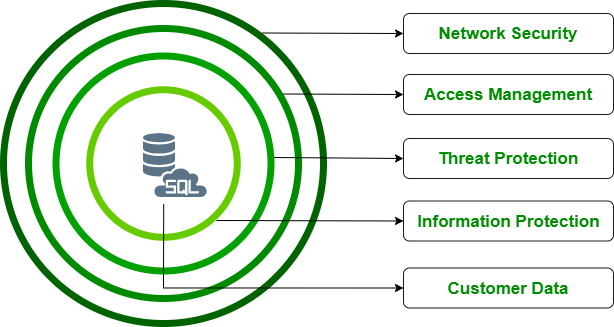
1. Network Security
The first layer of Azure’s data security is network protection, ensuring that unauthorized users cannot access your data.
Key Features:
- Firewall Protection:
- By default, Azure SQL Database and other services have their firewall disabled. This means no external access is allowed unless explicitly permitted.
- Users must whitelist specific IP addresses to grant access, even for Azure services.
- Server-Level and Database-Level Firewalls:
- Configure firewalls at both the server and individual database levels.
- Allows granular control to ensure only specific databases are accessible while others remain protected.
- Virtual Network Integration:
- Add endpoints to virtual networks to control traffic using Network Security Groups (NSGs) and ensure that traffic flows only through secure channels.
Benefits:
- Ensures no unauthorized traffic can access Azure resources.
- Provides flexibility with database-specific firewall rules.
- Integrates seamlessly with Azure Virtual Networks for added security.
2. Access Management
Azure provides comprehensive identity and access management controls to authenticate and authorize users and applications securely.
Key Features:
- SQL Authentication:
- Traditional username-password authentication for SQL databases.
- Azure Active Directory (Azure AD):
- Centralized identity management for users and groups.
- Allows organizations to manage user permissions without creating individual SQL credentials.
- Role-Based Access Control (RBAC):
- Assign specific roles to users or applications, such as Reader, Contributor, or Owner.
- Limits access based on the principle of least privilege.
- Row-Level Security:
- Restricts data access based on user roles or attributes.
- Ensures users only see the data they are authorized to view.
Benefits:
- Simplifies user management through Azure AD.
- Enforces the principle of least privilege, minimizing over-permissioned accounts.
- Allows fine-grained control over access to specific rows or columns in a database.
3. Threat Protection
Azure includes advanced threat protection features to detect, prevent, and respond to potential security threats.
Key Features:
- Advanced Data Security:
- A subscription-based feature that offers advanced protection for databases.
- Data Discovery and Classification:
- Automatically identifies sensitive fields like Personally Identifiable Information (PII).
- Tags sensitive data to enforce stricter security rules.
- Vulnerability Assessment:
- Scans databases for potential vulnerabilities, such as overly permissive firewall rules or unencrypted data.
- Advanced Threat Protection:
- Monitors databases for SQL injection attacks and brute-force password attempts.
- Sends alerts in real-time for suspicious activities.
Benefits:
- Protects databases from both external and internal threats.
- Provides actionable insights to improve security configurations.
- Enables compliance with data privacy regulations like GDPR.
4. Information Security
Azure ensures that data remains secure whether it is stored, transmitted, or accessed.
Key Features:
- Encryption at Rest:
- All data stored in Azure is encrypted by default using Transparent Data Encryption (TDE).
- Encryption keys are managed by Azure Key Vault, or users can bring their own keys (BYOK).
- Encryption in Transit:
- Data traveling between servers and clients is encrypted using TLS/SSL protocols, ensuring secure transmission.
- Always Encrypted:
- Data is encrypted on the client-side and remains encrypted in storage.
- Only the client holds the encryption keys, preventing unauthorized access even within Azure.
- Dynamic Data Masking:
- Masks sensitive fields in the database by replacing them with generic values.
- Prevents unauthorized users from viewing sensitive information.
- Application-Level Encryption:
- Developers can encrypt sensitive fields, such as passwords, using robust hashing algorithms and salting techniques.
Benefits:
- Ensures data remains secure even in the event of a breach.
- Provides end-to-end encryption, from storage to transit.
- Reduces exposure of sensitive data to unauthorized users.
5. Customer Data Security
Azure offers additional protections to secure customer data, ensuring compliance with regulatory requirements and preventing unauthorized access.
Key Features:
- Transport Layer Security (TLS):
- Protects data in motion between clients and Azure SQL Databases using encryption protocols.
- Geo-Replication and Data Backup:
- Ensures data is continuously backed up and can be restored in case of a disaster.
- Geo-redundant backups provide additional resilience.
- Multi-Tenancy Isolation:
- Keeps customer data isolated in shared environments to prevent data leakage.
Benefits:
- Meets industry-standard compliance for data security.
- Prevents unauthorized access to customer data, even in shared environments.
Advantages of Azure Data Security
- Comprehensive Protection:
Multiple layers of security ensure robust protection for data, from network to application levels. - Regulatory Compliance:
Supports compliance with GDPR, HIPAA, and other industry standards. - Ease of Management:
Centralized management of users, roles, and policies simplifies administration. - Scalable and Flexible:
Adapts to businesses of all sizes and security requirements. - Proactive Threat Detection:
Real-time monitoring and advanced threat protection reduce risks.
Disadvantages of Azure Data Security
- Additional Costs:
Advanced features like Advanced Data Security incur additional costs. - Complexity for Beginners:
Requires a learning curve for users unfamiliar with cloud security practices. - Dependency on Azure Services:
Heavily reliant on Azure-specific tools, making migration to other platforms challenging.
Best Practices for Azure Data Security
- Enable Multi-Layered Security:
Use a combination of network firewalls, RBAC, and encryption to secure data effectively. - Follow the Principle of Least Privilege:
Assign minimum permissions necessary for users and applications. - Monitor Regularly:
Use Azure Monitor and Advanced Threat Protection to detect and respond to threats. - Encrypt Sensitive Data:
Use Always Encrypted mode and Azure Key Vault for managing encryption keys. - Audit and Update Security Configurations:
Regularly review security settings and implement recommended configurations.
Conclusion
Azure’s multi-layered data security features provide comprehensive protection for sensitive data stored in the cloud. From network security to threat protection and encryption, Azure ensures your data remains safe from unauthorized access and breaches. By leveraging tools like Azure Active Directory, Transparent Data Encryption, and Advanced Threat Protection, businesses can meet compliance requirements and build trust with their users.
To learn more, visit the Azure Security Documentation.