

Microsoft Defender for Cloud
Introduction
Microsoft Defender for Cloud (formerly known as Azure Security Center) is a comprehensive, cloud-native security solution designed to protect workloads across Azure, on-premises environments, and other cloud platforms such as AWS and GCP. It combines threat protection, vulnerability management, and compliance monitoring into a unified platform, providing organizations with the tools they need to secure their cloud environments.
With advanced analytics, machine learning, and seamless integration with other Microsoft security tools, Microsoft Defender for Cloud enables security teams to detect, investigate, and respond to threats across hybrid and multi-cloud infrastructures.
What is Microsoft Defender for Cloud?
Microsoft Defender for Cloud is a security management solution designed to provide advanced threat protection and compliance monitoring for cloud workloads and applications. It offers a centralized dashboard to monitor and enhance your security posture across Azure, AWS, and Google Cloud environments.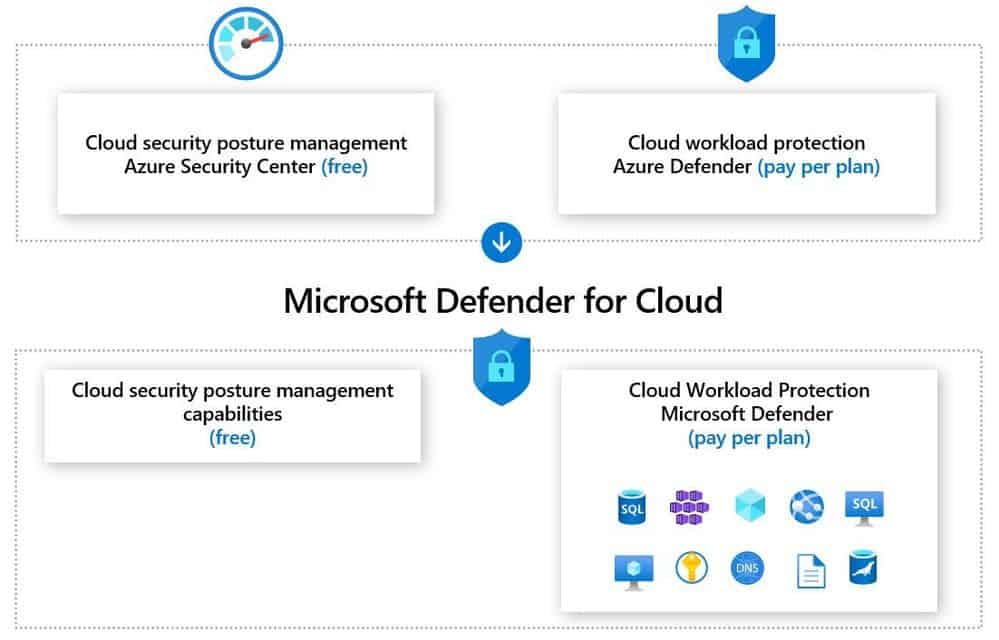
Key Features:
- Threat Protection: Real-time detection and response to malware, phishing, and advanced persistent threats.
- Vulnerability Management: Identify and remediate vulnerabilities in cloud workloads.
- Compliance Monitoring: Automate assessments for regulatory standards like HIPAA, GDPR, and PCI DSS.
- Identity and Access Management: Manage access using multi-factor authentication, conditional access, and role-based access control.
- Threat Intelligence: Leverage Microsoft Threat Intelligence for up-to-date insights on emerging threats.
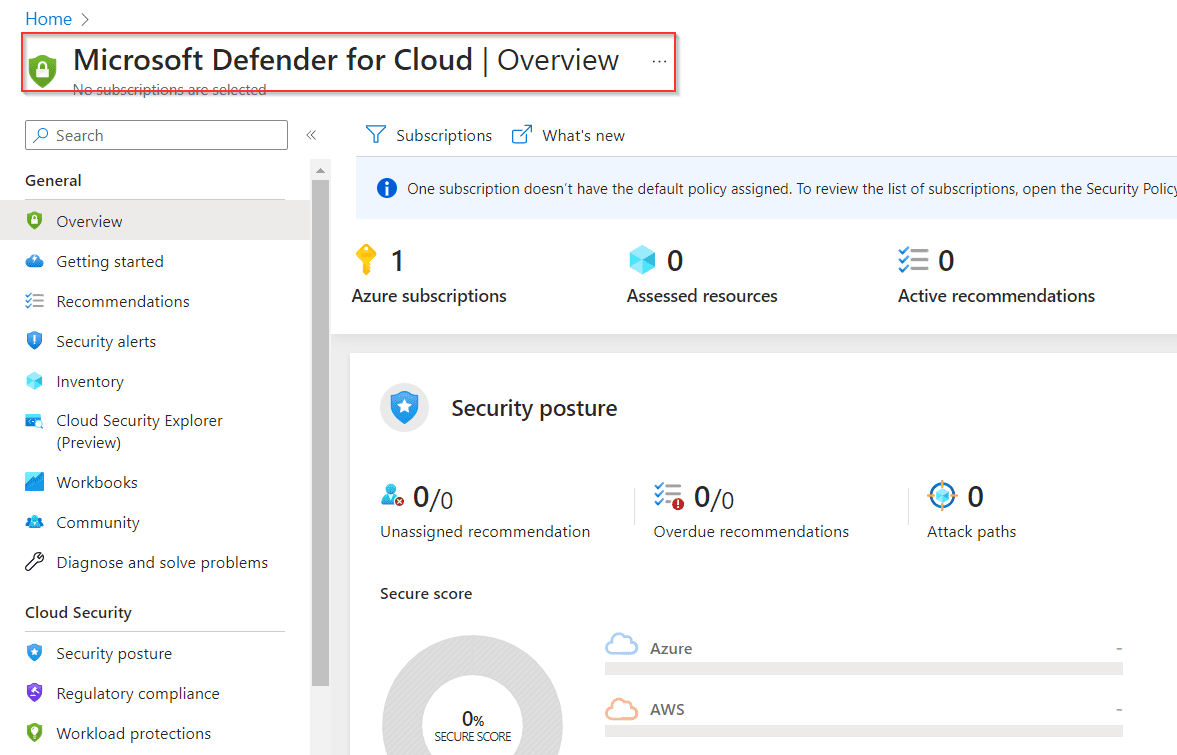
What is a Secure Score?
The Secure Score is a key feature of Microsoft Defender for Cloud, designed to help organizations assess and improve their security posture.
Goals of Secure Score:
- Understand Current Security State: Gain insights into your cloud environment’s vulnerabilities.
- Improve Security: Follow recommendations to mitigate risks and strengthen defenses.
The higher the secure score, the better your security posture. Each recommendation in Defender for Cloud contributes points to your secure score. By implementing these recommendations, organizations can improve their score and reduce security risks.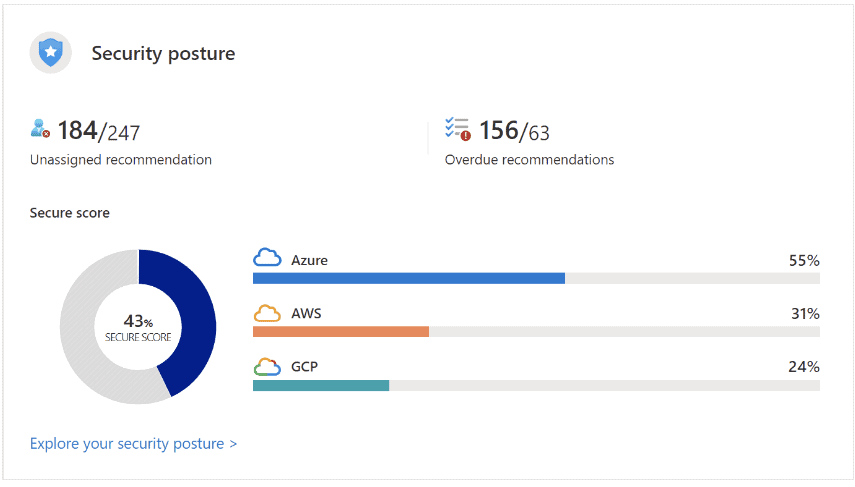
How is the Secure Score Calculated?
The secure score is calculated based on the implementation of security recommendations provided by Microsoft Defender for Cloud. Each recommendation is assigned a specific weight, and as you address these recommendations, your score increases.
Steps to Improve Secure Score:
- Review pending recommendations.
- Implement suggested actions, such as enabling multi-factor authentication or updating security configurations.
- Monitor progress in the Secure Score dashboard.
Security Alerts
Security Alerts in Microsoft Defender for Cloud notify administrators of potential threats and vulnerabilities detected in their cloud environments.
Responding to Security Alerts:
- View Full Details: Understand the scope and context of the alert.
- Take Action:
- Mitigate Threats: Resolve vulnerabilities or implement security patches.
- Prevent Future Attacks: Follow security recommendations to reduce risk.
- Automate Response: Trigger workflows using Logic Apps for immediate action.
- Suppress Irrelevant Alerts: Disable alerts that are not applicable to your organization.
Key Features of Microsoft Defender for Cloud
- Threat Protection:
- Uses AI and machine learning to detect and block threats in real-time.
- Protects against malware, phishing, SQL injection, and other cyber threats.
- Vulnerability Management:
- Identifies vulnerabilities in your cloud environment.
- Provides actionable recommendations to remediate risks.
- Compliance Management:
- Helps organizations comply with standards like HIPAA, GDPR, and PCI DSS.
- Automates compliance assessments and provides detailed reports.
- Identity and Access Management:
- Supports secure user authentication using multi-factor authentication and conditional access.
- Enforces role-based access control to limit unnecessary permissions.
- Threat Intelligence:
- Integrates with Microsoft’s Threat Intelligence Center for real-time updates on global threats.
- Provides insights into potential attack vectors and mitigation strategies.
- Integration with SIEM Solutions:
- Works seamlessly with Azure Sentinel, Splunk, and QRadar for centralized monitoring and incident response.
Benefits of Microsoft Defender for Cloud
- Comprehensive Security Coverage:
- Protects workloads across Azure, AWS, and GCP from a single console.
- AI-Driven Threat Detection:
- Continuously improves detection and response capabilities using AI and machine learning.
- Cloud-Native Design:
- Built specifically for cloud workloads, offering scalability and flexibility.
- Seamless Integration:
- Works with other Microsoft security solutions like Azure Sentinel and Microsoft Defender for Endpoint.
- Simplified Compliance:
- Automates compliance monitoring and reporting for regulatory standards.
- Cost Efficiency:
- Provides a unified platform for security management, reducing the need for multiple tools.
Step-by-Step Guide to Using Microsoft Defender for Cloud
Step 1: Enable Microsoft Defender for Cloud
- Log in to the Azure Portal.
- Navigate to Microsoft Defender for Cloud in the dashboard.
- Enable Defender for Cloud for your Azure subscription.
Step 2: Review Secure Score
- Go to the Secure Score dashboard.
- Review recommendations to improve your score, such as enabling MFA or updating firewall rules.
- Implement the recommendations to enhance security.
Step 3: Monitor Security Alerts
- Check the Security Alerts tab for active threats.
- Investigate each alert and take appropriate actions, such as applying patches or blocking suspicious IPs.
Step 4: Configure Automated Responses
- Use Logic Apps to create workflows for automatic threat response.
- Configure actions like isolating VMs or notifying administrators during incidents.
Step 5: Integrate with SIEM Solutions
- Connect Defender for Cloud to SIEM tools like Azure Sentinel for centralized threat management.
- Monitor and analyze logs to identify patterns and trends in security events.
Best Practices for Using Microsoft Defender for Cloud
- Enable All Defender Plans:
Use Defender for Servers, Databases, and other services for comprehensive protection. - Regularly Monitor Secure Score:
Continuously improve your security posture by following recommendations. - Integrate with Existing Tools:
Leverage integration with tools like Azure Sentinel for advanced analytics. - Automate Threat Response:
Use automated workflows to mitigate threats quickly. - Train Your Team:
Ensure security teams are familiar with Defender for Cloud features and workflows.
Disadvantages of Microsoft Defender for Cloud
- Cost:
Advanced features like automated responses and SIEM integrations may incur additional costs. - Learning Curve:
New users may require training to understand and utilize all features effectively. - Complex Configurations:
Some advanced features, like Logic Apps and SIEM integrations, may require additional setup.
Conclusion
Microsoft Defender for Cloud is an essential tool for securing workloads across Azure and other cloud platforms. Its robust features, such as threat detection, vulnerability management, and compliance monitoring, make it a comprehensive solution for cloud security. By leveraging AI-driven insights and seamless integrations with other Microsoft tools, organizations can enhance their security posture, reduce risks, and achieve regulatory compliance.
Whether you are a small business or an enterprise, Microsoft Defender for Cloud provides the scalability and flexibility needed to protect your cloud infrastructure effectively.
For more details, visit the Microsoft Defender for Cloud Documentation.