

Types of Cloud Computing
Cloud computing has revolutionized the way businesses store, process, and manage data. By delivering computing resources such as servers, storage, databases, and applications over the internet, cloud computing provides scalability, flexibility, and cost-efficiency. This guide explores the types of cloud computing and their features, helping you choose the best solution for your needs.
What Are the Types of Cloud Computing?
Cloud computing services are categorized into five types based on their deployment and usage:
- Public Cloud
- Private Cloud
- Hybrid Cloud
- Community Cloud
- Multi-Cloud
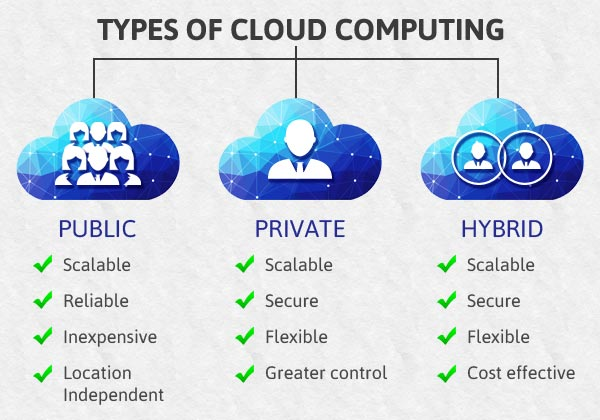
Each type has unique characteristics, advantages, and use cases. Let’s delve into each type in detail.
1. Public Cloud
The public cloud is a shared environment where computing resources are accessible to anyone over the internet on a pay-as-you-go basis. In this model, a Cloud Service Provider (CSP) manages the infrastructure, including servers, storage, and networking.
Examples of Public Cloud Providers:
- Amazon Elastic Compute Cloud (EC2)
- Microsoft Azure
- Google App Engine
- IBM SmartCloud Enterprise
Key Characteristics of Public Cloud:
- Accessibility: Accessible from anywhere with an internet connection.
- Shared Infrastructure: Multiple users share the infrastructure.
- Scalability: Resources can be scaled up or down easily.
- Pay-Per-Usage: Users pay only for the resources they consume.
- Managed by CSP: Service providers handle maintenance, security, and updates.
Advantages:
- Lower costs compared to private or hybrid clouds.
- Easy integration with minimal setup.
- High scalability to handle variable workloads.
- Location-independent access to resources.
- Built-in redundancy ensures reliability.
Disadvantages:
- Less secure due to shared resources.
- Performance depends on internet connectivity.
- Limited customization options.
- Dependency on service providers for uptime and SLA adherence.
Read more about public cloud computing.
2. Private Cloud
A private cloud, also known as an internal or corporate cloud, is dedicated exclusively to a single organization. It can be hosted either on-premises or by a third-party provider.
Examples of Private Cloud Platforms:
- VMware vSphere
- Microsoft Azure Stack
- IBM Cloud Private
Key Characteristics of Private Cloud:
- Exclusive Use: Only one organization can access the private cloud.
- Customizable: Tailored to the specific needs of the organization.
- Enhanced Security: Data governance and access controls are strictly enforced.
- Scalable: Resources can be adjusted as needed.
Advantages:
- High security and privacy for sensitive data.
- Full control over infrastructure and applications.
- Customizable to meet compliance and performance requirements.
- Seamless integration with existing on-premises systems.
Disadvantages:
- Higher upfront costs for setup and maintenance.
- Requires skilled IT staff for management.
- Limited scalability compared to public clouds.
Learn more about private cloud solutions.
3. Hybrid Cloud
A hybrid cloud combines public and private clouds, allowing data and applications to be shared between the two environments. This model provides the flexibility to leverage the benefits of both types.
Examples of Hybrid Cloud Solutions:
- Amazon Web Services (AWS) Outposts
- Microsoft Azure Arc
- Google Anthos
Key Characteristics of Hybrid Cloud:
- Flexibility: Organizations can use the public cloud for non-sensitive tasks and the private cloud for sensitive data.
- Scalability: Resources can be scaled using the public cloud while maintaining critical operations in the private cloud.
- Integration: Seamless connectivity between public and private clouds.
Advantages:
- Balances cost-efficiency and security.
- Supports workload portability across environments.
- Enhances disaster recovery capabilities.
- Offers greater control over sensitive data.
Disadvantages:
- Complex to manage and integrate.
- Dependency on high-speed internet connectivity.
- Higher costs compared to public cloud alone.
Explore hybrid cloud benefits.
4. Community Cloud
A community cloud is a shared infrastructure used by multiple organizations with similar needs, such as regulatory compliance, security, or collaboration.
Example Use Cases:
- Healthcare networks
- Government organizations
- Educational institutions
Key Characteristics of Community Cloud:
- Shared Infrastructure: Resources are shared among community members.
- Collaborative Environment: Designed for specific communities with shared goals.
- Cost-Efficiency: Costs are distributed among participants.
Advantages:
- Cost savings through shared infrastructure.
- Enhanced collaboration among organizations.
- Meets industry-specific compliance and regulatory standards.
Disadvantages:
- Limited scalability due to shared resources.
- Security features are not as robust as private clouds.
- Potential conflicts among community members.
Learn more about community cloud applications.
5. Multi-Cloud
Multi-cloud involves using multiple cloud service providers to meet an organization’s diverse needs. It allows businesses to leverage the strengths of different providers and avoid vendor lock-in.
Examples of Multi-Cloud Platforms:
- AWS
- Google Cloud Platform (GCP)
- Microsoft Azure
Key Characteristics of Multi-Cloud:
- Vendor Independence: Organizations can avoid being tied to a single provider.
- Diverse Services: Access specialized services from different providers.
- Resilience: Increased reliability through redundancy across platforms.
Advantages:
- Optimized performance by choosing the best provider for each workload.
- Enhanced disaster recovery with data spread across multiple providers.
- Flexibility to select cost-effective solutions.
Disadvantages:
- Complex management of multiple environments.
- Potential compatibility issues between platforms.
- Increased costs due to multiple subscriptions.
Discover how multi-cloud can transform your business.
Comparison Table: Cloud Types
| Feature | Public Cloud | Private Cloud | Hybrid Cloud | Community Cloud | Multi-Cloud |
|---|---|---|---|---|---|
| Host | Service Provider | Organization/Third Party | Both | Community/Third Party | Multiple Providers |
| Users | General Public | Single Organization | Selected Users | Community Members | Multiple Organizations |
| Access | Internet | Internet/VPN | Internet/VPN | Internet/VPN | Internet/VPN |
| Cost | Pay-per-usage | High Infrastructure Cost | Mixed | Shared Among Members | Variable |
| Security | Provider’s Responsibility | High Control | Depends on Setup | Depends on Setup | Depends on Setup |
| Scalability | High | Limited to Resources | Moderate | Limited | High |
Conclusion
Understanding the different types of cloud computing is essential for making informed decisions about your IT infrastructure. Whether you choose public, private, hybrid, community, or multi-cloud, the right solution depends on your organization’s needs, budget, and security requirements.
For tailored advice on cloud deployment, contact us or explore our resources. Stay ahead with the power of the cloud!