
🌟 Guide to get Started with BigQuery
📊 What is BigQuery?
Google BigQuery is a fully managed, serverless data warehouse designed by Google for scalable data analysis. It allows users to query petabytes of data in seconds using SQL-like syntax. With BigQuery, you can manage and analyze your data without worrying about infrastructure management, making it an ideal tool for data engineers, analysts, and administrators.
BigQuery provides a variety of tools for developers, including client libraries in multiple languages like Python, Java, and Node.js. It also integrates with Google Cloud services like Vertex AI for machine learning and allows you to import custom models for advanced analytics.
🏛️ Traditional vs Cloud Data Warehouse
BigQuery, as a cloud data warehouse, has significant advantages over traditional data warehouses:
- ⚡ Performance: Built for speed and flexibility, handling massive datasets efficiently.
- 📈 Scalability: Automatically scales to meet demand, whether querying terabytes or petabytes.
- 💰 Cost-Efficiency: Pay-as-you-go pricing, optimized for workload spikes and periods of inactivity.
- 🔧 Managed Services: Reduces operational overhead with built-in management features.
🔎 Row vs Column-Oriented Databases
BigQuery is a column-oriented database, making it ideal for analytical workloads like reporting and business intelligence. Unlike row-oriented databases (e.g., MySQL, PostgreSQL), which store data by rows, column-oriented databases store data by columns, allowing faster query performance for analytical use cases.
| Feature | Traditional Data Warehouses | BigQuery |
|---|---|---|
| Setup | On-premise hardware required | Fully managed, serverless |
| Scaling | Limited and manual | Automatic and infinite scaling |
| Cost | High upfront costs | Pay-as-you-go pricing model |
| Maintenance | Regular hardware maintenance | Google manages infrastructure |
| Performance | Dependent on hardware | Optimized for petabyte-scale queries |
🏛️ Key Features of BigQuery
- Serverless Architecture:
- No infrastructure management required.
- Focus on querying and analyzing data while Google handles scaling and management.
- Separation of Compute and Storage:
- Compute and storage are independent, allowing flexible scaling.
- Only pay for the resources you use.
- Scalability:
- BigQuery can process terabytes to petabytes of data in seconds to minutes.
- Scales automatically based on workload.
- Columnar Storage:
- Optimized for analytical queries by storing data in columns.
- Efficient for operations like aggregations and filtering.
- Standard SQL Support:
- Write queries using ANSI-compliant SQL (GoogleSQL).
- No need for specialized programming skills.
- Integration with Google Cloud Ecosystem:
- Works seamlessly with Google Cloud products like Dataflow, Dataproc, Vertex AI, and Looker.
- Supports machine learning (ML) with BigQuery ML.
- Built-in Security and Compliance:
- Includes fine-grained access controls using Identity and Access Management (IAM).
- Data encryption at rest and in transit.
- Data Sharing:
- Share datasets securely within your organization or with external stakeholders.
- No need to duplicate or transfer data.
⚙️ How Does BigQuery Work?
BigQuery uses a distributed architecture with separate storage and compute layers:
- Storage:
- Data is stored in a columnar format for efficient querying.
- BigQuery automatically manages data distribution and replication across Google’s global infrastructure.
- Compute:
- Queries are distributed across multiple nodes in parallel.
- BigQuery allocates resources dynamically based on query complexity.
- Execution:
- When a query is submitted, BigQuery scans only the relevant columns, processes the query in parallel, and merges results efficiently.
🚀 Guide to get Started with BigQuery
Follow these steps to get started with BigQuery using its sandbox feature, which allows free experimentation without a billing account:
1. Access BigQuery
- 🌐 Log in to the Google Cloud Console.
- 🔑 Navigate to BigQuery from the left-hand menu.
2. Enable the BigQuery Sandbox
- ➕ Create a new project by clicking Select Project → New Project.
- 📁 Name your project (e.g., `my-bigquery-sandbox`) and click Create.
Once enabled, the sandbox environment will display a notice confirming its activation.
3. Create a Dataset and Table
Datasets and tables are core components in BigQuery:
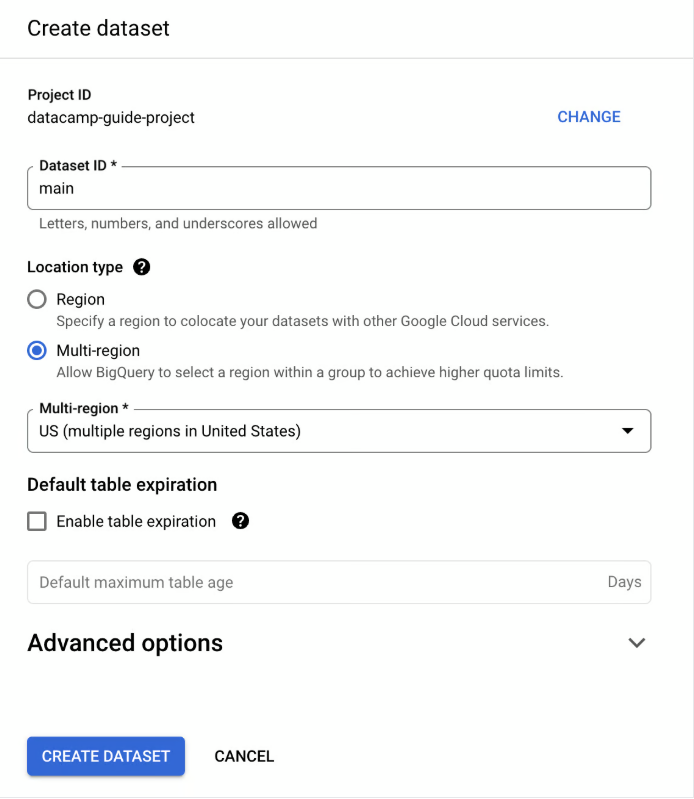
📁 Create a Dataset: Click on your project’s menu, select Actions, and click Create Dataset. Name it (e.g., `main`).

📋 Create a Table: Use SQL or the BigQuery Console to define a table structure.
CREATE TABLE `my-project.main.users` (
    id INT64 NOT NULL,
    first_name STRING NOT NULL,
    last_name STRING NOT NULL,
    active_account BOOL NOT NULL
);

4.Querying Data
- BigQuery supports ANSI-compliant SQL (GoogleSQL).
SELECT name, age
FROM `project_id.dataset_id.users`
WHERE age > 30
ORDER BY age DESC;
⚙️ Benefits of Using BigQuery
- Speed and Performance:
- Handle massive datasets with near real-time query performance.
- Columnar storage ensures only the necessary data is processed.
- Cost-Efficiency:
- Pay-as-you-go pricing for queries and storage.
- Query only the data you need.
- Ease of Use:
- User-friendly interface via Google Cloud Console.
- No infrastructure management required.
- Scalable and Reliable:
- Automatically scales resources to handle peak workloads.
- Redundant and fault-tolerant architecture ensures reliability.
- Data Insights with ML:
- Built-in machine learning capabilities with BigQuery ML.
- Seamless integration with Google Cloud AI/ML services.
🧐 Query a Public Dataset
BigQuery provides access to Google public datasets for free exploration:
- ➕ Click Add Data in the BigQuery Explorer.
- 🔎 Search for Google Trends and select the dataset.
- ⭐ Star the dataset for easier access.
Example Query: Find trending terms ranked first in the last two weeks:
SELECT term
FROM `bigquery-public-data.google_trends.top_terms`
WHERE rank = 1
  AND refresh_date >= DATE_SUB(CURRENT_DATE(), INTERVAL 2 WEEK)
GROUP BY term;