
🌥️How to Raise a Support Ticket in GCP and All About Support plan
Learn about GCP support plans, how to raise a ticket, and the resources available for your cloud journey.
🔍 Overview of Google Cloud Platform (GCP) Support
Google Cloud Platform (GCP) offers a variety of support options tailored to meet the needs of organizations, ranging from free basic support to premium, paid plans. Understanding these options ensures you get the right help when needed.
For a detailed view, visit the Google Cloud Customer Care documentation.
Google Support Language Options
| Plan | Basic | Standard | Enhanced | Premium |
| Language Supported | English | English | English, Korean, Japanese and Chinese | English, Korean, Japanese and Chinese |
💡 Types of GCP Support Plans
1. Free Basic Support
Every GCP user gets access to free support resources, including:
- Documentation: Detailed guides and tutorials to help users deploy and manage services.
- Community Forums: Peer-to-peer support through Google’s active developer community.
- Billing Support: Assistance for issues related to payments, invoices, or account configuration.
2. Billing Support
Billing support is free for all GCP customers. Use the Billing Support Requests form for queries about invoices, payment methods, or cost optimizations.
All GCP customers, regardless of their plan, receive free billing support. This includes:
- Help with understanding invoices and managing payment methods.
- Assistance with setting up budgets and cost alerts to control spending.
- Guidance on resource usage optimization.
3. Paid Support Plans
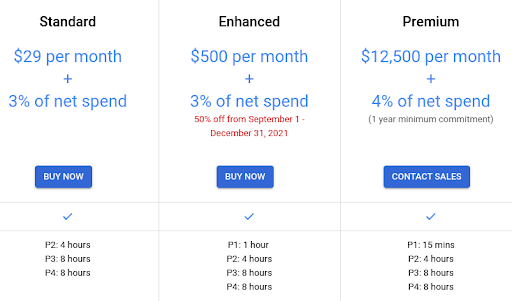
- Standard Support:
- Designed for development and production workloads.
- Provides a guaranteed response time for technical issues.
- Ideal for small-to-medium businesses with growing cloud usage.
- Enhanced Support:
- If you require faster, personalized support directly from Google’s technical team, consider signing up for Enhanced Support. This plan provides unlimited 1-on-1 technical support for various issues, including billing inquiries, outages, product usage questions, and feature-related concerns.Enhanced Support is ideal for medium to large organizations running production workloads that require additional assistance. Key benefits include:
- Fast Response Times: Priority 1 (P1) issues receive a response within 1 hour.
- 24/7 Support: Around-the-clock support is available for critical issues.
- Phone Support: Customers can access technical assistance via phone, offering a higher level of service compared to Standard Support.
- Ticket Escalation: You can escalate ongoing support tickets to the technical support team for quicker resolution.
Enhanced Support also includes advanced tools and features such as:
- Active Assist Recommender: Helps optimize costs for your Google Cloud resources.
- Cloud Support API: Provides better visibility and management of support tickets.
- Third-Party Technical Support: Assistance for integrating third-party tools and services.
Pricing: The cost for Enhanced Support is $500 per month, plus 3% of your monthly Google Cloud consumption.
- If you require faster, personalized support directly from Google’s technical team, consider signing up for Enhanced Support. This plan provides unlimited 1-on-1 technical support for various issues, including billing inquiries, outages, product usage questions, and feature-related concerns.Enhanced Support is ideal for medium to large organizations running production workloads that require additional assistance. Key benefits include:
- Premium Support:
- Dedicated Technical Account Manager (TAM): A dedicated TAM acts as your technical advisor, focusing on workload performance, optimization, and health.
- Expert Technical Solution Engineers: Support tickets are assigned to engineers with in-depth expertise in Google Cloud products.
- Advanced Tools:
- Active Assist Recommender: Helps optimize costs for Google Cloud resources.
- Cloud Support API: Provides enhanced visibility and management of support tickets.
- Third-Party Technical Support: Assistance for integrating and managing third-party services.
- Event Management Services: Plan product launches and critical events with priority support from Google’s event management team.
- Advanced Product Previews: Premium users gain early access to preview new Google Cloud products for production workloads.
- Multilingual Support: Customer care is available in English, Japanese, Chinese, and Korean to accommodate global enterprises.
Learn more about GCP’s Customer Care portfolio.
🌟 Community Support
GCP fosters an active community where users can share experiences and solutions. You can join community forums, read blogs, and explore open-source repositories for peer-to-peer support. Google Cloud encourages collaboration and knowledge-sharing through:
- Google Cloud Community: A platform for developers and administrators to ask questions, share experiences, and find solutions.
- Open-Source Projects: Access to GCP’s GitHub repositories and contributions from the global developer community.
- Training and Certification: Free and paid courses for learning GCP skills.
Visit the Community Support Overview for more information.
📊 How to Raise a Support Ticket in GCP
Raising a support ticket is essential when you encounter issues requiring expert intervention. Here’s a step-by-step guide to creating a support case in GCP:
Step 1: Log in to Google Cloud Console
Visit the Google Cloud Console and log in with your credentials.
Step 2: Navigate to the Support Section
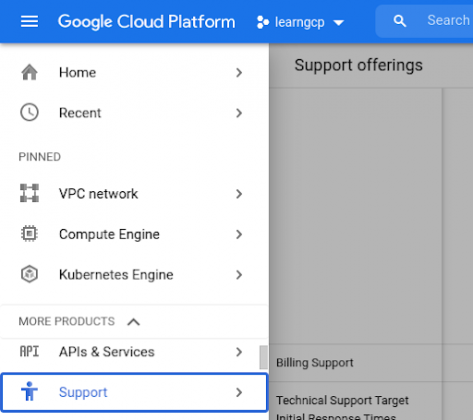
Click on the menu (☰) in the top-left corner, then select Support under the “Help & Support” section.
Step 3: Click on “Create a Case”
In the support dashboard, click on the “Create a Case” button to start a new support ticket.

Step 4: Fill in the Details
- Issue Type: Select the category of your issue (e.g., billing, technical, or product-related).
- Title: Provide a concise description of your issue.
- Description: Add a detailed explanation, including steps to reproduce the problem and any error messages.
- Attachments: Upload screenshots or logs if needed.
Step 5: Set Priority
Select the priority level based on the urgency and impact of the issue (e.g., P1 for critical issues, P4 for low-priority issues).
Step 6: Submit the Case
Review your details and click “Submit” to create the case. A support representative will contact you through the email linked to your account.
Learn more about the ticketing process in the official GCP documentation.
📈 Monitoring Service Status
If you suspect a service outage or degradation, you can check the Google Cloud Service Health Dashboard. This dashboard provides real-time updates on:
- Service outages.
- Maintenance schedules.
- Ongoing incidents
Google Maps Platform Support
GCP also offers specialized support for the Google Maps Platform:
- All customers receive free billing and technical support.
- Support cases can be created in the Google Maps Platform Support section of the GCP Console.
- Additional resources include FAQs and documentation for Maps APIs.
Benefits of GCP Support Plans
- Faster Response Times: Guaranteed resolution times for technical issues.
- Expert Guidance: Access to certified cloud engineers for architectural reviews and optimization.
- Proactive Support: Premium and Enhanced plans provide proactive insights for managing workloads effectively.
- Cost Management: Help with cost optimization and budget planning.