

How to Set Up Google Cloud Armor (DDoS Protection)
Introduction
In today’s digital world, security is a top priority for businesses and organizations.
Google Cloud Platform (GCP) constantly innovates to make securing your applications easier.
Google Cloud Armor is a robust security solution that helps protect your applications from DDoS attacks, web threats, bots, and more.
This blog will guide you on how to use Cloud Armor to mitigate distributed denial-of-service (DDoS) attacks and enhance application security.
What is Google Cloud Armor?
Google Cloud Armor is a web application and API protection (WAAP) service provided by Google Cloud. It helps organizations defend against a wide range of threats, including DDoS (Distributed Denial-of-Service) attacks, and provides robust security features for applications and services running on Google Cloud.
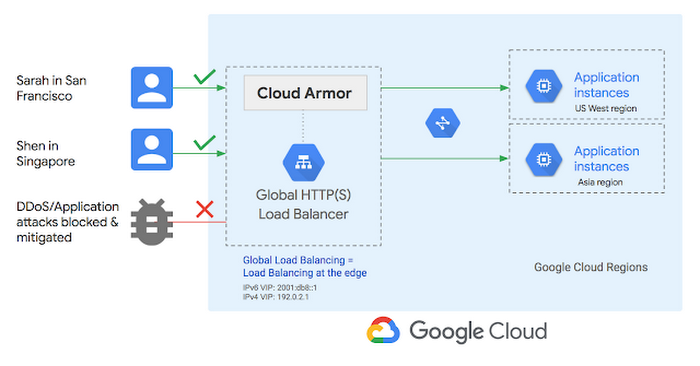
Google Cloud Armor is a network security service designed to safeguard your applications against various threats, including:
- DDoS Protection:
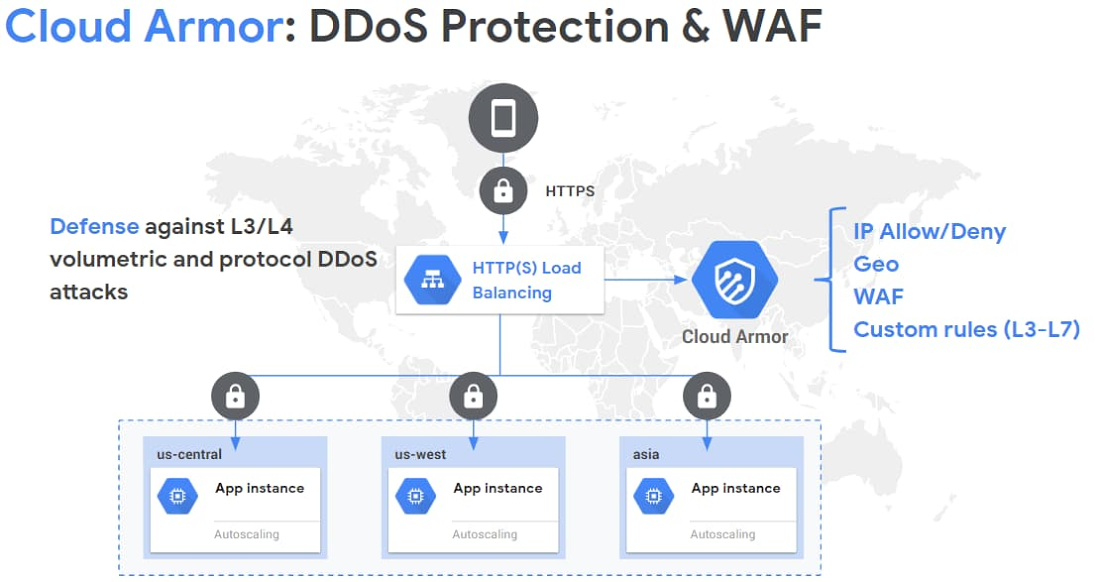
- Defends against Layer 3 and Layer 4 DDoS attacks.
- Scales automatically to absorb large-scale attacks without impacting application availability.
- Web Application Firewall (WAF):
- Provides WAF capabilities for Layer 7 (application layer) protection.
- Includes pre-configured and customizable rules to block common web vulnerabilities like SQL injection (SQLi) and cross-site scripting (XSS).
- Adaptive Protection:
- Uses machine learning to detect and mitigate emerging threats in real time.
- Analyzes traffic patterns to identify anomalies and proactively block suspicious activity.
- Custom Security Policies:
- Allows users to create and enforce custom security policies tailored to their specific application needs.
- Policies can be based on IP ranges, geolocation, request headers, and more.
- Integration with Google Cloud Load Balancing:
- Works seamlessly with Google Cloud HTTP(S) Load Balancers for global distribution and scaling.
- Ensures consistent protection across distributed environments.
- Rich Logging and Monitoring:
- Provides detailed logs and metrics through Cloud Logging and Cloud Monitoring for traffic analysis and forensic investigations.
- Enables integration with Security Command Center for centralized security management.
- Compliance and Reporting:
- Helps meet compliance requirements by enforcing stringent access controls and providing visibility into application traffic.
Cloud Armor supports both HTTP and HTTPS traffic and integrates seamlessly with load balancers to provide scalable protection.
Key Components of Google Cloud Armor
1. Security Policies
- Definition: The core of Google Cloud Armor, security policies define the rules that control traffic to your applications.
- Features:
- Policies can allow or deny traffic based on IP, geolocation, or other attributes.
- Rule priorities determine the order of evaluation.
- Policies can be attached to Google Cloud HTTP(S) Load Balancers.
2.Predefined WAF Rules
- Definition: A set of pre-configured rules that address common web application vulnerabilities.
- Features:
- Covers OWASP Top 10 vulnerabilities such as:
- SQL Injection (SQLi)
- Cross-Site Scripting (XSS)
- Remote file inclusion (RFI)
- Regularly updated to address emerging threats.
- Covers OWASP Top 10 vulnerabilities such as:
3. Custom Rules
- Definition: User-defined rules to handle specific traffic patterns or threats.
- Features:
- Match conditions based on HTTP headers, query strings, IP ranges, and other attributes.
- Flexibility to enforce specific policies tailored to unique application requirements.
3. DDoS Protection
- Definition: Comprehensive protection against volumetric and application-layer Distributed Denial-of-Service (DDoS) attacks.
- Features:
- Layer 3 and Layer 4 (network and transport layer) protection.
- Automatically scales to absorb massive traffic spikes.
- Integration with Google’s global network infrastructure.
4. Security Command Center Integration
Cloud Armor integrates with Google Cloud’s Security Command Center, providing a centralized view of security alerts and insights.
5. Adaptive Protection
- Definition: A machine-learning-driven feature that detects and mitigates evolving Layer 7 (application layer) threats.
- Features:
- Learns normal traffic patterns to identify anomalies.
- Automatically blocks abusive traffic in real-time.
- Helps combat zero-day threats.
6.Logging and Monitoring
- Definition: Tools for tracking, analyzing, and monitoring traffic and threats.
- Features:
- Detailed logs through Google Cloud Logging for auditing and investigation.
- Integration with Cloud Monitoring for real-time insights.
- Security reports for compliance and analysis.
7. Google Cloud Armor Managed Protection
- Definition: A comprehensive service tier offering additional managed capabilities.
- Features:
- Provides enhanced DDoS protection (network and application layers).
- Includes always-on monitoring and response support.
Cloud Armor for hybrid and multi-cloud deployments
Google Cloud Armor, along with Cloud CDN and Cloud Load Balancers, can now be utilized to protect applications hosted outside of Google Cloud. In modern enterprise environments, workloads are increasingly complex, often spanning across on-premises infrastructure, public cloud providers, or hybrid architectures. Whether these setups are a permanent part of an organization’s operations or transitional configurations as part of a migration strategy, ensuring consistent and robust security controls across all environments is crucial.
This capability addresses a key challenge for security teams: safeguarding internet-facing applications deployed on-premises or across multiple cloud platforms. Such applications are equally vulnerable to internet-based threats, including DDoS attacks, bot exploitation, and other malicious activities. With Google Cloud Armor, organizations can apply uniform security policies, enforce centralized threat protection, and benefit from Google’s global-scale DDoS mitigation network, regardless of where their applications are deployed.
By integrating Google Cloud Armor into these hybrid or multi-cloud setups, enterprises can:
- Enhance application-level security for workloads distributed across diverse infrastructures.
- Standardize security policies to maintain compliance and simplify management.
- Leverage Google’s global edge network to defend against large-scale attacks at the network perimeter.
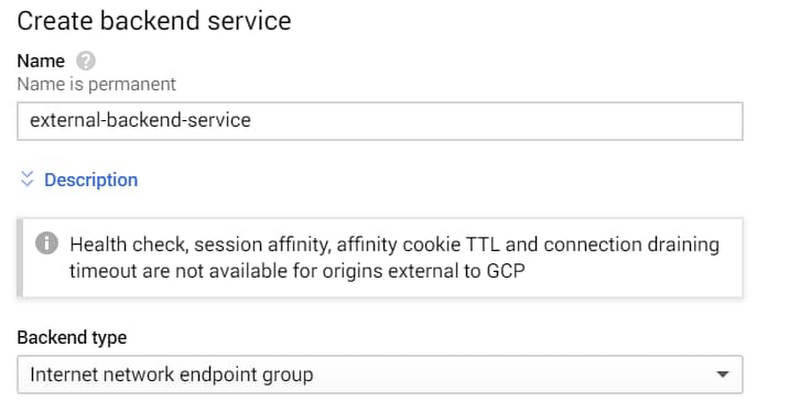
This makes Cloud Armor a vital tool for enterprises navigating the complexities of hybrid or multi-cloud strategies while ensuring a strong security posture for their internet-facing applications.
How to Set Up Google Cloud Armor
Setting up Google Cloud Armor involves several steps, including configuring security policies, attaching them to load balancers, and customizing rules for your application needs. Here’s a step-by-step guide:
Follow these steps to configure Cloud Armor for your application:
1. Prerequisites
Before you start, ensure:
- You have a Google Cloud account and project set up.
- Your application is deployed behind a Google Cloud HTTP(S) Load Balancer.
- Appropriate IAM permissions are granted:
compute.securityPolicies.*compute.urlMaps.*
2. Enable Required APIs
- Go to the Google Cloud Console.
- Navigate to
APIs & Services>Library. - Enable the following APIs:
- Cloud Armor API
- Compute Engine API
3. Create a Security Policy
A security policy defines the rules for managing and filtering traffic.
- Navigate to Cloud Armor:
- In the Console, go to
Security>Google Cloud Armor. - Click Create Policy.
- In the Console, go to
- Define Policy Settings:
- Provide a name and description for the policy.
- Choose the default action:
- Allow: All traffic is permitted unless a rule denies it.
- Deny: All traffic is blocked unless a rule allows it.
- Add Rules:
- Click Add Rule to specify traffic filters:
- Match Condition: Use IP ranges, geolocation, request headers, etc.
- Action: Allow or Deny.
- Priority: Lower numbers indicate higher precedence.
- Click Add Rule to specify traffic filters:
- Save the Policy.
4. Attach Security Policy to Load Balancer
- Go to
Load Balancingin the Console. - Select the HTTP(S) Load Balancer managing your application.
- Edit the backend service to attach the policy:
- Click on the backend service.
- Under Google Cloud Armor Security Policy, select your created policy.
- Save the changes.
5. Customize Rules (Optional)
- Use preconfigured WAF rules to protect against OWASP Top 10 vulnerabilities.
- In the Security Policy, add rules from the predefined WAF rule set.
- Define rate limiting rules to throttle abusive traffic.
6. Enable Adaptive Protection (Optional)
- In the Security Policy, enable Adaptive Protection.
- Configure the settings:
- Traffic monitoring period.
- Anomaly detection thresholds.
7. Test the Configuration
- Use Google Cloud Logging to analyze traffic:
- Ensure that legitimate traffic is allowed and malicious traffic is blocked.
- Conduct penetration testing or simulate attacks to verify the security rules.
8. Monitor and Optimize
- Monitor Logs:
- Use Cloud Logging to review blocked/allowed traffic.
- Integrate with Cloud Monitoring for alerts and dashboards.
- Adjust Policies:
- Regularly update rules based on traffic patterns and emerging threats.
- Add or modify rules as application needs evolve.
Integrate with Security Command Center
Enable the Security Command Center to monitor alerts, threats, and security metrics in a unified dashboard.
Benefits of Using Cloud Armor
- Enterprise-grade DDoS protection against Layer 3 and Layer 4 attacks.
- Preconfigured and customizable WAF rules for web application security.
- Comprehensive threat management through Adaptive Protection.
- Centralized security monitoring via Security Command Center.
- Scalable and cost-effective security solutions.
Advanced Protection with Adaptive Protection
Google Cloud Armor’s Adaptive Protection leverages machine learning to combat advanced Layer 7 DDoS attacks. The process involves:
1. Comprehensive DDoS Protection
Layer 3/4 Defense: Shields against large-scale volumetric attacks such as SYN floods and UDP amplification.
Layer 7 Defense: Protects applications from sophisticated application-layer DDoS attacks, such as HTTP floods.
Automatic Scalability: Leverages Google’s global infrastructure to handle attacks of terabit scale without disrupting service availability.
2. Advanced Web Application Security
Web Application Firewall (WAF): Predefined and customizable rules protect against OWASP Top 10 vulnerabilities like SQL injection (SQLi) and cross-site scripting (XSS).
Adaptive Protection: Machine learning detects and mitigates new and evolving threats in real time, providing zero-day protection.
3. Customizable Security Policies
Fine-Grained Control: Policies can be customized to allow or deny traffic based on IP ranges, geolocation, request headers, and other attributes.
Rate Limiting: Throttles abusive traffic to prevent resource exhaustion.
4. Global Scale and Low Latency
Google’s Global Network: Utilizes Google’s vast edge network for rapid threat mitigation, ensuring low latency and high performance.
Regional and Global Protection: Protects applications regardless of where users or attackers are located.
5. Seamless Integration with Google Cloud Services
HTTP(S) Load Balancer: Works directly with Google Cloud’s load balancing service for simplified deployment.
Identity-Aware Proxy (IAP): Secures applications by enforcing identity-based access controls.
Cloud Monitoring and Logging: Provides insights into traffic patterns, security events, and policy effectiveness.
6. Enhanced Visibility and Reporting
Detailed Logs: Cloud Logging captures comprehensive information about allowed and denied traffic.
Real-Time Monitoring: Cloud Monitoring delivers dashboards and alerts for actionable insights.
Security Command Center Integration: Centralized security management for monitoring and managing vulnerabilities.
Explore more about Adaptive Protection on the Google Cloud Armor page.
Conclusion
Google Cloud Armor is a powerful tool for protecting your applications from DDoS attacks, bots, and web vulnerabilities. Its scalability, ease of use, and integration with machine learning make it a top choice for enterprises looking to enhance their cloud security.
Start using Cloud Armor today to safeguard your applications and achieve peace of mind. For a deeper understanding, check out the official documentation.