
GCP VPC Firewall Rules Best Practices
Ensuring your cloud environment remains resilient against evolving cyber threats requires more than just a basic understanding of network configuration. In the complex landscape of the Google Cloud Platform (GCP), the Virtual Private Cloud (VPC) serves as the foundational perimeter where security is either won or lost. For senior cloud architects and security specialists, managing GCP VPC firewall rules best practices is a non-negotiable skill set. With the surge in AI workloads and cloud-native adoption in 2026, the surface area for potential exploits has expanded, making least-privilege access and micro-segmentation the primary defense mechanisms for any enterprise-grade infrastructure.
The business pain point is clear: a single misconfigured firewall rule can lead to catastrophic data breaches, non-compliance with GDPR or PCI DSS, and skyrocketing egress costs. Organizations are no longer just looking for connectivity; they are demanding zero-trust networking where every packet is scrutinized. This guide dives deep into the technical architecture, real-world deployment strategies, and cost optimization techniques necessary to master firewall rule management in a multi-cloud world.
Technical Architecture and Internal Workings
GCP firewalls are unique because they are distributed, stateful, and operate at the Layer 3/4 level of the OSI model. Unlike traditional appliance-based firewalls, Google Cloud implements firewalling at the virtual machine (VM) instance level through the Andromeda network virtualization stack. This means that while you define a rule at the VPC level, the enforcement happens right at the network interface (NIC) of the VM. This “distributed” nature eliminates the bottleneck often associated with centralized firewall appliances, allowing for seamless scalability.
The end-to-end flow begins with a packet entering the VPC. If the packet is part of an existing connection, the stateful nature of the firewall allows it through without re-evaluating the rules. If it is a new connection, GCP evaluates the rules based on priority (ranging from 0 to 65535, where lower numbers have higher priority). Each VPC network comes with two implied rules: an implied allow egress and an implied deny ingress. Understanding these defaults is critical because they dictate the starting posture of your entire network.
GCP VPC Firewall Rule Components
To effectively manage your security posture, you must understand how these components interact in a production environment:
| Component | Functionality | Cloud Strategy Impact |
| Priority | Determines rule evaluation order (0-65535). | Prevents rule shadowing in complex policies. |
| Direction | Ingress (inbound) or Egress (outbound). | Critical for egress filtering and cost control. |
| Action | Allow or Deny. | Foundation of the “Deny All” security model. |
| Target | Tags, Service Accounts, or All Instances. | Enables micro-segmentation without IP management. |
| Source/Dest | IP ranges (CIDR), Tags, or Service Accounts. | Defines the scope of the communication path. |
Real-World Use Cases: AWS, Azure, and GCP Comparison
In an enterprise-ready multi-cloud environment, architects often struggle with the subtle differences between how providers handle traffic filtering. While AWS Security Groups and Azure Network Security Groups (NSGs) are similar, GCP offers more flexibility through its use of Network Tags and Service Accounts.
Enterprise Example: Three-Tier Web Application
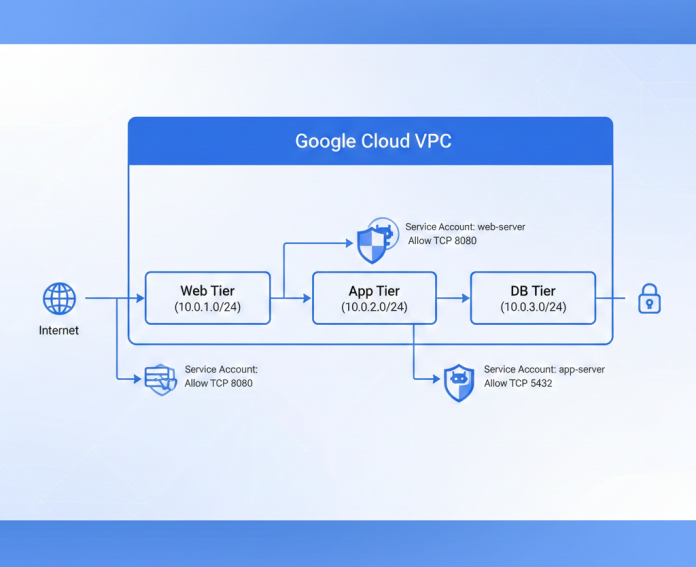
Consider a standard high-availability application consisting of a web front-end, an application tier, and a backend database. In AWS, you would chain security groups by referencing the ID of the web security group in the app security group’s ingress rules. In Azure, you would use Application Security Groups (ASGs) to group VMs.
In GCP, the best practice is to use Service Accounts as the identity for firewall rules. By assigning a web-server service account to your front-end and an app-server service account to your middleware, you can create a rule that says: “Allow TCP 8080 only if the source is web-server and the target is app-server.” This approach is superior for scalability because it doesn’t rely on IP addresses or tags that could be easily misapplied.
Security, Compliance, and Risk Management
Compliance frameworks like HIPAA, SOC2, and ISO 27001 require strict evidence of network isolation and auditability. To meet these standards, you must integrate IAM with your firewall management. Using Identity-Aware Proxy (IAP) for SSH and RDP access is a standard security recommendation that allows you to remove all external IP addresses from your instances, effectively closing the front door to brute-force attacks.
Logging and Monitoring are equally vital. Enabling VPC Flow Logs and Firewall Rules Logging provides the visibility needed for threat detection and troubleshooting. However, logging everything can lead to high cloud costs. We recommend a sampling rate strategy where you log 100% of “Deny” events but only a fraction of “Allow” events for non-critical traffic.
Comparison of Cloud Network Security Features
This table highlights the differences between the major providers to help you choose the right tool for your hybrid cloud strategy:
| Feature | GCP Cloud Firewall | AWS Security Groups | Azure NSG |
| Scope | VPC / Global | VPC / Regional | Subnet / NIC |
| Identity Based | Yes (Service Accounts) | No | No |
| Stateful | Yes | Yes | Yes |
| Default Ingress | Deny All | Deny All | Deny All |
| Default Egress | Allow All | Allow All | Allow All |
Best Practices & Production Recommendations
For senior cloud engineers, the goal is to create a “set and forget” infrastructure that is both secure and cost-efficient. Avoid using 0.0.0.0/0 (quad-zero) rules at all costs unless it is for a public load balancer. Instead, utilize Cloud NAT for outbound internet access without exposing VMs.
-
Adopt Hierarchical Firewall Policies: Use these at the Folder or Organization level to enforce global “must-have” rules, such as blocking all traffic from known malicious IP ranges or ensuring that SSH is never open to the public internet across all projects.
-
Use Service Accounts Over Tags: Network tags are strings and lack IAM control. Anyone with
compute.instanceAdmincan change a tag and bypass a firewall. Service accounts require specific IAM permissions to be attached, making them more secure. -
Implement Egress Filtering: Most breaches involve “calling home” to a Command & Control (C2) server. By restricting egress traffic to only known API endpoints and update repositories, you significantly reduce the risk of data exfiltration.
-
Regularly Audit Unused Rules: Use Firewall Insights (part of the Network Intelligence Center) to identify rules that haven’t seen traffic in the last 30 days. Deleting these reduces complexity and the chance of “shadowing” more specific rules.
Performance and Cost Efficiency SNIPPET
Common Mistakes to Avoid
-
Shadowed Rules: Creating a broad allow rule with a priority of 1000 and then a specific deny rule with a priority of 2000. The allow rule will always win.
-
Open Ports for Management: Leaving port 22 (SSH) or 3389 (RDP) open to the internet. Always use IAP or a VPN/Interconnect.
-
Ignoring Default Networks: The “default” VPC network comes with pre-populated rules that are often too permissive. Always delete the default network and start with a custom VPC.
Conclusion
Mastering GCP VPC firewall rules best practices is an ongoing journey of refinement. By moving toward a zero-trust architecture, leveraging service account-based rules, and maintaining strict egress filtering, you can build a cloud environment that is both highly secure and performant. As AI and machine learning workloads continue to dominate the Google Cloud ecosystem, your ability to secure the underlying network will be the differentiator in your organization’s digital transformation success.
Are you ready to harden your cloud network? Start by auditing your current firewall priority list and identifying any rules that violate the principle of least privilege.
Official Documentation