
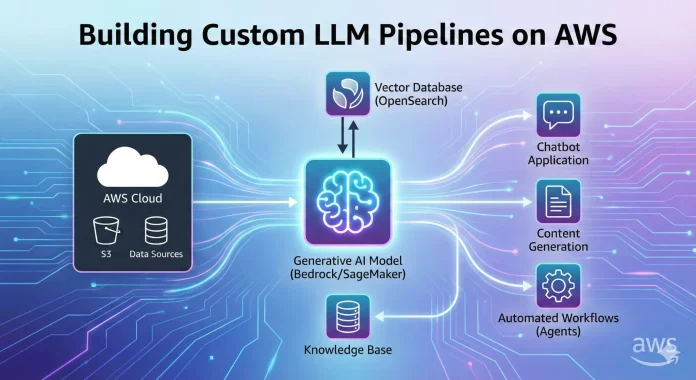
Building Custom LLM Pipelines on AWS
The era of “hello world” chatbots is over. Enterprises and developers are now racing to build production-grade, custom Large Language Model (LLM) pipelines that are secure, scalable, and cost-effective. If you are looking to move beyond simple API calls and architect a robust Generative AI solution, Amazon Web Services (AWS) offers the most mature ecosystem available.
In this guide, we will dismantle the complexities of building custom LLM pipelines .We will cover everything from Retrieval-Augmented Generation (RAG) architectures to cost optimization strategies using the latest 2026 features like Amazon Nova and Bedrock Agents.
Why AWS is the Premier Choice for Generative AI Workloads
Before writing code, it is crucial to understand why you are deploying here. The AWS Generative AI stack is bifurcated into two main paths: Amazon Bedrock (Serverless/Managed) and Amazon SageMaker (Custom Infrastructure).
Choosing between Bedrock vs SageMaker for custom LLM pipelines is often the first decision you face.
-
Amazon Bedrock is the fastest way to market. It provides a unified API to access high-performing models like Claude 3.5 Sonnet, Meta Llama 3, and the newly released Amazon Nova family.
-
Amazon SageMaker offers granular control. If you need to deploy open-source models on specific hardware (like AWS Inferentia2 or Trainium) or require deep model surgery, SageMaker is your operating theater.
For 90% of custom pipelines, a hybrid approach works best: using Bedrock for inference and SageMaker for data processing.
Building Custom LLM Pipelines on AWS with Core Components of a Production-Ready LLM Pipeline
A custom pipeline isn’t just a model; it is a system. To build a scalable GenAI architecture, you need to orchestrate data, embeddings, and retrieval.
1. The Data Ingestion Layer (S3 & Glue)
Your model is only as good as your data. In a typical AWS RAG pipeline, raw data (PDFs, internal wikis, JSON logs) resides in Amazon S3.
-
Trend Alert: Use AWS Glue for cleaning and Amazon Textract for OCR if you are dealing with scanned documents.
-
Optimization: Implement event-driven ingestion using S3 Event Notifications to trigger AWS Lambda functions whenever new data lands, keeping your vector index fresh.
2. The Embedding & Vector Database Layer
To make your custom LLM “smart” about your specific business data, you need vector search.
-
Embeddings: We recommend Titan Text Embeddings V2 for a balance of cost and performance, or Cohere Embed for multi-lingual support.
-
Vector Store: The native choice is Amazon OpenSearch Serverless with its specific vector engine. It eliminates the need to manage clusters. Alternatively, for those already in the partner ecosystem, Pinecone on AWS Marketplace offers excellent integration.
3. The Orchestration Layer (LangChain & Step Functions)
You need glue code to bind these services.
-
LangChain on AWS: Python libraries like
langchain-awsallow you to chain Bedrock agents and retrievers seamlessly. -
AWS Step Functions: For complex, multi-step workflows (e.g., “Summarize this document, then draft an email, then update the CRM”), Step Functions provide a visual state machine that is easier to debug than a monolithic Python script.
Step-by-Step: Implementing RAG with Amazon Bedrock

Let’s get technical. The most high-volume use case right now is building RAG pipelines on AWS. Here is how to do it efficiently without managing servers.
Setting up Knowledge Bases for Amazon Bedrock
AWS recently launched Knowledge Bases for Amazon Bedrock, a fully managed RAG feature. instead of writing your own retrieval logic:
-
Point Bedrock to your S3 bucket.
-
Select your embedding model (e.g., Titan V2).
-
Let AWS handle the chunking strategies and index creation in OpenSearch.
This significantly lowers the GenAI development barrier, allowing you to focus on prompt engineering rather than infrastructure plumbing.
Implementing Guardrails for Safety
Enterprise clients demand safety. Guardrails for Amazon Bedrock allow you to intercept inputs and outputs. You can block PII (Personally Identifiable Information), filter out competitor mentions, or prevent the model from answering off-topic questions. This is a critical layer for GenAI security compliance.
Advanced Customization: Fine-Tuning and Private Models
RAG is powerful, but sometimes you need the model to “speak” your specific dialect (e.g., legal, medical, or code).
When to use SageMaker JumpStart
If you need to fine-tune a model like Llama 3 70B or Mistral Large, Amazon SageMaker JumpStart provides a “click-to-train” interface. It handles the complex distributed training infrastructure for you.
-
Keyword Strategy: Focus on Parameter Efficient Fine-Tuning (PEFT) and LoRA (Low-Rank Adaptation) techniques to reduce training costs by up to 90% compared to full fine-tuning.
Bedrock Custom Model Import
A newer feature, Bedrock Custom Model Import, allows you to take a model you fine-tuned elsewhere (like in SageMaker or EC2) and import it into Bedrock to consume it as a serverless API. This bridges the gap between custom training and managed inference.
Cost Optimization Strategies for LLM Inference
The number one concern for CIOs is the cost of running LLMs on AWS. If you are not careful, on-demand inference can burn through budgets.
1. Provisioned Throughput vs. On-Demand
For spiky traffic (internal employee tools), stick to On-Demand pricing. You only pay for input/output tokens. However, for high-traffic consumer apps, Provisioned Throughput guarantees capacity and can be cheaper at scale.
2. Hardware Acceleration
If you are deploying open-source models on SageMaker, avoid generic GPU instances like the g5.xlarge unless necessary.
-
AWS Inferentia2: These chips are purpose-built for deep learning inference. Migrating your PyTorch models to Inferentia can lower inference costs by 40%.
-
AWS Trainium: For training workloads, Trainium offers similar savings compared to traditional NVIDIA-based EC2 instances.
3. Model Distillation
Use Model Distillation techniques. Train a large “teacher” model (like Claude 3.5 Opus) to generate synthetic data, and then fine-tune a smaller, cheaper “student” model (like Amazon Nova Micro or Llama 3 8B) to perform the specific task. This drastically reduces the per-token cost in production.
Future-Proofing: Agents and Multi-Modal Workflows
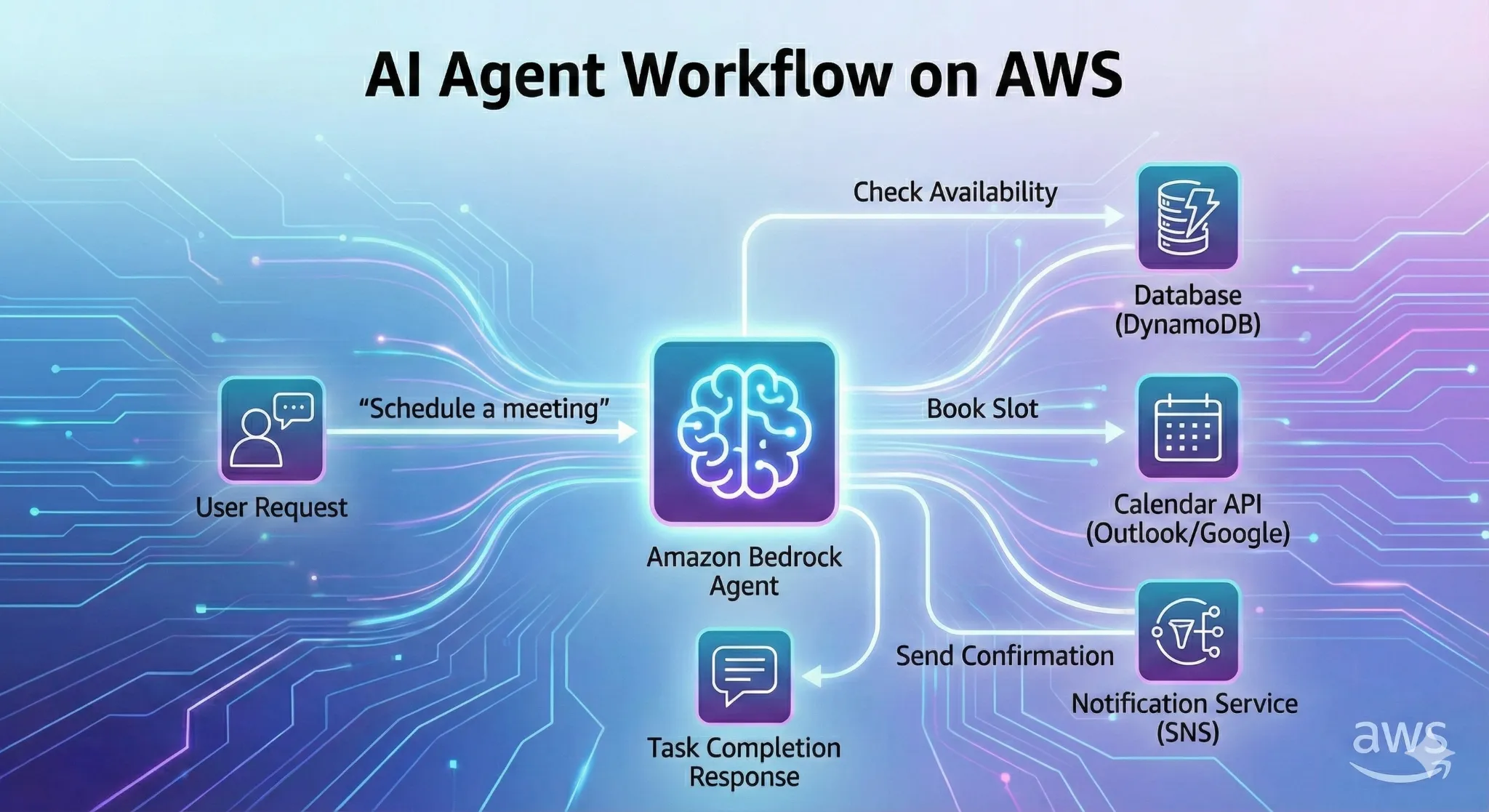
The future is Agentic. Amazon Bedrock Agents can now execute API calls. Imagine a pipeline that doesn’t just answer questions but does work:
-
“Check the inventory in DynamoDB.”
-
“Book a meeting in Outlook.”
-
“Trigger a deployment in CodePipeline.”
By defining OpenAPI schemas, your LLM pipeline transforms from a passive knowledge base into an active employee.
Conclusion and Next Steps
Building custom LLM pipelines on AWS requires navigating a rich menu of services. Whether you choose the managed ease of Bedrock or the raw power of SageMaker, the key is to architect for modularity. Start with a RAG PoC using Knowledge Bases, optimize costs with Inferentia, and scale using event-driven architectures.
Here are the official “do follow” links for the AWS services and features mentioned in the post. These are the primary product pages, which are ideal for SEO authority.
Core Generative AI Services
-
Amazon Bedrock:
https://aws.amazon.com/bedrock/ -
Amazon SageMaker:
https://aws.amazon.com/sagemaker/ -
Amazon Nova (Foundation Models):
https://aws.amazon.com/nova/ -
Amazon Titan:
https://aws.amazon.com/bedrock/titan/(or via the Bedrock main page)
Data & Storage
-
Amazon S3:
https://aws.amazon.com/s3/ -
Amazon OpenSearch Service (Vector Engine):
https://aws.amazon.com/opensearch-service/ -
AWS Glue:
https://aws.amazon.com/glue/ -
Amazon Textract:
https://aws.amazon.com/textract/
Orchestration & Compute
-
AWS Step Functions:
https://aws.amazon.com/step-functions/ -
AWS Lambda:
https://aws.amazon.com/lambda/ -
LangChain on AWS:
https://aws.amazon.com/what-is/langchain/
Hardware Acceleration (Cost Optimization)
-
AWS Inferentia:
https://aws.amazon.com/ai/machine-learning/inferentia/ -
AWS Trainium:
https://aws.amazon.com/ai/machine-learning/trainium/