
⚡Create an Azure Function
🌟 Introduction
Azure Functions is a serverless computing service offered by Microsoft Azure. It allows you to execute code in response to various events without having to provision or manage servers. Azure Functions is ideal for building event-driven, on-demand applications that scale automatically based on the workload.
In this guide, we’ll walk you through creating an Azure Function, its features, benefits, advantages and disadvantages, and best practices for efficient serverless application development.
💡 What is an Azure Function?
Azure Functions is a lightweight, event-driven compute service that enables developers to run small pieces of code in the cloud. It supports a variety of triggers and bindings, making it highly versatile for automating tasks and integrating with other Azure services or external APIs.
Common Use Cases:
- Processing data streams from IoT devices.
- Running scheduled tasks (e.g., nightly data processing).
- Responding to events such as HTTP requests, queue messages, or database changes.
- Integrating with APIs or building lightweight microservices.
✅ Key Features of Azure Functions
- Event-Driven: Supports various triggers such as HTTP, Timer, Queue, Blob, and more.
- Language Support: Write functions in C#, Java, Python, JavaScript, PowerShell, and more.
- Scalability: Automatically scales based on demand, ensuring high availability.
- Pay-As-You-Go: Only pay for the execution time, making it cost-efficient.
- Integration: Easily integrates with Azure services like Storage, Cosmos DB, and Event Grid.
- Local Development: Develop and test functions locally using the Azure Functions Core Tools.
💡 Benefits of Azure Functions
- Reduced Costs: Eliminate the need for managing infrastructure; only pay for execution time.
- Quick Development: Build and deploy functions in minutes with minimal setup.
- Highly Scalable: Automatically adjusts resources to handle fluctuating workloads.
- Broad Language Support: Write functions in your preferred programming language.
- Event Integration: Respond to events from Azure and third-party services seamlessly.
🌟 Advantages of Azure Functions
- Serverless Architecture: Focus on writing code without worrying about infrastructure management.
- Cost Efficiency: Perfect for intermittent workloads with its consumption-based pricing model.
- Integration Ready: Connects effortlessly with Azure and external APIs.
- Global Availability: Hosted on Azure’s globally distributed infrastructure.
- Rapid Prototyping: Ideal for building and testing microservices or APIs quickly.
⚠️ Disadvantages of Azure Functions
- Cold Start Delays: Functions may take longer to execute if they haven’t been used recently.
- Execution Time Limit: Consumption plan functions have a maximum execution time of 5 minutes.
- Complex Debugging: Debugging can be challenging for complex workflows.
- Dependency on Azure Ecosystem: Functions are optimized for Azure services, limiting portability.
🛠️ How to Create an Azure Function
📌 Step 1: Log in to the Azure Portal
- Go to the Azure Portal and sign in with your credentials.
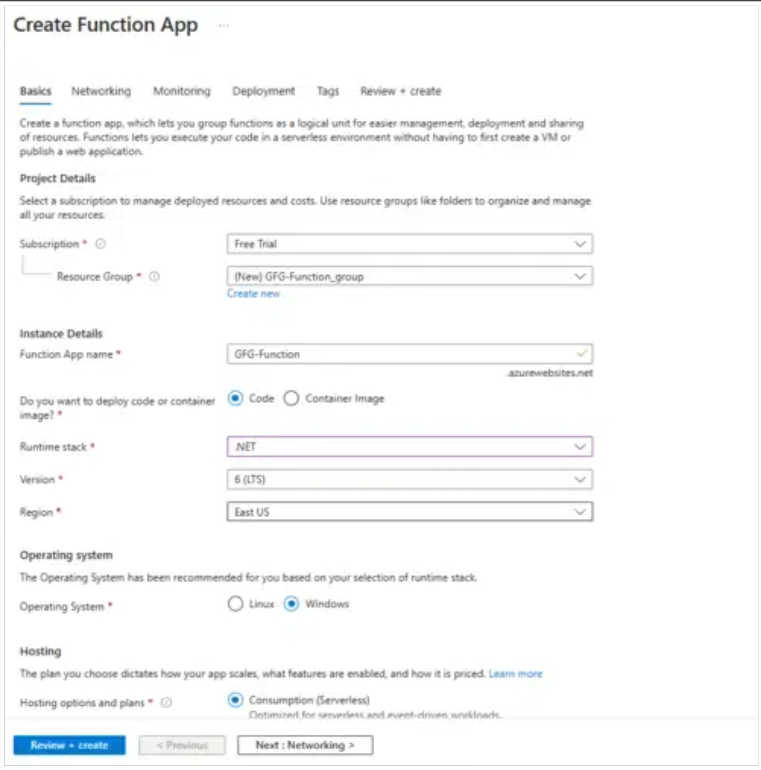
📌 Step 2: Create a Function App
- In the Azure Portal, search for “Function App” in the search bar and select the service.

- Click + Create to begin creating a new Function App.

- Fill in the following details:
- Subscription: Select your Azure subscription.
- Resource Group: Create a new resource group or select an existing one.
- Function App Name: Enter a unique name for your Function App (e.g., `MyFirstFunctionApp`).
- Region: Choose the Azure region closest to your users.
📌 Step 3: Configure the Hosting Plan
- Under the Hosting section:
- Select the Consumption (Serverless) plan for pay-as-you-go pricing.
- Choose the Operating System (Windows or Linux).
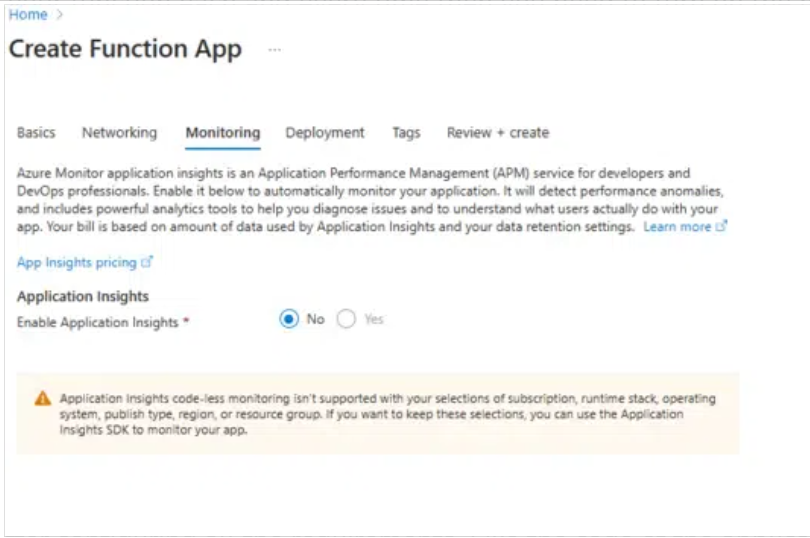
📌 Step 4: Set Up Monitoring
- Enable Application Insights for monitoring and diagnostics.
- Click Review + Create to verify your configurations.
- Click Create to deploy the Function App.
📌 Step 5: Create a Function
- Navigate to your newly created Function App in the Azure Portal.
- Click + Create to add a new function.
- Select a template based on your use case, such as:
- HTTP Trigger: For HTTP-based functions.
- Timer Trigger: For scheduled tasks.
- Blob Trigger: For file processing workflows.
- Write your function code using the Azure Portal editor or upload it from your local environment.
- Click Save and Test/Run to execute your function.
Language Supported By Azure Functions
Below are some languages which you can run on both Windows and Linux operating systems.
There are some other languages but which are mentioned above are the most commonly used languages.
✅ Best Practices for Azure Functions
- Use Durable Functions: Manage stateful workflows efficiently using Durable Functions.
- Optimize Cold Starts: Use the Premium plan to reduce cold start delays.
- Monitor Performance: Enable Application Insights for real-time monitoring.
- Secure Your Functions: Use Azure Key Vault to manage secrets securely.
- Test Locally: Use Azure Functions Core Tools for local development and debugging.
🎯 Conclusion
Azure Functions is a powerful tool for building event-driven, serverless applications. With its pay-as-you-go pricing model and automatic scaling, it is a cost-effective solution for many use cases.
Start building your first Azure Function today by logging into the Azure Portal. For advanced features and scenarios, check out the official Azure Functions documentation.