

Google Cloud SQL is a fully managed relational database service provided by Google Cloud Platform (GCP). It ensures high availability with automatic failover, making your database consistently accessible. Cloud SQL simplifies database management, allowing users to deploy, maintain, and oversee databases effortlessly, even without a dedicated server administrator. When integrated with GCP services such as Google Compute Engine (GCE), App Engine, or Kubernetes Engine, it becomes seamless to build and manage applications that depend on databases.
- Instance: A Cloud SQL instance acts as a virtual machine to run the database. You can create multiple instances to handle your applications efficiently.
- Database: A database organizes structured data into tables consisting of rows and columns, enabling easy access and management.
- Table: Tables represent organized data in rows and columns, often used in data analysis, reporting, and research.
- Field: A field stores individual pieces of data within a table record.
- Primary Key: A unique identifier for each record in a table, ensuring no duplicate or null values.
- Replication: This feature creates copies of Cloud SQL instances, facilitating data transfer and redundancy.
- Backups: Cloud SQL enables automatic and manual backups to restore data if needed, protecting against potential loss.
What Makes Google Cloud SQL Stand Out?
Fully-Managed Database Service:
- Cloud SQL eliminates the need for database infrastructure management by handling tasks like migrations, backups, and recovery.
- It allows businesses to concentrate on productivity and scaling applications, saving time and resources.
Relational Database System:
- Cloud SQL stores related data in rows and tables, enabling organized management of interrelated data items.
- Features include:
- SQL (Structured Query Language): A powerful interface to interact with relational databases.
- Data Integrity: Ensures data accuracy and consistency.
Supported Database Engines
Google Cloud SQL supports multiple database engines to cater to various use cases and preferences:
- MySQL
- PostgreSQL
- SQL Server
How to Create a Cloud SQL Instance
Follow these steps to create a Cloud SQL instance on Google Cloud Platform:
Step 1: Navigate to the SQL Section
In the GCP Console, access the navigation menu and click SQL.
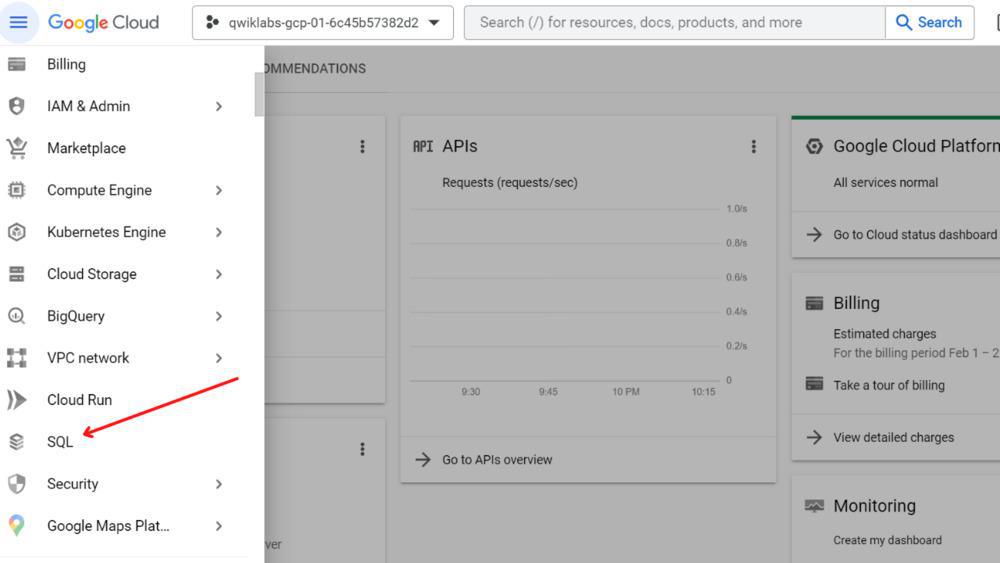
Step 2: Create an Instance
Click Create Instance and choose the desired database engine, such as MySQL.
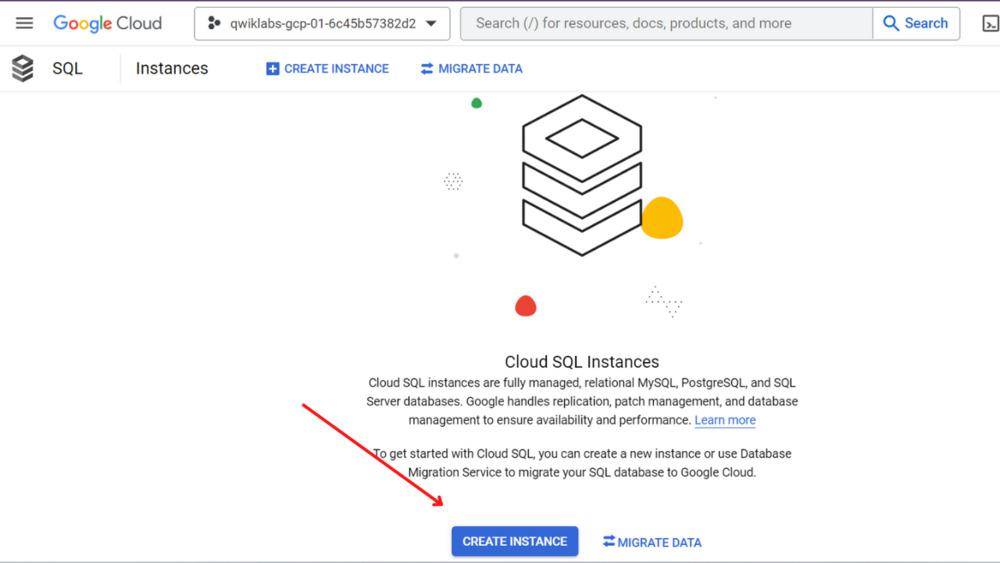
Step 3: Configure Your Instance
- Click choose MySQL
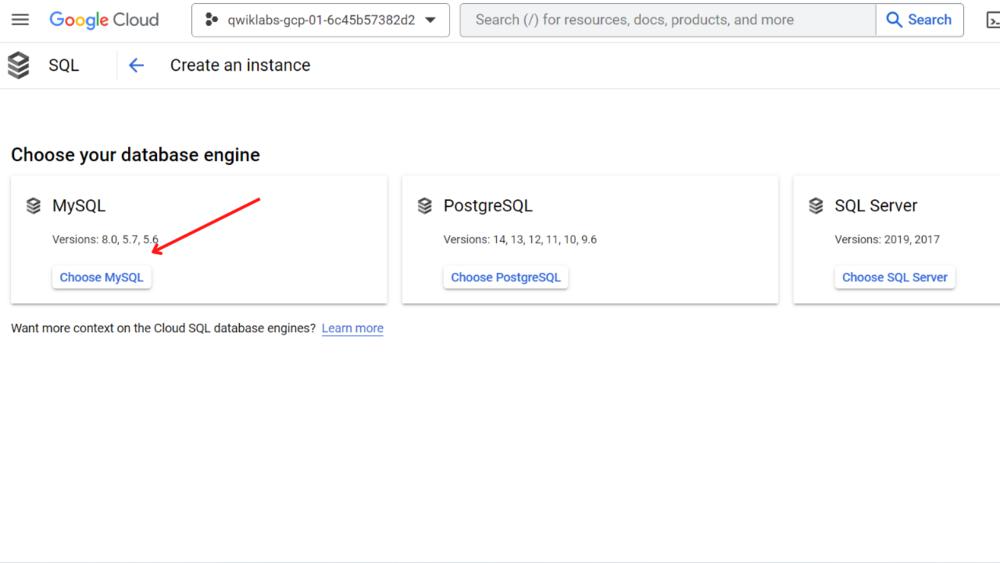
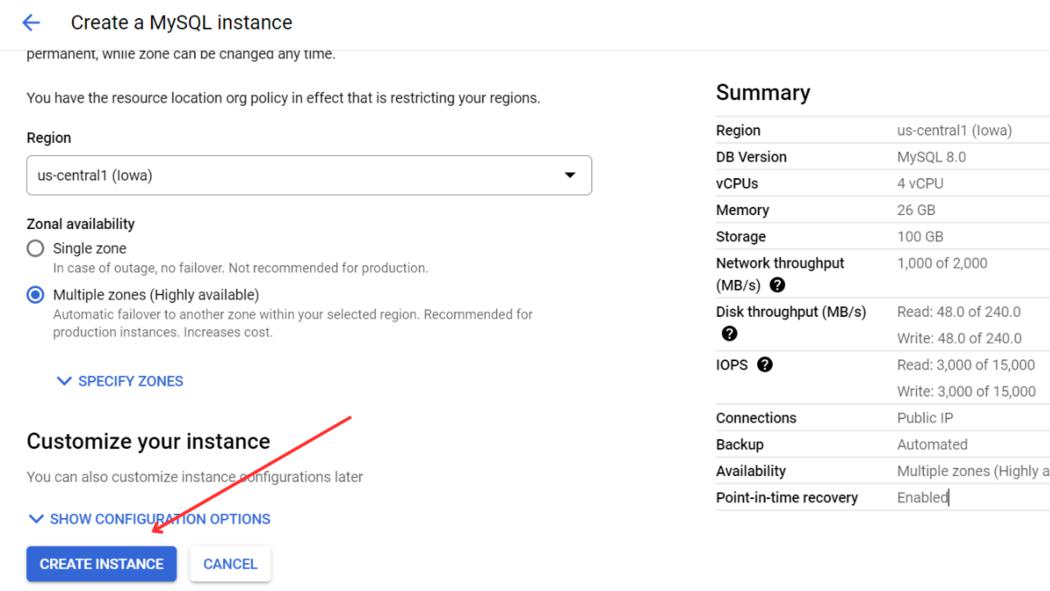
- To create a MySQL instance, you need to provide an Instance ID and set a password. For the Instance ID, enter “myinstance.” In the password field, click the Generate link to create a secure password, and use the eye icon to view it. Make sure to save this password for future use. Leave all other settings at their default values unless specific configurations are required.
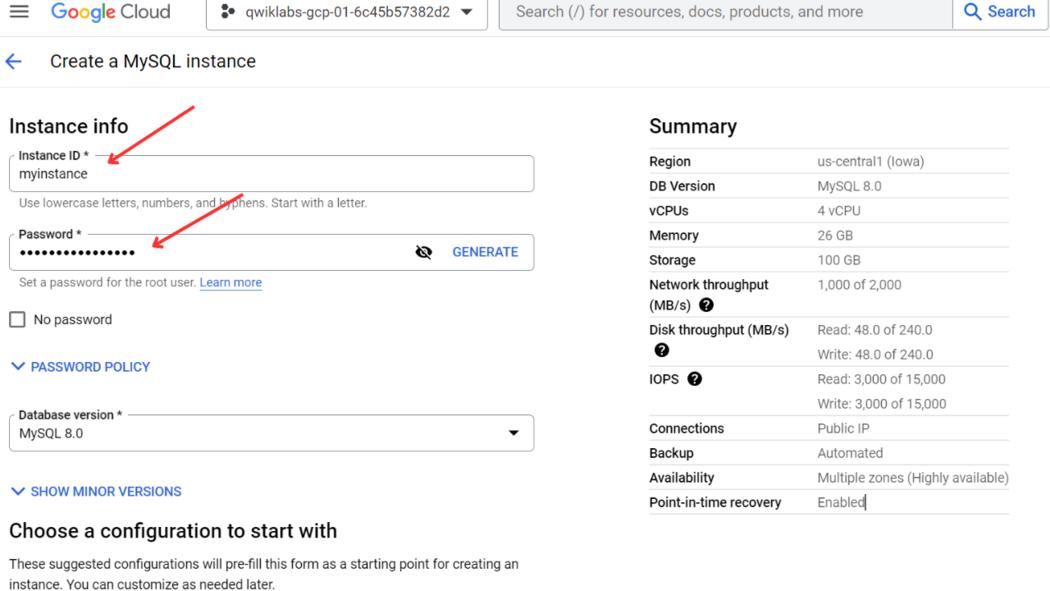
Step 4: Finalize Creation
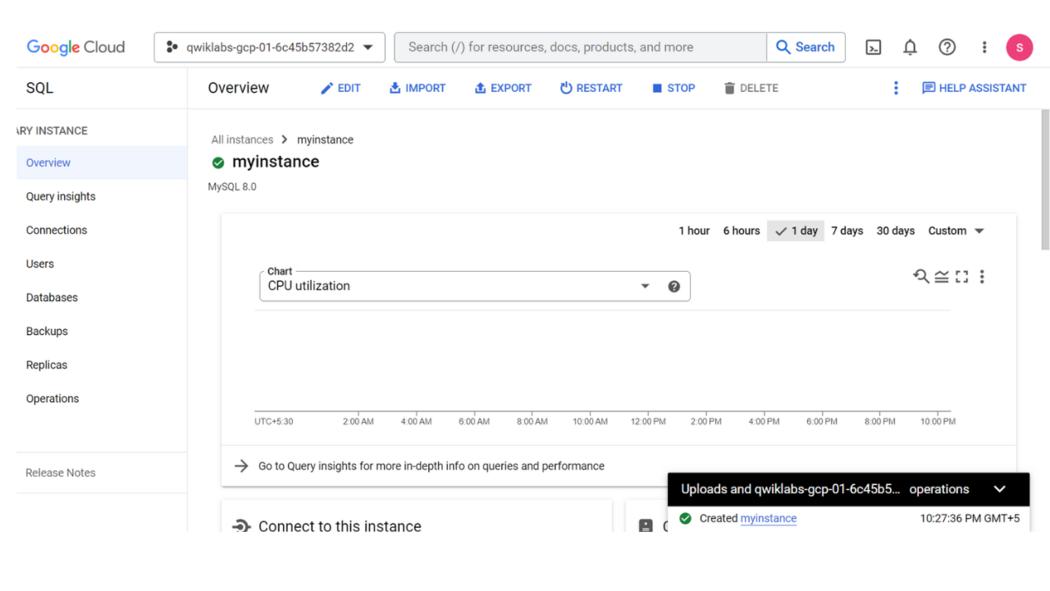
Click Create Instance to complete the setup. Your Cloud SQL instance is now ready for use.
Connecting to a Cloud SQL Instance
Step 1: Establish Connection
Use the following command to connect to your instance:
gcloud sql connect myinstance --user=root
Step 2: Create a Database
Run the following SQL command to create a database named guestbook:
CREATE DATABASE guestbook;
Step 3: Insert Sample Data
Create a table and insert sample data:
    USE guestbook;
    CREATE TABLE entries (guestName VARCHAR(255), content VARCHAR(255), entryID INT NOT NULL AUTO_INCREMENT, PRIMARY KEY(entryID));
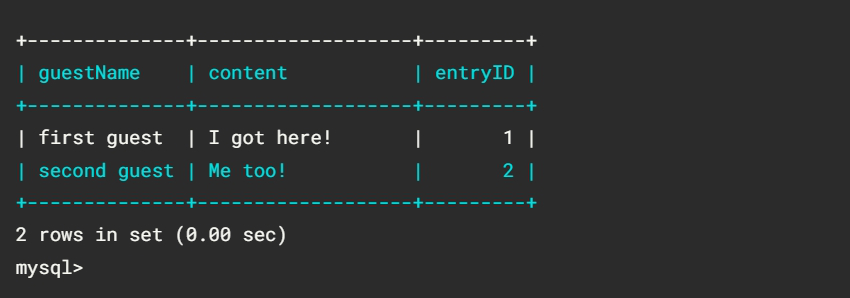
    INSERT INTO entries (guestName, content) values ("first guest", "I got here!");
Step 4: Query the Database
Retrieve data using:
SELECT * FROM entries;
Benefits of Using Google Cloud SQL
- Fully Managed Infrastructure
Google Cloud SQL takes away the operational burden of managing database infrastructure. Developers can focus on building and improving applications while Google handles tasks like hardware provisioning, software patching, database backups, and updates. This simplifies workflows and reduces the need for a dedicated database administrator, making it an excellent choice for startups and small teams looking to optimize their resources. - High Availability
Cloud SQL ensures data accessibility through built-in automatic failover and multi-zone replication. In the event of hardware or network failures, it seamlessly switches to a replica, minimizing downtime. This makes it highly reliable for mission-critical applications where even a few minutes of downtime could have significant business implications. - Scalability
The ability to scale resources vertically (e.g., increasing CPU or memory) and horizontally (e.g., adding replicas) enables Cloud SQL to handle growing workloads effectively. This flexibility is essential for businesses experiencing fluctuating demands, such as e-commerce platforms during peak shopping seasons or SaaS providers onboarding large clients. - Performance Optimization
Google Cloud SQL offers advanced performance tuning options, such as automatic database caching and query optimization. These features allow applications to handle large datasets and high query loads with minimal latency. Additionally, integrated monitoring tools like Cloud Monitoring and Cloud Logging provide actionable insights to ensure optimal performance. - Seamless Integration with GCP Services
Cloud SQL integrates effortlessly with other Google Cloud services like App Engine, Compute Engine, BigQuery, and Kubernetes Engine. This interconnected ecosystem simplifies building complex applications by providing a unified platform for computing, storage, and data analysis. - Security
Cloud SQL provides enterprise-grade security features, including encryption for data at rest and in transit, Identity and Access Management (IAM) for role-based permissions, and automated backups to safeguard against data loss. It also complies with major regulatory standards, such as GDPR, HIPAA, and SOC, making it suitable for industries like healthcare and finance.
Challenges of Google Cloud SQL
- Limited Database Engines
While Cloud SQL supports popular relational databases like MySQL, PostgreSQL, and SQL Server, it lacks support for non-relational databases like MongoDB or Cassandra. This limitation might require businesses to use additional services or tools to meet diverse database requirements, adding complexity to their architecture. - Vendor Lock-in
Adopting Cloud SQL ties businesses to the Google Cloud ecosystem. While GCP provides excellent features and reliability, migrating workloads to another cloud provider or on-premises environment can be challenging and time-consuming, especially if the database has been heavily customized. - Cost Considerations
Operating databases in the cloud can become expensive as workloads grow. Costs increase with the use of higher-tier instances, additional storage, and backups. While pay-as-you-go and committed-use discounts are available, businesses need to plan carefully to avoid exceeding their budget. For organizations with predictable workloads, committed-use pricing can offer significant savings. - Learning Curve for Beginners
For teams new to cloud-based databases, understanding and leveraging Cloud SQL’s capabilities might require time and training. Proper configuration of networking, permissions, and instance types is essential to ensure security, scalability, and cost-efficiency.
Conclusion
Google Cloud SQL is a feature-rich and fully managed relational database solution that caters to a wide range of use cases. Its seamless integration with other GCP services and advanced capabilities like automatic failover, scalability, and security make it a go-to option for organizations of all sizes. Whether you’re building a web application, managing analytics pipelines, or running an enterprise application, Cloud SQL simplifies the complexities of database management.
Despite its limitations, such as database engine constraints and potential vendor lock-in, the benefits often outweigh the challenges for businesses looking to modernize their infrastructure. With proper planning and usage, Cloud SQL can provide the reliability, performance, and flexibility needed for modern cloud-native applications.