

📊 How to Create an Azure SQL Database
🌟 Introduction
Azure SQL Database is a fully managed relational database service that offers high availability, scalability, and security for your applications. Whether you’re developing a modern web application or migrating on-premises databases to the cloud, Azure SQL Database provides a reliable and cost-effective solution.
This guide will walk you through creating an Azure SQL Database, including its key features, benefits, advantages and disadvantages, and best practices for efficient database management.
💡 What is Azure SQL Database?
Azure SQL Database is a cloud-based, Platform-as-a-Service (PaaS) offering that eliminates the need for managing physical hardware or operating systems. It is built on the SQL Server engine and supports most SQL Server features, making it ideal for developers and businesses seeking a seamless transition to the cloud.
Key Use Cases:
- Hosting modern web and mobile applications.
- Running enterprise-level transactional databases.
- Performing analytics on structured data.
- Migrating on-premises SQL Server databases to Azure.
✅ Key Features of Azure SQL Database
- Managed Service: Fully managed database with automatic backups, updates, and monitoring.
- High Availability: Built-in replication and redundancy ensure continuous availability.
- Scalability: Easily scale up or down based on workload requirements.
- Advanced Security: Includes data encryption, threat detection, and compliance certifications.
- Intelligent Performance: AI-driven insights and optimizations for improved query performance.
- Serverless Option: Automatically scales based on demand, reducing idle resource costs.
💡 Benefits of Azure SQL Database
- Reduced Maintenance: No need to manage hardware, OS updates, or backups.
- Cost Efficiency: Pay only for the resources you use with flexible pricing models.
- Global Reach: Deploy databases in any Azure region for low latency and data residency compliance.
- Integration: Easily integrates with Azure services like Power BI, Azure Logic Apps, and more.
- Support for Multiple Workloads: Handles transactional, analytical, and hybrid workloads efficiently.
🌟 Advantages of Azure SQL Database
- High Availability: Built-in features ensure uptime even during maintenance or failures.
- Automatic Backups: Regular backups simplify disaster recovery.
- Intelligent Features: AI-powered insights improve query performance and identify potential issues.
- Easy Migration: Tools like Azure Migrate simplify the transition from on-premises databases.
- Developer-Friendly: Supports common SQL Server features for easy adoption.
⚠️ Disadvantages of Azure SQL Database
- Limited Customization: As a managed service, you have limited control over server configurations.
- Cost for High-Performance Databases: Premium tiers can become expensive for resource-intensive workloads.
- Learning Curve: Transitioning from on-premises databases to the cloud may require training.
- Latency: For applications far from Azure data centers, latency may be a concern.
🛠️ How to Create an Azure SQL Database
📌 Step 1: Log in to the Azure Portal
- Go to the Azure Portal and sign in with your credentials.
📌 Step 2: Create a SQL Database
- In the Azure Portal, search for “SQL Database” in the search bar and select the service.
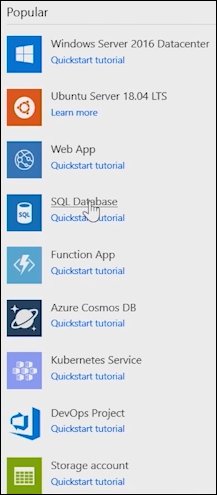
- Click + Create to start the SQL Database creation process.
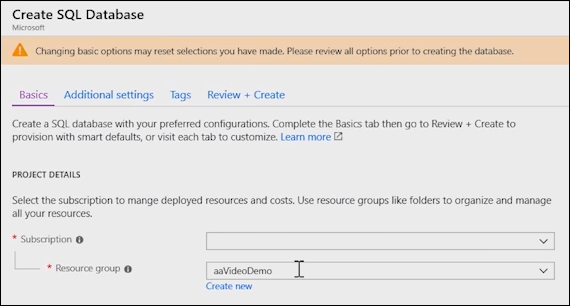
- Provide the following details:
- Subscription: Choose your Azure subscription.
- Resource Group: Select an existing resource group or create a new one.
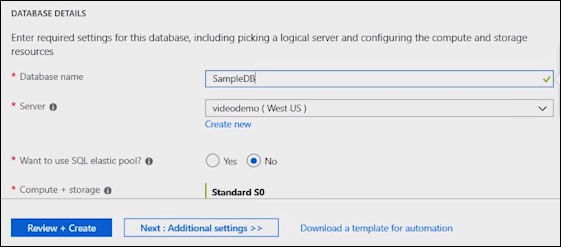
- Database Name: Enter a name for your database (e.g., `MyDatabase`).
- Server: Select an existing SQL server or create a new one.
📌 Step 3: Configure the Server
- If creating a new server:
- Enter a unique server name (e.g., `SampleDB`).
- Specify an admin username and password.
- Choose the server’s region (preferably near your users).
📌 Step 4: Select a Pricing Tier
- Choose the pricing tier based on your workload:
- Basic: Suitable for small workloads with low traffic.
- Standard: For mid-tier applications with moderate performance needs.
- Premium: For high-performance applications requiring low latency.
- Serverless: Automatically scales based on demand, ideal for intermittent workloads.
- Click Apply to save your configuration.
📌 Step 5: Review and Deploy
- Click Review + Create to validate your settings.
- Once validation passes, click Create to deploy your SQL Database.
📌 Step 6: Connect to the Database
- After deployment, go to your database in the Azure Portal.
- Click Connection Strings to get the connection details for your application or tools like SQL Server Management Studio (SSMS).
- Use the admin credentials to connect to your database and start managing it.
✅ Best Practices for Azure SQL Database
- Enable Threat Detection: Use built-in security features to identify potential threats.
- Optimize Indexing: Regularly monitor and optimize indexes to improve query performance.
- Monitor Costs: Use Azure Cost Management to track usage and optimize pricing tiers.
- Set Up Backups: Configure automated backups and test recovery scenarios.
- Secure Access: Use firewalls and Azure Active Directory for secure database access.
🎯 Conclusion
Azure SQL Database is a powerful and flexible service for hosting modern applications and managing relational data in the cloud. With its managed features, scalability, and integration with other Azure services, it’s an excellent choice for developers and businesses alike.
Start creating your Azure SQL Database today by logging into the Azure Portal. For more advanced configurations and features, check out the official Azure SQL Database documentation.