
What is Cloud Storage
Cloud storage is a virtual data storage model that allows users to store, manage, and access data remotely over the internet. Instead of relying on physical devices like hard drives or local servers, data is stored on distributed servers managed by cloud service providers. Cloud storage platforms like Google Drive, Amazon S3, and Microsoft Azure Blob Storage provide scalable and secure solutions for individuals and organizations to store and retrieve data on-demand.
In this blog post, we’ll explore everything you need to know about cloud storage, including its features, architecture, types, advantages, disadvantages, use cases, and much more.
Why Use Cloud Storage?
Traditional storage solutions often come with several limitations, such as restricted scalability, high maintenance costs, and accessibility issues. Cloud storage addresses these challenges by offering flexible, cost-efficient, and globally accessible solutions. Businesses and individuals are increasingly turning to cloud storage for data backups, sharing files, hosting websites, and ensuring disaster recovery.
Cloud storage allows users to:
- Store large volumes of data without physical storage devices.
- Access data from any device with an internet connection.
- Enable seamless collaboration among teams and individuals.
- Ensure robust data security with redundancy and backup options.
What is Cloud Storage – Key Features
- Scalability:
- Easily expand or reduce storage capacity based on changing requirements without additional infrastructure.
- Global Accessibility:
- Access data from anywhere in the world using a web browser, mobile app, or API.
- Data Redundancy:
- Protect data with multiple copies stored across geographically dispersed data centers.
- Cost Efficiency:
- Pay-as-you-go pricing models eliminate upfront hardware costs.
- High Security:
- Protect sensitive data with encryption, firewalls, and access control mechanisms.
- Collaboration:
- Enable multiple users to work on shared files in real-time.
- Backup and Recovery:
- Automate data backup and ensure quick recovery in case of data loss or cyberattacks.
Storage Systems in the Cloud
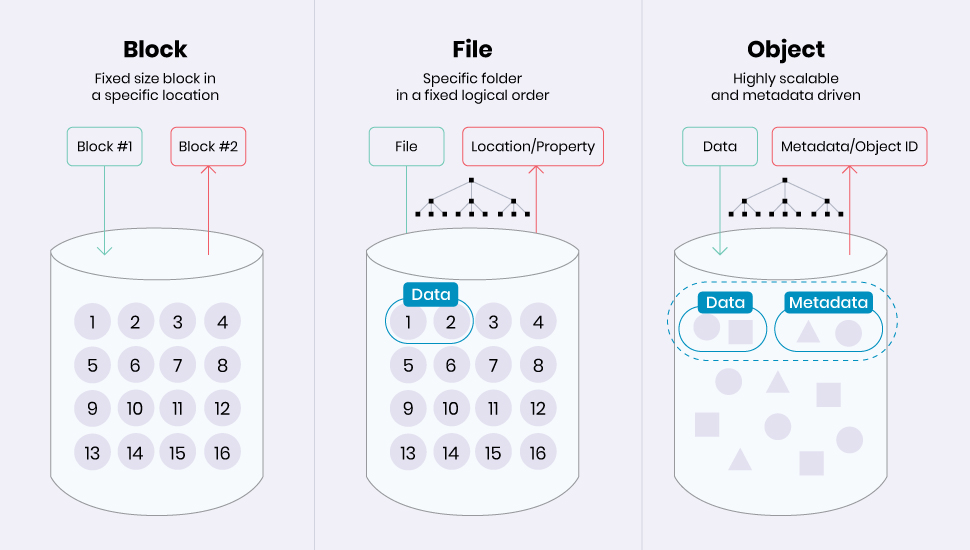
Cloud storage solutions can be classified into three main types based on how data is stored and accessed:
1. Block Storage
- Description: Data is divided into fixed-size blocks, similar to physical hard drives.
- Use Cases: High-performance applications like databases and enterprise applications.
- Example Providers:
2. File Storage
- Description: Data is stored hierarchically and accessed through file-sharing protocols like NFS or SMB.
- Use Cases: Shared file repositories, collaboration platforms.
- Example Providers:
3. Object Storage
- Description: Data is stored as objects, each with a unique identifier and metadata.
- Use Cases: Media storage, backup solutions, and big data applications.
- Example Providers:
How Does Cloud Storage Work?
Cloud storage operates through a network of remote servers where data is stored, managed, and retrieved. Here’s how it works:
- Uploading Data:
- Users upload files to a cloud storage platform using a web interface, API, or mobile app.
- Data Segmentation:
- Files are broken into smaller data blocks and encrypted for security.
- Replication:
- These blocks are stored redundantly across multiple servers in different data centers.
- Access Management:
- Robust authentication and access controls ensure only authorized users can access data.
- Data Retrieval:
- When requested, the system retrieves and reassembles the data blocks into the original file.
Cloud Storage Architecture
Cloud storage architecture comprises several components that work together to ensure seamless storage and retrieval of data:
- Client Interface:
- Provides users with access via web portals, mobile apps, or APIs.
- Storage Infrastructure:
- Comprises distributed servers located in multiple data centers.
- Management Layer:
- Handles replication, load balancing, and resource allocation.
- Redundancy Layer:
- Ensures multiple copies of data are stored for reliability and fault tolerance.
- Security Layer:
- Implements encryption, firewalls, and monitoring systems to safeguard data.
Advantages of Cloud Storage
- Cost Savings:
- Eliminate upfront costs of physical storage devices and pay only for what you use.
- Scalability:
- Scale up or down based on your data storage needs with no manual intervention.
- Accessibility:
- Access your data from any device, anywhere, with an internet connection.
- Disaster Recovery:
- Ensure business continuity with robust backup and recovery solutions.
- Global Collaboration:
- Teams across the globe can collaborate in real-time on shared files.
- Security:
- Advanced security features protect data against cyber threats and unauthorized access.
Disadvantages of Cloud Storage
- Internet Dependency:
- A stable internet connection is required for accessing cloud-stored data.
- Potential Security Risks:
- While cloud providers implement security measures, data is still vulnerable to breaches.
- Latency Issues:
- Uploading or downloading large files may experience delays depending on network bandwidth.
- Hidden Costs:
- Data transfer fees or additional features may lead to unexpected costs.
- Limited Control:
- Users have limited control over the underlying infrastructure and operations.
Use Cases of Cloud Storage
- Data Backup and Recovery:
- Protect critical data with automated backups and quick recovery options.
- File Sharing and Collaboration:
- Enable real-time collaboration for teams across different locations.
- Big Data Storage:
- Store and analyze vast amounts of data for machine learning and AI applications.
- Disaster Recovery Solutions:
- Ensure minimal downtime and fast recovery in case of natural disasters or cyberattacks.
- Hosting Websites and Media:
- Store and deliver images, videos, and other media files globally with low latency.
Future Trends in Cloud Storage
- Hybrid Cloud Models:
- Combining on-premises storage with cloud storage for enhanced flexibility.
- AI Integration:
- AI-powered storage systems for better resource optimization and automation.
- Edge Computing:
- Moving storage closer to the source of data generation for faster processing.
- Quantum Storage:
- Leveraging quantum technology to revolutionize data storage and security.
Refer for more Information
- AWS Cloud Storage
- Google Cloud Storage
- Microsoft Azure Storage
- Dropbox Cloud Storage
- iCloud by Apple
Conclusion
Cloud storage has become an integral part of modern computing, enabling secure, scalable, and cost-effective data management solutions. Whether you’re a business looking to streamline operations or an individual managing personal files, cloud storage provides unparalleled convenience and reliability. With advancements in AI and edge computing, the future of cloud storage promises even greater efficiency and innovation.
Start leveraging cloud storage today and experience the benefits of seamless data management!