

Cloud Computing Architecture
Cloud computing has become the backbone of modern IT infrastructure, offering a flexible and scalable platform for businesses and individuals. Understanding the architecture of cloud computing provides insight into how it works, its components, and the advantages it brings to the table.
Components of Cloud Computing Architecture
Cloud computing architecture consists of several layers and components that work together to deliver seamless services to users. Below, we explore these components in more detail.
1. Client Infrastructure
Client infrastructure acts as the entry point for users to access cloud computing resources. This component is responsible for providing the graphical interface through which users can interact with cloud services. Common tools include:
- Web Browsers: Chrome, Firefox, Safari, and others facilitate access to web-based cloud applications.
- Devices: Computers, smartphones, tablets, and thin clients provide the hardware for accessing cloud platforms.
Why it matters: A well-designed client infrastructure ensures a smooth and intuitive user experience.
2. Applications
Applications form the core purpose of cloud computing. These include a wide range of software solutions hosted in the cloud, such as:
- Productivity tools like Google Workspace and Microsoft Office 365
- Collaboration platforms like Slack and Cisco WebEx
- Specialized applications for industries like healthcare, e-commerce, and finance
Applications in the cloud eliminate the need for local installations, ensuring that users can work from any device with an internet connection.
Examples:
- Google Apps: Offers email, storage, and document editing tools.
- Salesforce: A leading CRM solution hosted entirely in the cloud.
Learn how cloud applications are transforming industries.
3. Cloud Services
Cloud services are divided into three main categories, each serving distinct purposes:
a. Software as a Service (SaaS)
SaaS enables users to access software over the internet without downloading or managing the underlying infrastructure.
Key Benefits:
- No installation required
- Automatic updates
- Accessible from anywhere
Examples: Google Workspace, Dropbox, Salesforce.
b. Platform as a Service (PaaS)
PaaS provides a platform for developers to build, test, and deploy applications.
Key Benefits:
- Simplifies app development
- No need to manage infrastructure
- Supports scalability
Examples: Microsoft Azure, OpenShift, Google App Engine.
c. Infrastructure as a Service (IaaS)
IaaS offers virtualized computing resources, including servers, storage, and networking.
Key Benefits:
- High scalability
- Cost-efficient for resource-heavy applications
- Complete control over the infrastructure
Examples: Amazon EC2, Google Compute Engine.
Explore cloud services in detail.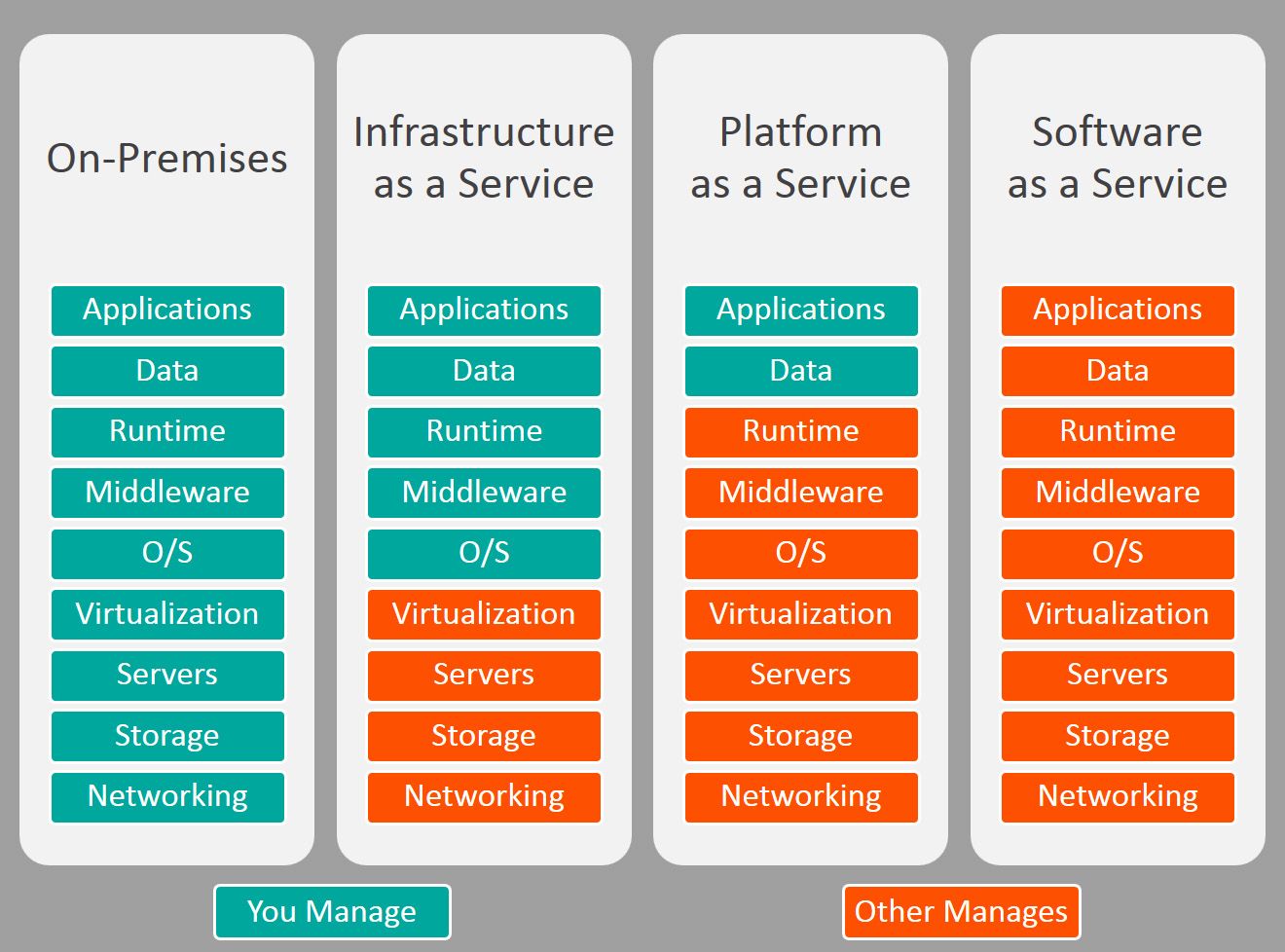
4. Runtime Cloud
The runtime environment in cloud computing is crucial for executing applications. It ensures that all applications run efficiently on virtual machines, handling dependencies and runtime frameworks.
Key Features:
- Supports various programming languages
- Optimizes application performance
- Ensures compatibility across devices
5. Storage
Cloud storage is a critical component of the architecture, offering flexible and scalable storage solutions. Businesses can store structured and unstructured data, including:
- Documents and spreadsheets
- High-resolution images and videos
- Application data and logs
Types of Cloud Storage:
- Object Storage: Ideal for unstructured data, like media files.
- Block Storage: Provides low-latency access for databases.
- File Storage: Mimics traditional file systems for shared access.
Discover top cloud storage options.
6. Infrastructure
The cloud infrastructure forms the backbone of the architecture, comprising both physical and virtual components:
- Physical: Servers, storage devices, and network switches.
- Virtual: Virtual machines, virtual networks, and software-defined storage.
Cloud infrastructure supports the seamless delivery of computing resources to end users.
7. Management
Management tools ensure smooth operation and coordination across cloud components. Key responsibilities include:
- Resource allocation
- Monitoring performance
- Implementing security policies
8. Security
Security is a cornerstone of cloud computing, addressing concerns about data breaches, unauthorized access, and compliance with regulations. Key features include:
- Data Encryption: Ensures data is secure during transmission and storage.
- Access Control: Restricts access based on roles and permissions.
- Regular Audits: Monitors and addresses potential vulnerabilities.
Learn how cloud security works.
9. Internet as a Medium
The internet connects the front end and back end, enabling users to access cloud services regardless of location. A stable internet connection ensures smooth communication and data transfer.
Benefits of Cloud Computing Architecture
The architecture of cloud computing provides numerous benefits:
- Scalability: Resources can be scaled up or down based on demand.
- Cost Efficiency: Pay-as-you-go models eliminate upfront investments.
- Global Accessibility: Access services and data from anywhere.
- Improved Collaboration: Teams can work on shared platforms in real-time.
- Security: Advanced measures protect sensitive data.
Explore the advantages of cloud computing.
Challenges in Cloud Computing Architecture
Despite its benefits, cloud computing architecture faces certain challenges:
- Data Privacy: Ensuring compliance with regulations like GDPR and HIPAA.
- Downtime Risks: Reliance on internet connectivity can lead to service interruptions.
- Vendor Lock-In: Switching providers may involve high costs and technical difficulties.
Learn how to overcome cloud challenges.
Future Trends in Cloud Computing Architecture
The future of cloud computing architecture is shaped by emerging technologies, including:
- Edge Computing: Processing data closer to the source for reduced latency.
- Serverless Architectures: Allowing developers to focus solely on code.
- AI and Machine Learning: Leveraging cloud-based tools for automation and insights.
Explore future trends in cloud computing.
Conclusion
Cloud computing architecture is a sophisticated and dynamic framework that underpins modern IT solutions. By integrating powerful components like storage, runtime environments, and robust security measures, it offers scalability, flexibility, and efficiency for businesses and individuals alike.
Whether you’re exploring SaaS, PaaS, or IaaS, understanding the architecture of cloud computing can help you harness its full potential.
For more insights, contact us or explore our resources to stay ahead in the cloud computing era.