
Software as a Service (SaaS)
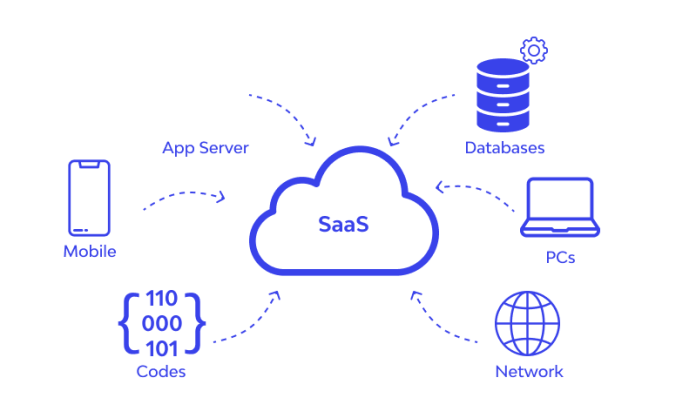
Software as a Service (SaaS) is a cloud computing model that delivers software applications over the internet, eliminating the need for installation or maintenance on local devices. SaaS, also referred to as “On-Demand Software”, enables businesses and individuals to access software applications anytime, anywhere, via a subscription-based model.
This guide provides a detailed overview of SaaS, including its characteristics, advantages, disadvantages, and the top providers in the market.
What is Software as a Service (SaaS)?
In the SaaS model, applications are hosted by cloud service providers and delivered to users through the internet. End-users can access these applications via a web browser or a dedicated mobile app without requiring any installation or on-premises infrastructure. SaaS providers handle software updates, maintenance, and security, freeing users to focus on utilizing the software for their needs.
Key Characteristics of SaaS
- Web-Based Delivery: SaaS applications are accessed via a web browser or mobile app, ensuring accessibility from any device with an internet connection.
- Multi-Tenancy: A single instance of the application serves multiple users, enabling cost efficiency and simplified maintenance.
- Automatic Updates: Providers handle software updates, ensuring users always have access to the latest features and security patches.
- Scalability: SaaS platforms scale easily to accommodate changing user demands, allowing businesses to adjust the number of users or features as needed.
- Subscription-Based Pricing: SaaS uses a pay-as-you-go model, offering flexible monthly or yearly subscriptions.
- Data Security: Providers implement robust security measures such as encryption, access controls, and backups to safeguard user data.
Learn more about SaaS characteristics.
How Software as a Service Works
SaaS applications are hosted on the provider’s servers and delivered over the internet. Here’s a step-by-step breakdown of the process:
- Hosting: SaaS providers host applications on their servers, handling all infrastructure and maintenance.
- Access: Users authenticate using login credentials via a web browser or app.
- Subscription: Access is granted based on subscription plans, typically billed monthly or annually.
- Updates: Providers deploy updates and patches directly to the cloud, ensuring users always have the latest version.
Services Provided by SaaS
1. Business Applications
SaaS enables businesses to access critical applications such as:
- ERP (Enterprise Resource Planning): Streamlines business processes.
- CRM (Customer Relationship Management): Enhances customer engagement and sales tracking.
- Billing and Accounting: Automates financial management.
Examples: Salesforce, NetSuite, QuickBooks
2. Document Management
SaaS platforms offer tools for creating, managing, and sharing electronic documents.
Examples: Google Workspace, Dropbox, Zoho Docs
3. Collaboration Tools
Facilitates teamwork through shared repositories, communication platforms, and project management tools.
Examples: Slack, Microsoft Teams, Asana
4. Marketing and Sales Automation
Automates lead generation, email campaigns, and customer relationship management.
Examples: HubSpot, Marketo, Pardot
5. Human Resources Management
Simplifies payroll, employee onboarding, time tracking, and performance management.
Examples: Workday, BambooHR, ADP Workforce Now
6. E-Commerce Platforms
Enables businesses to manage online storefronts, product catalogs, and payment processing.
Examples: Shopify, BigCommerce, WooCommerce
Advantages of SaaS
- Ease of Use
SaaS eliminates the need for complex installations or configurations, allowing businesses to start using applications immediately. - Cost Efficiency
Subscription-based pricing avoids large upfront costs for software licenses, making SaaS an affordable solution for businesses of all sizes. - Automatic Updates
Providers handle updates, ensuring users always have access to the latest features without manual intervention. - Scalability
SaaS applications can easily scale to accommodate increased user demands or business growth. - Accessibility
Applications are accessible from any device with an internet connection, promoting remote work and flexibility. - Integration
SaaS platforms often provide APIs for seamless integration with other tools and services.
Disadvantages of SaaS
- Data Security
While providers implement strong security measures, hosting sensitive data in the cloud may pose privacy risks. - Internet Dependency
SaaS applications require a stable internet connection, which may impact usability during outages. - Latency Issues
Applications that demand high-speed responsiveness may face latency issues due to internet delays. - Vendor Lock-In
Migrating data and applications to another provider can be time-consuming and challenging. - Limited Customization
SaaS applications may not offer the same level of customization as on-premises software.
Popular SaaS Providers
| Provider | Services |
|---|---|
| Salesforce.com | CRM solutions for sales, customer service, and marketing automation |
| Microsoft Office 365 | Online suite for word processing, spreadsheets, and presentations |
| Google Workspace | Gmail, Google Calendar, Google Drive, and Docs for collaboration |
| NetSuite | ERP, accounting, and CRM for business management |
| Slack | Team communication and collaboration |
| Dropbox | Cloud storage and file sharing |
| Zendesk | Help desk and customer support solutions |
| Shopify | E-commerce platform for managing online stores |
SaaS Pricing Models
SaaS providers typically offer two pricing models:
- Subscription-Based
Users pay a fixed monthly or yearly fee based on the number of users or features accessed. - Usage-Based
Pricing is determined by actual usage, such as the number of API calls or transactions processed.
Discover SaaS pricing options.
Use Cases for SaaS
- Small Businesses: Affordable access to professional-grade software without heavy IT investments.
- Startups: Quick deployment of tools for collaboration, project management, and marketing.
- Enterprises: Enhanced scalability and integration with existing infrastructure.
- Remote Work: Enables teams to work collaboratively from any location.
Future Trends in SaaS
- AI and Machine Learning
SaaS platforms are integrating AI to provide predictive analytics, automation, and personalization. - Vertical SaaS
Industry-specific SaaS solutions are gaining traction, addressing unique needs in sectors like healthcare, education, and finance. - Mobile-First Solutions
SaaS applications optimized for mobile devices will continue to grow, ensuring accessibility on the go. - Advanced Security
Enhanced encryption, multi-factor authentication, and compliance measures will address growing security concerns. - Multi-Cloud Strategies
Businesses will adopt multi-cloud SaaS solutions to reduce vendor dependency and enhance flexibility.
Conclusion
Software as a Service (SaaS) is a game-changing cloud computing model that empowers businesses to access powerful software applications without the need for infrastructure management. With its subscription-based pricing, scalability, and ease of use, SaaS is transforming how organizations operate in the digital age.
While there are challenges such as vendor lock-in and data security concerns, the benefits of SaaS far outweigh its limitations for most businesses. By choosing the right provider and leveraging SaaS capabilities, organizations can improve productivity, reduce costs, and achieve greater flexibility.
For more information on cloud service model refer PaaS and IaaS