
GCP resource hierarchy explained
In the rapidly evolving landscape of 2026, enterprise cloud adoption has moved beyond simple migration toward sophisticated, automated governance. A critical business pain point for many senior cloud architects is managing the chaotic sprawl of cloud-native resources that occurs when a clear structure is absent. Without a robust organizational framework, security teams often struggle with over-privileged service accounts and permission leaks, while finance departments find it nearly impossible to implement accurate cost allocation. Navigating these challenges requires a deep understanding of how to organize your environment effectively. In this guide, the GCP resource hierarchy explained provides the blueprint for building a secure, scalable, and compliant landing zone that supports distributed authority without sacrificing centralized management.
Deep Technical Architecture and Internal Working
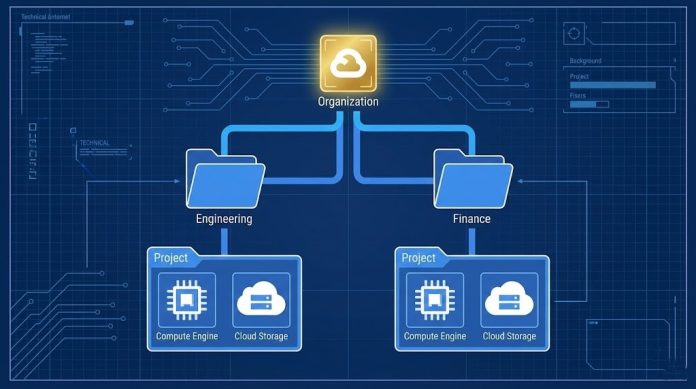
The Google Cloud resource hierarchy is a logical structure designed to help you manage resources like Compute Engine, Cloud Storage, and BigQuery across your entire estate. It operates as an inverted tree, where the organization node acts as the root. Below the organization, you can create folders to group related projects, and within those projects, you deploy your actual resources. This hierarchy is not just for organization; it is the primary mechanism for IAM inheritance and organizational policy enforcement. Every resource in Google Cloud is a descendant of a project, and that project sits within the hierarchy, inheriting the security posture defined at the levels above it.
The internal working of this system relies heavily on the Cloud Resource Manager API. When an IAM policy is evaluated, Google Cloud calculates the “effective policy” by taking the union of all allow policies attached at each level. For example, if a user is granted the Storage Object Viewer role at the folder level, they inherit that access for every project and every bucket within that folder. This policy inheritance ensures that high-level governance such as ensuring data residency in specific regions or enforcing the principle of least privilege cascades down automatically to new workloads.
Comparison of Resource Levels across Major Cloud Providers
Understanding how different clouds handle logical grouping is essential for architects managing a multi-cloud strategy. While the concepts are similar, the implementation details vary significantly between AWS, Azure, and GCP.
| Feature | Google Cloud (GCP) | Amazon Web Services (AWS) | Microsoft Azure |
| Root Level | Organization Node | AWS Organization | Management Groups / Tenant |
| Logical Group | Folders | Organizational Units (OUs) | Management Groups / Subscriptions |
| Deployment Unit | Projects | AWS Accounts | Subscriptions |
| Resource Scope | Project-based | Account-based | Resource Group-based |
| Identity Link | Cloud Identity / Workspace | IAM Users / AWS SSO | Microsoft Entra ID (Azure AD) |
Real-World Use Cases for Enterprise Environments
In a production-ready enterprise cloud adoption scenario, the hierarchy must reflect your business’s operational model. For a FinOps team, the billing hierarchy is just as important as the security hierarchy. By associating a billing account at the folder level or using resource tagging and labels at the project level, organizations can achieve granular cost allocation and consolidated billing. This visibility is the foundation of modern cloud governance framework strategies, allowing teams to track resource usage against specific cost centers without manual intervention.
Consider a global retail corporation. They might use folders to isolate different business units like “Engineering” and “Human Resources.” Under the Engineering folder, they further divide resources into “Production” and “Development” folders. This setup enables multi-tenancy and environmental isolation, ensuring that a configuration change in a test VPC never impacts the production environment. By utilizing Terraform for GCP, architects can define this entire structure as infrastructure as code, making the deployment of new landing zones predictable and repeatable.
IAM Inheritance and Policy Enforcement Logic
The power of the GCP resource hierarchy lies in its ability to enforce guardrails through IAM policy inheritance. When managing access, you must understand that “deny” policies (where available) and specific constraints override broad allow permissions.
| Level | Inheritance Rule | Best Practice Use Case |
| Organization | Mandatory Root | Global security admins and Org Policies. |
| Folder | Cascading Logic | Departmental isolation and shared VPC hosting. |
| Project | Trust Boundary | Grouping resources for a single microservice. |
| Resource | Individual Granularity | Granting access to a specific Cloud Storage bucket. |
Security, Compliance, and Risk Management
Managing governance at scale requires a rigorous approach to risk management and compliance. Organizations must adhere to strict data residency and sovereignty requirements, especially in highly regulated sectors. The GCP resource hierarchy explained here demonstrates how organizational policy constraints can be used to restrict where resources can be created, effectively preventing data from leaving a specific geographic boundary.
Furthermore, monitoring is essential. Turning on Cloud Audit Logs at the organization level provides a comprehensive trail of who did what and when across all projects. This centralized logging is vital for compliance audits and detecting potential security threats like lateral movement or unauthorized API limits increases. By integrating Identity and Access Management with your hierarchy, you can ensure that service accounts used by CI/CD pipelines have only the permissions they need for their specific project, minimizing the blast radius of a potential breach.
Best Practices and Production Recommendations
When building your cloud setup, avoid the common mistake of over-nesting folders. While the limit is 10 levels deep, a structure that is too complex becomes difficult to manage. Aim for a depth of 3 or 4 levels to maintain clarity. Additionally, always use a project ID and project number that follow a consistent naming convention to facilitate automation.
-
Mirror your Organization structure: Your cloud hierarchy should ideally reflect your business units or environment stages (Dev, Staging, Prod).
-
Use Groups for IAM: Never grant roles to individual user accounts. Instead, use Google Groups to simplify identity and access management.
-
Automate Project Lifecycle: Use Resource Manager API or Terraform to automate project lifecycle management, including the creation and deletion of projects to prevent “ghost projects” that inflate costs.
-
Implement Shared VPC: Use host projects for networking and service projects for applications to centralize network security while allowing teams to manage their own compute resources.
-
Enforce Quotas: Set resource quotas at the project level to prevent a single buggy script from consuming your entire organization’s budget or hitting global API limits.
Comparison of Billing vs Resource Hierarchy
One of the most frequent points of confusion for engineers is the difference between where resources live and where they are billed.
| Component | Hierarchy Role | Billing Role |
| Organization | Root Governance | Top-level Billing Node |
| Billing Account | N/A | Linked to projects for payment |
| Labels | Metadata for sorting | Key for cost breakdown reports |
| Project | Container for services | The primary unit of cost tracking |
Strengthening Your Cloud Posture
The GCP resource hierarchy explained in this guide serves as the skeleton of your Google Cloud environment. By masterfully organizing your organization node, folders, and projects, you create a system that is resilient to growth and secure by design. In 2026, the ability to automate centralized management while allowing for distributed authority is the hallmark of a successful cloud strategy. Implementing these best practices GCP resources will not only satisfy your governance requirements but also empower your development teams to move faster with clear, secure boundaries.
Are you ready to audit your current structure? Begin by reviewing your IAM inheritance patterns and ensuring that your landing zones are optimized for both security and cost.
Links Suggestions: