
How to Manage Linux System Routing Rules With Iptables
Iptables is a user-space utility program for managing firewall rules on Linux. It’s a powerful tool for blocking undesired network traffic, allowing specific traffic, redirecting packets, and protecting against DDoS attacks.
How Does Iptables Work?
Iptables uses filters organized into tables containing chains of rules to manage network traffic. When network packets match a rule, specific actions are applied. If no rule matches, the default policy is applied.
This guide shows how to manage Linux firewalls using Iptables.
How To Install Iptables on Linux
Iptables is pre-installed on most Linux distributions, but here’s how to install it if it’s missing.
Iptables for Ubuntu/Debian
Install Iptables on Ubuntu/Debian:
sudo apt update
sudo apt install iptables
Verify installation:
iptables --versionIptables for RHEL/CentOS/Fedora
Install Iptables on RHEL-based systems:
sudo dnf update
sudo dnf install iptables-services
Enable Iptables to start on boot:
sudo systemctl start iptables
sudo systemctl enable iptables
Exploring Iptables Chain Rules
Iptables is structured as follows: Iptables ➔ Tables ➔ Chains ➔ Rules.
Filter Table
- INPUT – For packets coming to the server.
- OUTPUT – For packets leaving the server.
- FORWARD – For packets routed through the server.
NAT Table
- PREROUTING – Alters incoming packets before routing.
- POSTROUTING – Alters outgoing packets after routing.
- OUTPUT – Alters locally generated packets.
Iptables Target Values
When packets match a rule, they are assigned one of the following targets:
- ACCEPT – Allows the packet through.
- DROP – Blocks the packet.
- RETURN – Returns the packet to the previous chain.
List Iptables Firewall Rules
List all rules with:
sudo iptables -L -n -v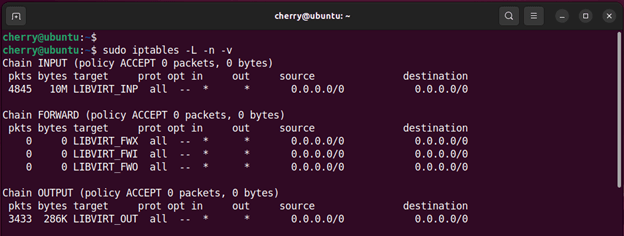
How To Define Iptables Rule Chains
To add a rule to a chain:
sudo iptables -A <chain> -i <interface> -p <protocol> -s <source> --dport <port> -j <target>Block an IP Address on Iptables
Block an IP with:
sudo iptables -A INPUT -s xxx.xxx.xxx.xxx -j DROP
Unblock an IP Address on Iptables
To remove an IP block, use:
sudo iptables -D INPUT -p tcp -s 173.82.232.55 -j DROP
Open a Port(s) on Iptables
To allow a specific port:
sudo iptables -A INPUT -p tcp --dport 3306 -j ACCEPTTo allow multiple ports:
sudo iptables -A INPUT -p tcp -m multiport --dports 22,80,443,3389 -j ACCEPT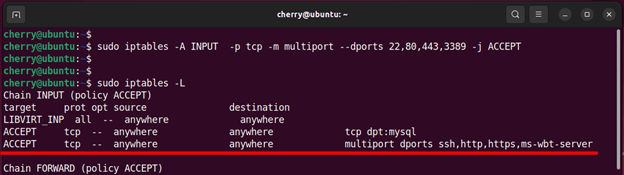
Allow a Network Subnet on a Specific Port
Allow SSH connections from a specific subnet:
sudo iptables -A INPUT -p tcp -d 192.168.40.0/24 --dport 22 -j ACCEPT
Block a Port(s) on Iptables
To block traffic on port 80:
sudo iptables -A INPUT -p tcp --dport 80 -j DROP
Block Incoming Ping Requests
Block incoming ping requests for security:
sudo iptables -A INPUT -p icmp -i ens33 -j DROP
Block Access from Specific MAC Addresses
Block access from a specific MAC address:
sudo iptables -A INPUT -m mac --mac-source 00:00:00:00:00:00 -j DROP
Flush Iptables Firewall Rules
Flush all firewall rules:
sudo iptables -FFlush rules for a specific table (e.g., NAT):
sudo iptables -t nat -F
Save Iptables Firewall Rules
Save rules to a file:
sudo iptables-save > ~/iptables.rules
Restore Iptables Firewall Rules from a File
Restore rules from a saved file:
sudo iptables-restore < ~/iptables.rules
Iptables is an essential security tool for managing Linux network traffic. By mastering Iptables, you gain control over how data packets are routed and secured, ensuring a safer Linux environment.