
🌐 Create Azure Web App
🌟 Introduction
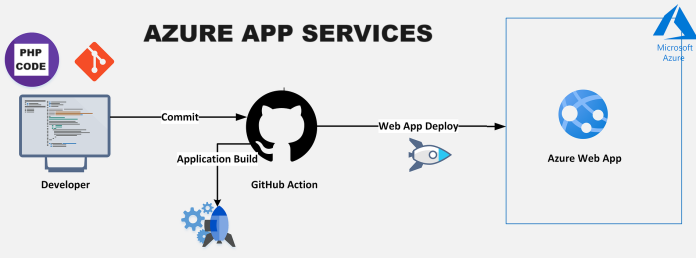
Azure Web Apps, part of the Azure App Service platform, provides a scalable and fully managed environment to host web applications, RESTful APIs, and mobile backends. With Azure Web Apps, developers can focus on building their applications while Azure handles infrastructure, scaling, and security.
In this guide, we’ll explore the step-by-step process, key features, benefits, advantages and disadvantages, and best practices for creating and deploying an Azure Web App.
💡 What is an Azure Web App?
Azure Web Apps is a Platform-as-a-Service (PaaS) offering that allows developers to deploy and host web applications in a fully managed environment. It supports multiple programming languages and integrates seamlessly with DevOps pipelines.
Common Use Cases:
- Hosting business websites or blogs.
- Building RESTful APIs for applications.
- Deploying server-side rendered applications.
- Running microservices as part of a larger architecture.
✅ Key Features of Azure Web App
- Multi-Language Support: Supports .NET, Java, Python, PHP, and Node.js.
- Integrated DevOps Tools: Connects with GitHub, Azure DevOps, and Bitbucket for CI/CD pipelines.
- Auto-Scaling: Dynamically adjusts resources based on traffic demands.
- Custom Domains and SSL: Easily add custom domains and secure them with SSL/TLS certificates.
- Built-In Monitoring: Includes monitoring with Azure Monitor and Application Insights.
- Serverless Integration: Extends functionality with Azure Functions.
💡 Benefits of Azure Web App
- Quick Deployment: Deploy apps without managing infrastructure.
- Scalability: Automatically scale resources based on application usage.
- High Availability: Ensure uptime with Azure’s global infrastructure.
- Cost-Effective: Pay only for the resources you use.
- Secure Environment: Get built-in DDoS protection, SSL certificates, and compliance with industry standards.
🌟 Advantages of Azure Web App
- Simplified Management: No need to manage servers or virtual machines.
- Language and Framework Flexibility: Supports a variety of programming languages.
- Integration with Azure Services: Easily connect to Azure Storage, Azure SQL, and other services.
- Global Reach: Deploy your web app to multiple Azure regions.
- Customizable Scaling: Configure manual or automatic scaling options.
⚠️ Disadvantages of Azure Web App
- Cost for High Traffic Applications: Heavily trafficked apps may incur higher costs.
- Limited Customization: Access to underlying infrastructure is restricted.
- Learning Curve: Beginners may find Azure configuration options overwhelming.
- Platform Restrictions: Certain configurations are limited by Azure’s predefined setups.
🛠️ How to Create Azure Web App
📌 Step 1: Log in to the Azure Portal
- Go to the Azure Portal and sign in with your credentials.
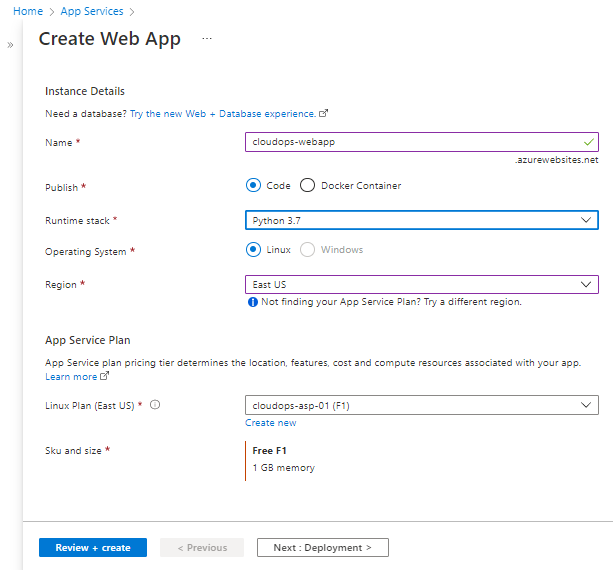
📌 Step 2: Create a Web App
- Search for “App Services” in the search bar and select it.
- Click + Create to start a new web app.
- Fill in the required details:
- Subscription: Select your subscription.
- Resource Group: Choose an existing group or create a new one.
- Name: Enter a unique name for your app (e.g., `myfirstwebapp`).
- Runtime Stack: Select your preferred language/framework (e.g., .NET, Node.js).
- Region: Choose the Azure region closest to your audience.
📌 Step 3: Configure Hosting Plan
- Under App Service Plan, select:
- Create a new hosting plan or use an existing one.
- Choose a pricing tier (Free, Shared, Standard, or Premium).
📌 Step 4: Deploy Your Web App
- Go to the Deployment Center in the app’s settings.
- Select your deployment source:
- GitHub: For continuous deployment from GitHub repositories.
- Azure DevOps: For automated pipelines.
- Local Git: For manual deployments.
- Follow the prompts to complete the deployment.
📌 Step 5: Test the Web App
- Return to the Overview section of your web app.
- Copy the URL (e.g., `https://myfirstwebapp.azurewebsites.net`) and open it in your browser.
✅ Best Practices for Azure Web App
- Enable Auto-Scaling: Automatically scale resources during traffic spikes.
- Use Staging Slots: Deploy updates to staging before pushing to production.
- Monitor Performance: Leverage Azure Monitor and Application Insights.
- Secure Your Web App: Add SSL/TLS certificates and restrict access with IP rules.
- Optimize Costs: Regularly review pricing tiers and resource usage.
Troubleshooting Common Issues
- Deployment Fails:
- Check the deployment logs in the Deployment Center.
- Ensure the runtime stack matches your application’s requirements.
- Slow Performance:
- Upgrade to a higher pricing tier for better performance.
- Enable Application Insights to diagnose bottlenecks.
- Custom Domain Issues:
- Verify DNS settings and ensure the custom domain is mapped correctly in the Azure portal.
- Scaling Problems:
- Review scaling rules in the App Service Plan and adjust thresholds accordingly.
🎯 Conclusion
Azure Web Apps offer a robust and scalable platform for hosting modern applications. With features like auto-scaling, built-in monitoring, and seamless integration with DevOps tools, it is a powerful solution for developers.
Get started today by logging into the Azure Portal. For more advanced configurations, check out the official Azure documentation.