
Automate Your Infrastructure with Terraform and Ansible
In the world of modern IT, Infrastructure as Code (IaC) has become an essential practice for automating and managing infrastructure. Tools like Terraform and Ansible make it possible to create, configure, and deploy resources programmatically, eliminating manual processes and reducing errors.
In this comprehensive guide, we’ll explore how to use Terraform and Ansible to automate infrastructure setup, configuration, and management. This includes hands-on examples, technical details, and official resources for deeper learning.
infrastructure automation with terraform
Key Benefits
- Consistency: Avoid configuration drift by defining infrastructure in code.
- Efficiency: Deploy infrastructure faster without manual intervention.
- Scalability: Easily manage infrastructure across multiple environments.
- Version Control: Track changes using tools like Git.
For a deeper dive into IaC, visit Terraform’s official guide.
Understanding Terraform and Ansible
Terraform: Provisioning Tool
Terraform is a declarative IaC tool that automates the provisioning of infrastructure resources like servers, networks, and databases across cloud providers (e.g., AWS, Azure, GCP).
- Key Features:
- Multi-cloud support.
- State management.
- Dependency tracking.
Ansible: Configuration Management Tool
Ansible is an agentless automation tool that focuses on configuration management, application deployment, and task automation.
- Key Features:
- YAML-based playbooks.
- Simple and agentless operation.
- Broad module ecosystem.
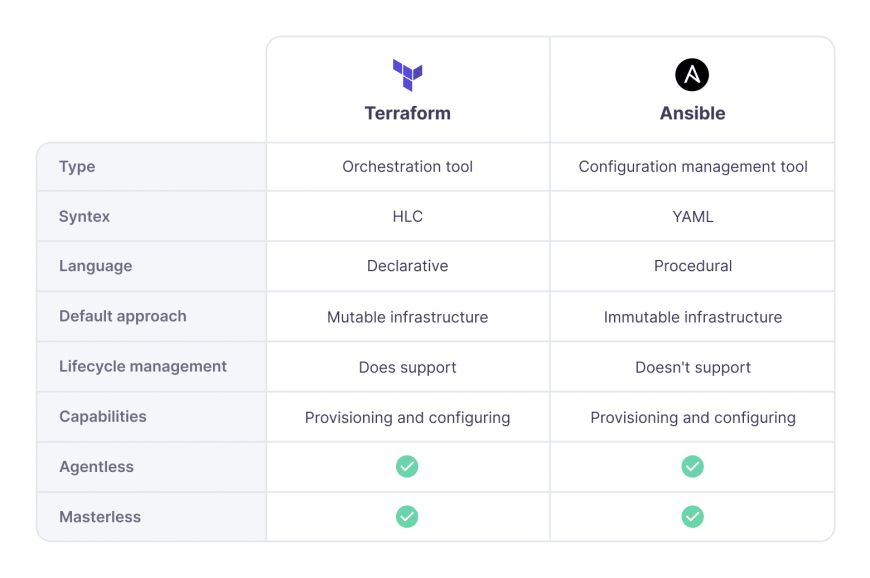
Automate Your Infrastructure with Terraform and Ansible- step by step guide
We’ll automate a use case where Terraform provisions an AWS EC2 instance, and Ansible configures the instance with necessary software.
1. Automating Infrastructure with Terraform
Step 1: Install Terraform
- Download and install Terraform:
curl -fsSL https://apt.releases.hashicorp.com/gpg | sudo apt-key add - sudo apt-add-repository "deb [arch=amd64] https://apt.releases.hashicorp.com $(lsb_release -cs) main" sudo apt update && sudo apt install terraform - Verify installation:
terraform -v
Step 2: Write Terraform Configuration
- Create a directory for Terraform files:
mkdir terraform_project && cd terraform_project - Create a file
main.tf:provider "aws" { region = "us-east-1" } resource "aws_instance" "example" { ami = "ami-0c55b159cbfafe1f0" # Ubuntu 20.04 AMI instance_type = "t2.micro" tags = { Name = "Terraform-Instance" } } - Initialize Terraform:
terraform init - Plan the infrastructure:
terraform plan - Apply the configuration:
terraform apply
- Outcome: An EC2 instance is provisioned in AWS.
2. Automating Configuration with Ansible
Step 1: Install Ansible
- Install Ansible on your system:
sudo apt update sudo apt install ansible -y - Verify installation:
ansible --version
Step 2: Write an Ansible Playbook
- Create a directory for Ansible files:
mkdir ansible_project && cd ansible_project - Create an inventory file
inventory:[web] 1.2.3.4 ansible_user=ubuntu ansible_ssh_private_key_file=~/.ssh/id_rsa - Create a playbook
playbook.yml:--- - hosts: web become: yes tasks: - name: Update and upgrade apt packages apt: update_cache: yes upgrade: dist - name: Install Nginx apt: name: nginx state: present - name: Start and enable Nginx service: name: nginx state: started enabled: yes
Step 3: Run the Ansible Playbook
- Execute the playbook:
ansible-playbook -i inventory playbook.yml - Outcome: Nginx is installed and configured on the EC2 instance.
3. Combine Terraform and Ansible
To combine Terraform and Ansible:
- Output Terraform IPs: Modify
main.tfto output the public IP of the EC2 instance:output "public_ip" { value = aws_instance.example.public_ip } - Use Ansible Dynamic Inventory: Create a
dynamic_inventory.pyscript to pull IPs from Terraform state:import json with open("terraform.tfstate") as f: data = json.load(f) instance = data["resources"][0]["instances"][0]["attributes"] ip = instance["public_ip"] print(json.dumps({"web": {"hosts": [ip]}})) - Run Ansible Playbook with Dynamic Inventory:
ansible-playbook -i dynamic_inventory.py playbook.yml
Advanced Features
1. Terraform Modules
Organize reusable Terraform code:
module "ec2_instance" {
  source = "./modules/ec2"
  instance_type = "t2.micro"
  ami = "ami-0c55b159cbfafe1f0"
}
2. Ansible Roles
Create roles for modular playbooks:
ansible-galaxy init nginx_role
Real-World Use Case
Scenario: Automating a High-Availability Web Application Deployment.
- Use Terraform to provision:
- An AWS Auto Scaling Group.
- An Application Load Balancer.
- Use Ansible to configure:
- Web servers with Nginx and application code.
- Database servers with MySQL.
Best Practices
- Use Variables:
- Define Terraform and Ansible variables to avoid hardcoding.
- Example in Terraform:
variable "instance_type" {
  default = "t2.micro"
}
- Version Control:
- Store all IaC files in a Git repository.
- State Management:
- Use remote state storage for Terraform:
backend "s3" {
  bucket = "terraform-state"
  key    = "state.tfstate"
  region = "us-east-1"
}
- Use remote state storage for Terraform:
- Testing:
- Test infrastructure in a staging environment before production deployment.
Official Resources
- Terraform Documentation
- Ansible Documentation
- AWS EC2 Documentation
- Automating Kubernetes Operations | Simplify and Scale Your Workflows
- Management with Ansible, Chef, and Puppet
Conclusion
Automating infrastructure with Terraform and Ansible brings reliability, speed, and scalability to your workflows. By leveraging these tools, you can provision, configure, and manage resources with minimal effort. Whether you’re a DevOps professional or a developer, mastering IaC is a crucial step toward modern infrastructure management.
Would you like me to proceed with post #3 (Containerization and Orchestration)? Let me know!