

Pros and Cons of Cloud Computing
Cloud computing has become a game-changer for businesses worldwide, revolutionizing the way we manage data, collaborate, and access applications. Like any technology, it has its share of advantages and disadvantages. In this post, we’ll dive into both aspects to help you make an informed decision about leveraging cloud computing for your business.
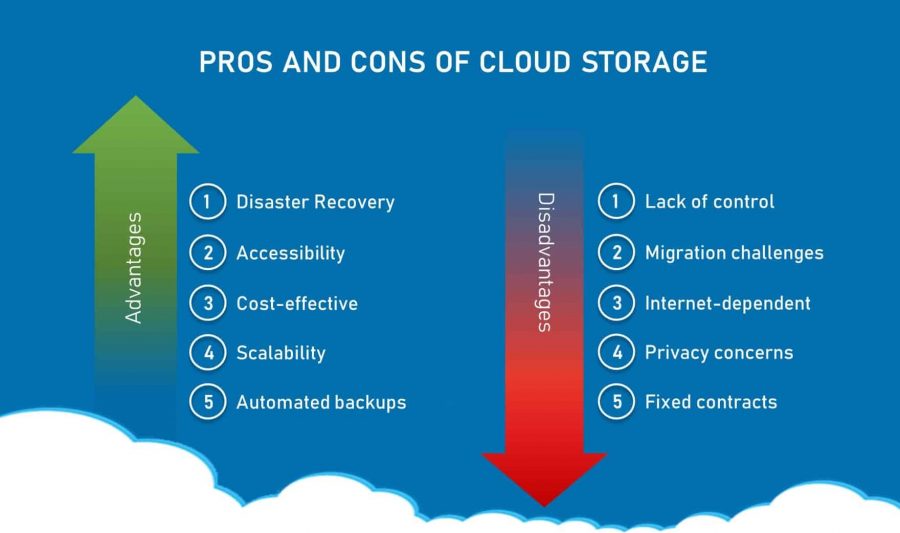
Discuss Pros and Cons of Cloud Computing
Advantages of Cloud Computing
Cloud computing offers a plethora of benefits that can transform business operations. Let’s explore these in detail:
1. Data Backup and Restoration
Cloud computing provides an efficient way to back up and restore data. Businesses can easily retrieve their data in case of accidental loss, system failure, or disasters, ensuring business continuity.
Learn more about data backup in cloud computing.
2. Improved Collaboration
Cloud technology fosters teamwork by allowing multiple users to work on shared documents and projects in real-time. This improves productivity and ensures seamless communication among teams.
Explore how cloud improves collaboration.
3. Excellent Accessibility
With cloud computing, data can be accessed from anywhere with an internet connection. This enables remote work, operational flexibility, and enhanced productivity.
Read about cloud accessibility benefits.
4. Cost-Effective Maintenance
Cloud computing eliminates the need for businesses to invest heavily in hardware and software maintenance. Service providers handle infrastructure updates and upkeep, saving time and resources.
Discover cost-effective cloud solutions.
5. Automatic Updates
Cloud service providers take care of updates, security patches, and infrastructure management. This allows businesses to focus on strategic projects instead of routine maintenance.
6. Mobility
Cloud-based applications and data are accessible via smartphones, tablets, or any internet-connected device, providing users with the flexibility to work on the go.
7. Pay-Per-Use Model
The cloud operates on a pay-as-you-go basis, allowing businesses to only pay for the resources they use. This eliminates upfront investments and enables better budget management.
Understand cloud pricing models.
8. Scalable Storage Capacity
With cloud computing, businesses can scale their storage needs up or down based on demand. The cloud supports a wide variety of data, including documents, videos, and images.
Explore scalable cloud storage.
9. Enhanced Data Security
Cloud providers prioritize security, offering features like encryption, access controls, and regular security audits to protect sensitive business data.
Find out more about cloud security.
10. Disaster Recovery and Business Continuity
Cloud computing ensures quick recovery from disruptions through data redundancy, geographically distributed data centers, and reliable backup solutions.
See how cloud supports disaster recovery.
11. Agility and Innovation
With access to the latest cloud-based tools and services, businesses can innovate rapidly and respond quickly to market changes.
12. Green Computing
By utilizing energy-efficient data centers, cloud providers help reduce the carbon footprint and support sustainable practices.
Learn about green cloud computing.
Disadvantages of Cloud Computing
While cloud computing offers numerous benefits, it also comes with certain drawbacks that businesses should consider:
1. Vendor Reliability and Downtime
Cloud providers may experience outages or technical issues that disrupt access to data and applications, impacting productivity.
Read about cloud downtime risks.
2. Internet Dependency
Cloud computing relies heavily on a stable internet connection. Any interruption in internet service can halt operations.
3. Limited Control and Customization
Organizations using standardized cloud services may find it challenging to customize the infrastructure or applications to meet specific needs.
4. Data Security and Privacy Concerns
Storing sensitive data in the cloud raises concerns about unauthorized access, data breaches, and compliance with privacy laws.
Explore how to address cloud privacy concerns.
5. Hidden Costs
While the pay-as-you-go model is attractive, businesses must be cautious about hidden costs, such as data transfer fees, storage expansion charges, and compliance-related expenses.
6. Dependency on Service Providers
Businesses relying heavily on a single provider are at risk of disruptions if the provider faces financial issues or alters its pricing model.
Learn about managing vendor dependency.
7. Data Location and Compliance
Data stored in global data centers may be subject to different legal and regulatory requirements, leading to compliance challenges in certain industries.
Read about cloud compliance solutions.
How to Mitigate Cloud Computing Challenges
- Assess Vendors Carefully: Evaluate the reliability, security protocols, and financial stability of cloud service providers.
- Create a Backup Strategy: Develop robust disaster recovery and backup plans to minimize downtime.
- Understand Pricing Models: Review all associated costs to avoid unexpected expenses.
- Stay Compliant: Ensure your provider complies with local data protection laws and industry regulations.
Conclusion
Cloud computing offers transformative advantages, from cost savings to enhanced agility and security. However, businesses should also weigh the potential disadvantages, such as internet dependency and data privacy concerns. By carefully selecting a reliable service provider and implementing a solid risk management strategy, organizations can maximize the benefits of cloud computing while minimizing its drawbacks.
For more insights on cloud computing and related technologies, stay tuned to our blog!