
How to build a disaster-recovery architecture across AWS and GCP
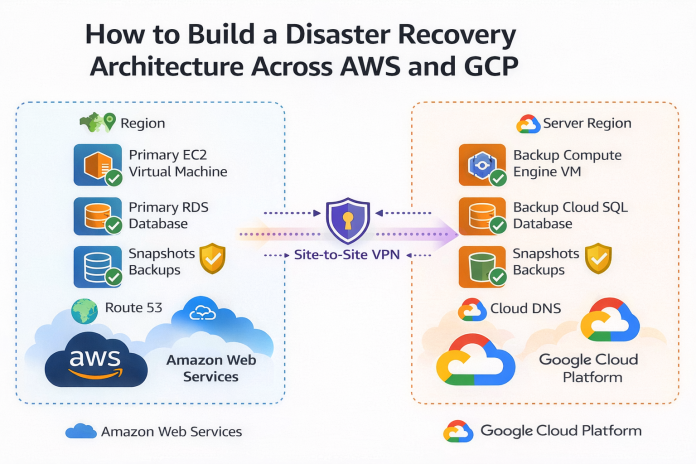
Building a disaster-recovery (DR) architecture across AWS and GCP is a strategic move to insulate your business from provider-level outages (e.g., a total AWS region failure). Because these clouds don’t natively “speak” to each other, you must build the connective tissue yourself.
The most practical and cost-effective model for multi-cloud DR is usually Active-Passive (Pilot Light) or Warm Standby, where AWS is your primary producer and GCP is your recovery site.
Here is the step-by-step guide to building this architecture.
1. High-Level Architecture
In this setup, your users normally access the application on AWS. Data is continuously replicated to GCP. If AWS fails, you flip a DNS switch, and users are routed to GCP.
2. Network Connectivity (The Foundation)
You need a secure, private pipe between your AWS VPC and GCP VPC to replicate data without traversing the public internet (which is slow and insecure for databases).
-
Option A: Site-to-Site VPN (Easiest)
-
AWS: Create a “Customer Gateway” (pointing to GCP’s IP) and a “Virtual Private Gateway.”
-
GCP: Create a Cloud VPN gateway and tunnel.
-
Result: A secure IPsec tunnel. Good for low-to-medium throughput.
-
-
Option B: Cross-Cloud Interconnect (Performance)
-
Use Google Cross-Cloud Interconnect. This is a managed service where Google provisions a physical link directly to your AWS Direct Connect location.
-
Why: Lower latency and higher throughput (10Gbps/100Gbps) than VPN, essential for large database syncing.
-
3. Data Replication Strategy
This is the hardest part. You must replicate three types of state: Database, Object Storage, and Infrastructure.
A. Database Replication (Relational)
You cannot easily use “AWS RDS Read Replica” on GCP because they are proprietary. You must use standard database replication protocols.
-
PostgreSQL (RDS to Cloud SQL):
-
Use Logical Replication (pglogical). Configure your AWS RDS instance as the Publisher and a Google Cloud SQL instance as the Subscriber.
-
Tip: Keep the GCP database running (it can be a small instance to save money) and resizing it during a disaster event.
-
-
MySQL:
-
Use GTID-based external master replication. Configure Cloud SQL to replicate from the external master (AWS RDS).
-
B. Object Storage (S3 to GCS)
You need files uploaded to S3 to appear in Google Cloud Storage (GCS).
-
Tool: Use Storage Transfer Service on GCP.
-
Configuration: Set up an “Event-driven transfer.”
-
Configure an S3 Event Notification to send messages to an AWS SQS queue when a new file is uploaded.
-
GCP Storage Transfer Service listens to this queue and pulls the new object to GCS near real-time.
-
4. Application & Infrastructure Sync
You cannot “replicate” EC2 instances to Compute Engine because the AMIs (machine images) are different. You must abstract the infrastructure.
-
Containerization (Kubernetes):
-
Use Docker containers for your apps. This makes them portable.
-
Deploy EKS on AWS and GKE on GCP.
-
CI/CD Pipeline: Configure your Jenkins/GitLab/GitHub Actions pipeline to deploy to both clusters. When you push code, it updates the app on AWS (active) and GCP (standby).
-
Scale to Zero: On GCP, set the replica count to 0 or 1 to minimize costs. During a disaster, your first step is to scale this up.
-
-
Infrastructure as Code (Terraform):
-
Do not click buttons in the console. Use Terraform to define your infrastructure.
-
Maintain two state files or workspaces:
aws-prodandgcp-dr. -
If AWS goes down, you can run
terraform applyon the GCP side to spin up missing load balancers or compute groups.
-
5. Traffic Failover (The “Big Red Button”)
DNS is your traffic controller.
-
Primary Tool: AWS Route 53 (or a neutral 3rd party like Cloudflare or NS1).
-
Setup:
-
Create a Health Check in Route 53 that pings your AWS application endpoint.
-
Create a Failover Routing Policy.
-
Primary Record: Points to AWS Load Balancer (Associated with the Health Check).
-
Secondary Record: Points to GCP Load Balancer.
-
-
The Event: If the AWS endpoint returns a 500 error or times out, Route 53 automatically updates DNS to point users to the GCP IP address.
How to build a disaster-recovery architecture across AWS and GCP
Summary Checklist for Implementation
| Component | AWS (Primary) | GCP (DR Site) | Link/Tool |
| Compute | EKS / EC2 AutoScaling | GKE / Compute Engine | CI/CD Pipeline (Deploy to both) |
| Database | RDS / Aurora | Cloud SQL / Spanner | Logical Replication (pglogical/binlog) |
| Storage | S3 Buckets | Cloud Storage (GCS) | GCP Storage Transfer Service |
| Network | VPC (e.g., 10.1.0.0/16) | VPC (e.g., 10.2.0.0/16) | Cloud VPN or Cross-Cloud Interconnect |
| DNS | Route 53 Active Record | Route 53 Passive Record | DNS Failover Policy |
The “Gotchas” (Read this before building)
-
-
IP Overlap: Ensure your AWS VPC CIDR (e.g., 10.0.0.0/16) and GCP VPC CIDR (e.g., 10.1.0.0/16) do not overlap. If they do, you cannot connect them via VPN.
-
-
Egress Fees: Cloud providers charge for data leaving their cloud. Replicating terabytes of data from AWS to GCP will incur AWS Data Egress fees. Budget for this.
-
Secret Management: Your app on GCP needs different database credentials than on AWS. Use a secrets manager (like Google Secret Manager) to inject the correct DB hostnames at runtime so the app code doesn’t need to change.
The Strategic Imperative: Why Cross-Cloud DR?
Relying on a single cloud provider creates a single point of failure. Though rare, history has shown us that DNS outages, localized natural disasters, or cascading software bugs can take down entire regions (e.g., us-east-1) for hours.
A Multi-Cloud DR architecture offers:
-
Sovereignty: You own your uptime, independent of AWS’s status page.
-
Leverage: It forces you to maintain portable code (containers/Terraform), preventing vendor lock-in.
-
Compliance: Many financial and healthcare regulations now mandate “exit strategies” or multi-vendor redundancy.
Phase 1: The Network Foundation (The “Pipe”)
You cannot replicate terabytes of database changes over the public internet securely or reliably. You need a dedicated, encrypted tunnel.
Option A: HA VPN (The Standard Choice)
For most enterprises, a High-Availability (HA) Cloud VPN is sufficient.
-
AWS Side: Deploy a Virtual Private Gateway (VGW) attached to your VPC.
-
GCP Side: Deploy a Cloud VPN Gateway with dynamic routing (BGP).
-
The Glue: Use BGP (Border Gateway Protocol) to exchange routes. When you add a subnet in AWS, GCP automatically “sees” it.
Option B: Cross-Cloud Interconnect (The Pro Choice)
For data-intensive workloads (10TB+), use Google Cross-Cloud Interconnect.
-
How it works: Google provisions a physical fiber connection directly to your AWS Direct Connect location.
-
Benefit: You get dedicated bandwidth (10Gbps or 100Gbps) with a lower egress fee than standard internet traffic, ensuring your database replication doesn’t lag.
Phase 2: The Data Layer (The Hard Part)
Stateless applications are easy to move. State (data) is heavy, sticky, and hard to sync. This is where your DR strategy lives or dies.
Relational Database Strategy: The “Read Replica” Pattern
Since AWS RDS and Google Cloud SQL are proprietary managed services, they don’t natively replicate to each other. We must drop down to the engine level.
Scenario: PostgreSQL (AWS RDS) to PostgreSQL (GCP Cloud SQL)
-
The Source (AWS): Configure your RDS instance to allow logical replication (
rds.logical_replication = 1). Ensure your security groups allow traffic from the GCP VPC CIDR. -
The Transport: Use pglogical (a logical replication extension).
-
The Destination (GCP): Spin up a minimal Cloud SQL instance. Configure it as a subscriber to the AWS publisher.
-
The Cutover: During a disaster, you “promote” the GCP replica to be a standalone primary writer.
Object Storage: S3 to GCS
We need every invoice, profile picture, and log file in S3 to appear in Google Cloud Storage (GCS).
-
Solution: GCP Storage Transfer Service (Event-Driven).
-
Workflow:
-
User uploads file to S3.
-
S3 triggers an SQS notification.
-
GCP Storage Transfer Service polls the queue.
-
The file is pulled over the private link into a GCS bucket.
-
Result: Near-synchronous replication with no custom code.
-
Phase 3: The “Pilot Light” Compute Strategy
We will use a Pilot Light strategy. This means the infrastructure on GCP is “on” but running at minimum capacity (the pilot light).
-
AWS (Primary): EKS Cluster with 50 nodes.
-
GCP (DR): GKE Cluster with 1 node (just enough to run system pods and keep the connection alive).
-
Deployment: Your CI/CD pipeline (Jenkins/GitLab) must apply the same Docker images and Helm charts to both clusters simultaneously. The GCP cluster just has the replica count set to 0 for the application pods.
Real-Time Use Case: “FinTech Global” Survives Black Friday
Let’s look at a concrete example to prove this works.
The Company: FinTech Global, a payment processor handling $5M/hour. The Setup:
-
Primary: AWS
us-east-1(Virginia). -
Secondary: GCP
us-central1(Iowa). -
Database: 2TB PostgreSQL DB.
-
RTO Goal: < 15 Minutes.
-
RPO Goal: < 1 Minute (max data loss).
The Event: 10:00 AM Black Friday
A massive network partition hits AWS us-east-1. The console is unreachable. API latency spikes to 10s, then timeouts.
The Failover Procedure (The “Runbook”)
Minute 0-2: Detection & Decision
-
Datadog alerts trigger: “AWS Health Check Failed.”
-
Decision: The CTO declares “Code Red.” The DR procedure is initiated.
Minute 2-5: The Database Flip
-
Action: Operations team runs the
promote_gcp_db.shscript. -
Technical Detail: This script connects to the GCP Cloud SQL instance, stops the replication subscription (severing the link to the dead AWS RDS), and executes
SELECT pg_promote(). -
Result: The GCP database is now a writable primary.
Minute 5-10: The Scale Up
-
Action: Terraform Apply triggered for GCP.
-
Technical Detail: The script updates the GKE Horizontal Pod Autoscaler (HPA) minimum replicas from 0 to 20.
-
Result: GKE requests 20 nodes from GCP Compute Engine. Within 3 minutes, pods are pulling images and starting up.
Minute 10-12: The DNS Switch
-
Action: DNS Failover.
-
Technical Detail: The team updates the Cloudflare Global Traffic Manager to point
api.fintechglobal.comfrom the AWS Load Balancer IP to the GCP External Load Balancer IP. -
Result: Traffic begins flowing to GCP.
Minute 14: Recovery Confirmed
-
Traffic is processing. The database is accepting writes. The company is back online.
The Result
-
RTO: 14 minutes.
-
RPO: 45 seconds (The amount of data in flight during the crash).
-
Cost: They paid for a “Pilot Light” (approx. 10% of full cost) to save millions in potential lost revenue.
Component Comparison: AWS vs. GCP for DR
Understanding the equivalent services is crucial for translation.
| Feature Category | AWS Component (Primary) | GCP Component (Secondary) | Connection/Replication Tool |
| Compute Orchestration | Amazon EKS (Elastic Kubernetes Service) | Google GKE (Google Kubernetes Engine) | Terraform / Helm (Deploys to both) |
| Relational Database | Amazon RDS for PostgreSQL | Cloud SQL for PostgreSQL | pglogical or Debezium (Change Data Capture) |
| NoSQL Database | Amazon DynamoDB | Google Cloud Bigtable / Firestore | Custom Lambda/Dataflow pipeline |
| Object Storage | Amazon S3 | Google Cloud Storage (GCS) | GCP Storage Transfer Service |
| DNS / Traffic | Route 53 | Cloud DNS | weighted routing or 3rd party (Cloudflare) |
| Function-as-a-Service | AWS Lambda | Google Cloud Functions | Serverless Framework (Abstracts code) |
| Network Security | Security Groups / NACLs | Firewall Rules | Terraform (Syncs rules) |
Infrastructure as Code: The Automator
You cannot rely on manual clicks during a panic. Use Terraform.
Example: Defining the Multi-Cloud Provider
# main.tf
# Configure AWS (Primary)
provider “aws” {
region = “us-east-1”
alias = “primary”
}
# Configure GCP (Secondary)
provider “google” {
project = “fintech-dr-project”
region = “us-central1”
alias = “secondary”
}
# The AWS VPC
resource “aws_vpc” “production” {
provider = “aws.primary”
cidr_block = “10.0.0.0/16”
# … configuration
}
# The GCP VPC (Must not overlap!)
resource “google_compute_network” “disaster_recovery” {
provider = “google.secondary”
name = “dr-network”
auto_create_subnetworks = false
}
resource “google_compute_subnetwork” “dr_subnet” {
provider = “google.secondary”
name = “dr-subnet-us-central1”
ip_cidr_range = “10.1.0.0/16” # Non-overlapping
region = “us-central1”
network = google_compute_network.disaster_recovery.id
}
Cost Optimization (FinOps for DR)
Running two clouds can double your bill if you aren’t careful. Here is how to minimize the “insurance premium”:
-
Spot Instances for DR: Since the GCP cluster is stateless until the moment of disaster, configure the GKE node pools to use Spot VMs (Preemptible). If a disaster hits, you can quickly swap to standard instances, but for daily testing/idle time, Spot is 60-90% cheaper.
-
Lifecycle Policies: In the DR storage bucket (GCS), set aggressive lifecycle policies. You might only need the last 7 days of backups for immediate recovery, not 7 years.
-
Minimum Viable Product (MVP): Your DR site doesn’t need to run everything. It only needs the critical path (Checkout, Login). Analytics, reporting, and internal tools can stay down until the primary region recovers.
Conclusion and Next Steps
Building a cross-cloud disaster recovery architecture between AWS and GCP is a non-trivial engineering feat, but it is the ultimate maturity milestone for cloud-native organizations. It requires a shift in mindset from “cloud-native” to “cloud-agnostic.”
By leveraging Terraform for consistent infrastructure, Containerization for application portability, and standardized replication protocols for data, you build a system that is resilient to the worst-case scenarios.
Official References (Do Follow)
-
Google Cross-Cloud Interconnect:
https://cloud.google.com/network-connectivity/docs/interconnect/concepts/cross-cloud-interconnect-overview -
GCP Storage Transfer Service:
https://cloud.google.com/storage-transfer/docs/overview -
pglogical Documentation:
https://github.com/2ndQuadrant/pglogical -
Terraform Google Provider:
https://registry.terraform.io/providers/hashicorp/google/latest/docs